MySqlBackup.NET.RawBytes - Backup MySQL in C# Without Connectors
Github: https://github.com/MySqlBackupNET/MySqlBackup.NET.RawBytes
In the C# world, MySqlBackup.NET has been around for quite some time (since 2013) to provide the solution of backup and restore of MySQL database. It does so by using one of these connectors:
- MySql.Data - by Oracle
- MySqlConnector (MIT)
- Devart Express for MySQL
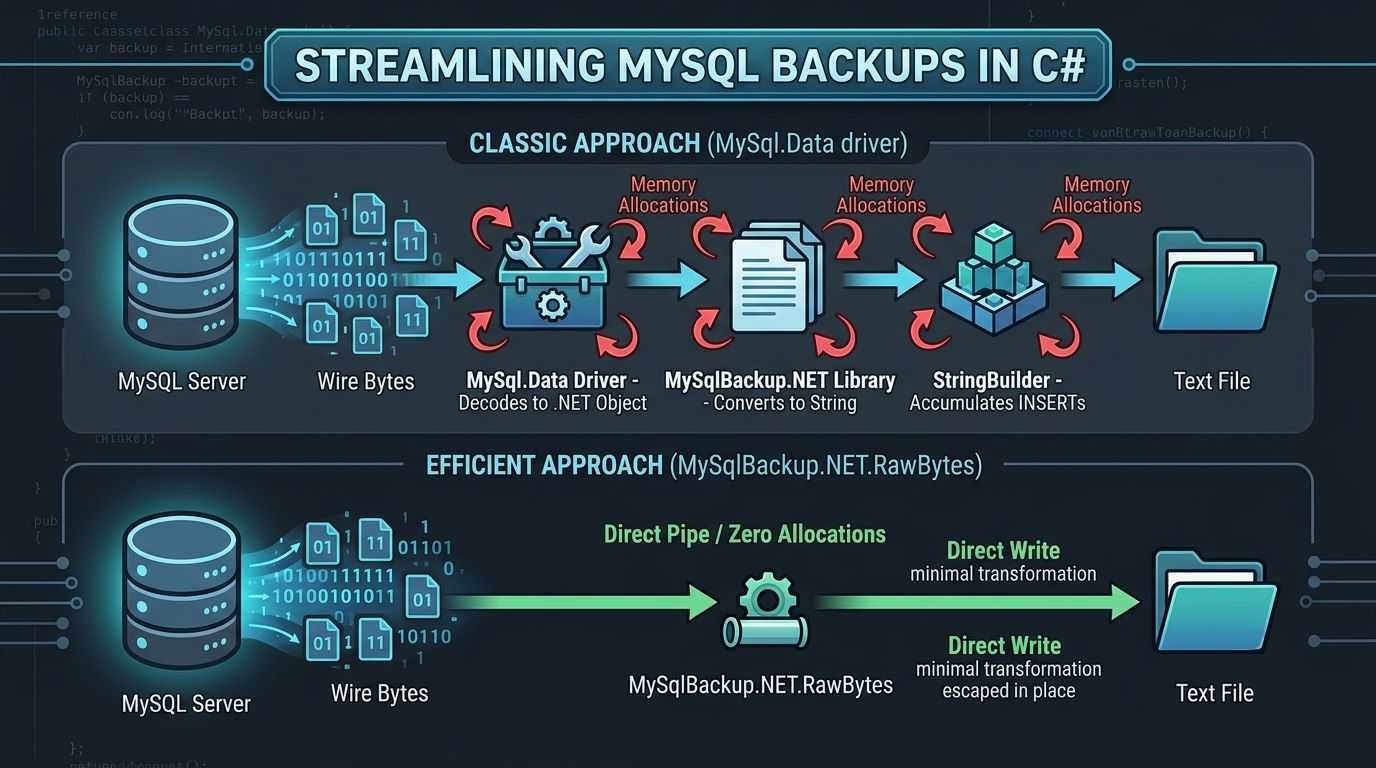
All of these methods come with baggage. It converts raw well formatted values (in string) into .NET objects. Then MySqlBackup.NET re-interpret the converted .NET objects back into the original well formatted values (in string) and export that as the dump content.
From the perspective of the backup process, the process of "formatted value string" to ".NET objects" an back to "formatte value string" is unnecessary. It consumes CPU and RAM resources, consuming a lot of time.
Let's take a simple example. Imagine a row with 3 columns:
| Column | Data Type | Value | Text Length |
|---|---|---|---|
| Column 1 | varchar | Hello | 5 |
| Column 2 | datetime | 2026-07-01 10:00:00 | 19 |
| Column 3 | decimal | 99.95 | 5 |
The incoming raw data from MySQL will "look" something like this:
(5)Hello(19)2026-07-01 10:00:00(5)99.95When transmitted on the wire, the individual string "Hello" (prefixed with its 5-byte length) looks like this:
00000101 01001000 01100101 01101100 01101100 01101111 (binary)
05       48       65       6C       6C       6F       (hexadecimal)
5 (len)  H        e        l        l        o        (ascii)
*len = length
In hexadecimal, this is what it looks like. The line breaks presented below are for illustration purposes only, not the actual line break.
05 48 65 6C 6C 6F
13 32 30 32 36 2D 30 37 2D 30 31 20 31 30 3A 30 30 3A 30 30
05 39 39 2E 39 35
which represents:
05 48 65 6C 6C 6F
5  H  e  l  l  o

13 32 30 32 36 2D 30 37 2D 30 31 20 31 30 3A 30 30 3A 30 30
19 2  0  2  6  -  0  7  -  0  1     1  0  :  0  0  :  0  0

05 39 39 2E 39 35
5  9  9  .  9  5
See? The original bytes are already perfectly formatted.
So, MySqlBackup.NET.RawBytes takes the direct approach. It speaks the MySQL wire protocol directly — no driver, no MySqlConnection, no DataReader. It reads bytes off the TCP socket and writes them straight into your output file. The result is a library with zero external dependencies that works on both .NET Framework 4.8 and modern .NET.
This article walks you through the basics: why it was built the way it was, and how to use it in your own projects.
What problem does this solve?
When a traditional backup library dumps a table, a single cell value undergoes a massive, multi-step translation process just to travel from the database to your disk:
MySQL Server
  └─ Wire Bytes
       └─ MySql.Data Driver (allocates & decodes into a .NET Object)
             └─ Backup Library (calls .ToString() on the object)
                   └─ StringBuilder (allocates heap memory to append the statement)
                        └─ File Stream (writes text to disk)
Every single step in that chain forces heap allocations. When you multiply this by millions of rows and dozens of columns, your application experiences massive Garbage Collection (GC) pressure. The CPU spends valuable cycles allocating temporary objects, only to immediately spend more cycles cleaning them up.
MySqlBackup.NET.RawBytes completely short-circuits this pipeline:
MySQL Server
  └── Wire Bytes (read directly into a pooled byte array)
        └── File Stream (piped straight to disk with raw byte transformation)
By operating purely at the byte level, the library eliminates the middleman:
- Numeric Fields: The MySQL server already transmits numbers as ASCII digits over the wire. We pipe these bytes directly to the file without parsing them into .NET integers or decimals.
- Text Fields: String escaping is performed byte-by-byte directly inside the raw incoming buffer.
- Binary Fields:
BLOBand binary data are hex-encoded in place.
By utilizing pooled buffers and bypassing the .NET object lifecycle entirely, nothing is ever allocated as a managed .NET String or object unless absolutely necessary. The result is a dramatic drop in memory consumption and a massive increase in backup throughput.
Prerequisites
- .NET Framework 4.8 or .NET 8+
- A running MySQL 5.7 / 8.x or MariaDB server
- No other NuGet packages
The entire MySQL client lives in a handful of .cs files under Wire/. You reference the project directly or build it into a DLL — there is nothing to install from a package manager yet.
Backing up a database
The main class for dumping is StreamingDumpEngine. You create a connection with MySqlConn, open it, hand both the connection and its raw TCP stream to the engine, and call DumpDatabase.
using MySqlBackup.NET.RawBytes.Wire;
using MySqlBackup.NET.RawBytes.Dump;

// 1. Open a connection
using (var conn = new MySqlConn())
{
    conn.Open("127.0.0.1", 3306, "root", "your_password", "my_database");

    // 2. Create the dump engine
    var engine = new StreamingDumpEngine(conn, conn.RawStream);

    // 3. Write the dump to a file
    using (var file = File.Create("my_database.sql"))
    {
        engine.DumpDatabase("my_database", file);
    }
}

Console.WriteLine("Backup complete.");
That is the whole thing. The output file is a standard SQL dump — it restores cleanly with the mysql command-line tool and is compatible with dumps produced by mysqldump or the classic MySqlBackup.NET.
Restoring a database
Restoring uses StreamingRestoreEngine. It reads the .sql file as a stream, parses it into individual SQL statements (handling quoted strings, comments, and /*!...*/ conditional blocks correctly), and executes each one over the same raw wire connection.
using MySqlBackup.NET.RawBytes.Wire;
using MySqlBackup.NET.RawBytes.Dump;

using (var conn = new MySqlConn())
{
    conn.Open("127.0.0.1", 3306, "root", "your_password", "my_database");

    var restore = new StreamingRestoreEngine(conn, conn.RawStream);

    // Optional: log errors instead of throwing
    restore.OnStatementError = (errorCode, message) =>
    {
        Console.Error.WriteLine($"Error {errorCode}: {message}");
        return true; // true = continue, false = abort
    };

    using (var file = File.OpenRead("my_database.sql"))
    {
        restore.RestoreDatabase(file);
    }
}

Console.WriteLine("Restore complete.");
The restore engine never loads the whole file into memory. It reads in fixed-size chunks (64 KB by default) and streams statements to the server one at a time.
Commonly used options
Both engines expose options as plain public fields — no builder pattern, no XML config. Set them before calling DumpDatabase.
var engine = new StreamingDumpEngine(conn, conn.RawStream);

// Include DROP TABLE before each CREATE TABLE (default: true)
engine.DropTable = true;

// Include CREATE TABLE statements (default: true)
engine.CreateTable = true;

// Include row data as INSERT statements (default: true)
engine.DumpRows = true;

// Format: false = all rows on one line (compact), true = one row per line (readable)
engine.InsertLineBreakBetweenInserts = false;

// Split large tables into multiple INSERT batches (default: 512 KB)
engine.MaxInsertBytes = 512 * 1024;

// Add -- comment blocks with table names (default: false)
engine.WriteComments = false;

// Strip AUTO_INCREMENT=N from CREATE TABLE (useful for clean restores)
engine.RemoveAutoIncrement = false;

// Strip DEFAULT CHARSET / COLLATE from CREATE TABLE
engine.RemoveTableCharset = false;
Structure only (no data)
engine.DumpRows = false;Data only (no CREATE TABLE)
engine.DropTable   = false;
engine.CreateTable = false;
Track progress
engine.OnTableComplete = (tableName, rowCount) =>
{
    Console.WriteLine($"  {tableName}: {rowCount} rows");
};
A complete example: backup, then restore to a new database
The following is a self-contained example that dumps one database and restores it into another, using only the library — no mysql.exe required.
using System;
using System.Collections.Generic;
using System.IO;
using MySqlBackup.NET.RawBytes.Wire;
using MySqlBackup.NET.RawBytes.Dump;

class BackupRestoreExample
{
    const string Host      = "127.0.0.1";
    const int    Port      = 3306;
    const string User      = "root";
    const string Password  = "your_password";
    const string SourceDb  = "my_database";
    const string TargetDb  = "my_database_copy";
    const string DumpFile  = "backup.sql";

    static void Main()
    {
        // --- Step 1: Dump the source database ---
        Console.WriteLine($"Dumping {SourceDb} ...");

        using (var conn = new MySqlConn())
        {
            conn.Open(Host, Port, User, Password, SourceDb);

            var engine = new StreamingDumpEngine(conn, conn.RawStream);
            engine.OnTableComplete = (table, rows) =>
                Console.WriteLine($"  {table}: {rows} rows");

            using (var fs = File.Create(DumpFile))
                engine.DumpDatabase(SourceDb, fs);
        }

        Console.WriteLine($"Dump written to {DumpFile}");

        // --- Step 2: Create the target database ---
        Console.WriteLine($"Creating {TargetDb} ...");

        using (var conn = new MySqlConn())
        {
            conn.Open(Host, Port, User, Password, SourceDb);
            conn.Query($"DROP DATABASE IF EXISTS `{TargetDb}`");
            conn.Query($"CREATE DATABASE `{TargetDb}` CHARACTER SET utf8mb4");
        }

        // --- Step 3: Restore into the target database ---
        Console.WriteLine($"Restoring into {TargetDb} ...");

        int statements = 0;
        var errors = new List<string>();

        using (var conn = new MySqlConn())
        {
            conn.Open(Host, Port, User, Password, TargetDb);

            var restore = new StreamingRestoreEngine(conn, conn.RawStream);
            restore.OnStatementExecuted = _ => statements++;
            restore.OnStatementError = (code, msg) =>
            {
                errors.Add($"{code}: {msg}");
                return true; // continue on error
            };

            using (var fs = File.OpenRead(DumpFile))
                restore.RestoreDatabase(fs);
        }

        Console.WriteLine($"Done. {statements} statements executed, {errors.Count} error(s).");
        foreach (var e in errors)
            Console.WriteLine($"  ERROR {e}");
    }
}
How TIMESTAMP columns are handled correctly
One subtle problem with database backups is time zones. MySQL TIMESTAMP columns store values as UTC internally but display them in the session's current time zone. If you dump on a server set to UTC+8 and restore on a server set to UTC+0, every timestamp shifts by eight hours.
MySqlBackup.NET.RawBytes handles this automatically. Before reading any rows, the engine runs SET TIME_ZONE='+00:00' on the connection so that all timestamps are read as UTC. The dump file also includes SET TIME_ZONE='+00:00' in its header block, which tells the importing server to interpret the values as UTC during restore. The original session time zone is restored on the connection afterward.
You do not need to do anything to get this behaviour — it is on by default.
What the output looks like
A typical dump file looks like this (with the default options):
/*!40101 SET @OLD_CHARACTER_SET_CLIENT=@@CHARACTER_SET_CLIENT */;
/*!40101 SET NAMES utf8mb4 */;
/*!40103 SET TIME_ZONE='+00:00' */;
/*!40014 SET @OLD_FOREIGN_KEY_CHECKS=@@FOREIGN_KEY_CHECKS, FOREIGN_KEY_CHECKS=0 */;
...

DROP TABLE IF EXISTS `products`;
CREATE TABLE IF NOT EXISTS `products` (
  `id` int NOT NULL AUTO_INCREMENT,
  `name` varchar(100) NOT NULL,
  `price` decimal(10,2) NOT NULL,
  PRIMARY KEY (`id`)
) ENGINE=InnoDB AUTO_INCREMENT=1000 DEFAULT CHARSET=utf8mb4;
INSERT INTO `products` (`id`, `name`, `price`) VALUES (1,'Simple Widget',9.99), (2,'O''Brien''s Special',19.95), (3,'Gadget',42.50);

...

/*!40103 SET TIME_ZONE=@OLD_TIME_ZONE */;
/*!40101 SET SQL_MODE=@OLD_SQL_MODE */;
...
Single quotes inside values are doubled (' → ''), backslashes are escaped, and binary data is written as hex literals (0xDEADBEEF). The format is identical to what mysqldump produces, so existing tooling that processes dump files works without modification.
Summary
| Task | Class | Key method |
|---|---|---|
| Back up a database | StreamingDumpEngine | DumpDatabase(dbName, stream) |
| Restore a database | StreamingRestoreEngine | RestoreDatabase(stream) |
| Open a connection | MySqlConn | conn.Open(host, port, user, pass, db) |
The library requires no NuGet packages, targets .NET Framework 4.8 and .NET 8+, and produces output that is fully compatible with the MySQL ecosystem. For most use cases the three lines — open, configure, dump — are all you need.