SQLite is a Good Choice for Beginner C# Developers
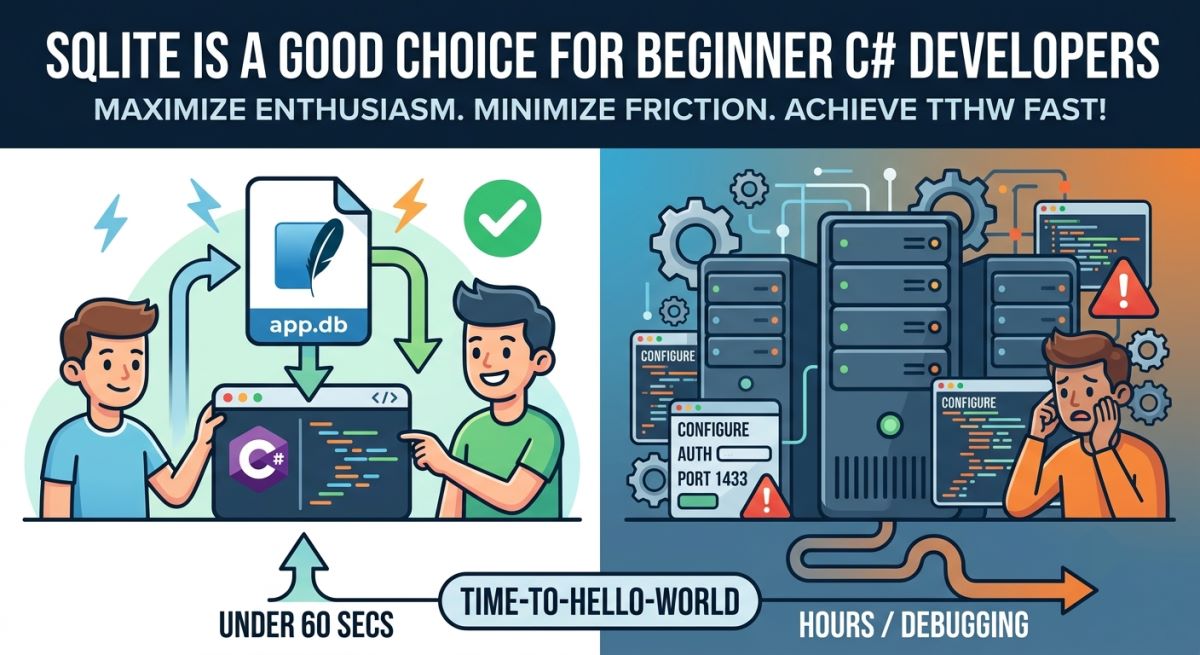
When you are learning a new programming stack, your enthusiasm is your most valuable and fragile resource. Every hurdle placed between you and your first successful running application drains that enthusiasm.
For beginners entering the world of C# web development, the choice of database is often the first major fork in the road. While traditional tutorials frequently guide students to install enterprise database engines like Microsoft SQL Server (MSSQL) or MySQL, this article argues for a different starting point: SQLite.
Specifically, we will look at how SQLite dominates the most critical educational metric: "Time-To-Hello-World."
1. The Metric That Matters: Time-To-Hello-World
In educational software engineering, Time-To-Hello-World (TTHW) is the duration between a student deciding to learn a tool and the moment they see their first customized database query succeed on screen.
When a beginner tutorial starts with MySQL, PostgreSQL or MSSQL, the TTHW is measured in hours. The student must:
- Download a multi-megabyte/gigabyte installer.
- Navigate complex setup wizard screens.
- Configure Windows Services (making sure the daemon actually starts).
- Resolve TCP port conflicts (like figuring out why port
3306or1433is blocked). - Setup a root password and database user permissions.
If any of these steps go wrong, the student is forced to debug OS-level network protocols and database administration issues before they have written a single line of C#.
With SQLite, the TTHW is under 60 seconds. There is nothing to download or install. You add a single NuGet package to your C# project, write your code, and run. The database engine compiles directly inside your C# application and starts up instantly.
2. The "No-Server" Philosophy: Files vs. Daemons
To understand why SQLite is so easy for beginners, you have to understand its architecture.
MSSQL and MySQL are Client-Server Databases. They run as background system daemons (like mysqld.exe or sqlservr.exe). Your C# application must act as a client, establishing a network socket connection to this background process to write data.
SQLite is an Embedded Database. It has no background process. It is simply a library that compiles right into your compiled C# executable.
Instead of hiding your data inside a locked system service, SQLite stores your entire database in a single file on your disk (e.g., app.db inside your project folder).
- Want to see the database? It’s sitting right there in your project explorer.
- Want to start over? Just delete the
app.dbfile. - Want to back up your database? Copy-paste the file.
For a beginner, this file-based model is tangible and intuitive. It demystifies where the data actually goes.
3. Zero Authentication and Connection String Nightmares
One of the biggest sources of frustration for beginners is the database connection string. In the enterprise world, every database engine speaks a completely different dialect, forcing students to memorize distinct, rigid parameters just to talk to their data:
// MSSQL (Dealing with instances and security certificates)
Server=localhost\SQLEXPRESS;Database=SchoolDB;Trusted_Connection=True;TrustServerCertificate=True;

// PostgreSQL (Dealing with explicit ports and system users)
Host=localhost;Port=5432;Database=SchoolDB;Username=postgres;Password=my_password;

// MySQL (Using entirely different shorthand keywords)
Server=localhost;Port=3306;Database=SchoolDB;Uid=root;Pwd=my_password;
If a beginner types a single character wrong, capitalizes the wrong keyword, or forgets to bypass a local SSL certificate requirement (TrustServerCertificate=True), they get hit with a cryptic error before their app even compiles.
In SQLite, because there are no users, passwords, network ports, or instances, the connection string collapses into a single, beautiful line of plain English:
Data Source=app.db
4. Portability and Collaboration
In a classroom or online learning environment, students must share their code with teachers or peers.
If a student builds a C# web app using MySQL, zipping up their project folder and sending it to a teacher is not enough. The database tables and rows live inside the student's local MySQL instance. To share it, they must export a SQL dump file, send it separately, and the teacher must import it into their own local MySQL server.
With SQLite, the database file sits inside the project folder. When a student pushes their project to GitHub or zips the folder, the database travels with it. The teacher can download the project and run it instantly—no database setup required.
5. Object-Relational Mapper
The core concepts and mechanisms of an Object-Relational Mapper (ORM) remain identical regardless of the underlying database provider. Once a student learns how to query and migrate data using an ORM with SQLite, they can carry those skills over to MySQL, MSSQL or PostgreSQL completely friction-free.
Conclusion: Training Wheels That Work
SQLite is not a toy database—it is the most widely deployed database engine on the planet, powering every iPhone, Android, web browser, and smart device.
For a beginner C# developer, SQLite acts as the perfect set of training wheels. It removes installation friction, eliminates connection errors, makes database files tangible, and keeps the initial focus entirely on writing clean C# code.
Once the student is comfortable writing C# web APIs and managing database models, they can easily take the training wheels off, swap a single line of code, and deploy their app using MySQL, PostgreSQL or MSSQL in the cloud.