How Programs Talk to Another Program – Introduction to C# Socket and Port

The Memory Boundary
Every program running on your computer lives inside its own memory boundary, a private space assigned and enforced by the operating system.
Within this boundary, communication is direct. A function calls another function. Objects are passed as parameters. Data sits in variables that any part of the program can reach. Everything happens inside the same walled garden, fast, direct, no ceremony required.
// Within the same program, direct communication
string name = "Ahmad";
int result = ProcessData(42, name);
DisplayResult(result);
This is the simplest form of communication in computing. One function hands data to another. No protocol needed. No translation. They share the same memory, so they simply… reach.
But what happens when a program needs to talk to another program?
The other program lives in its own memory boundary. Its own walled garden. Program A cannot reach into Program B’s memory and read a variable. The operating system forbids it, for good reason. If any program could read or write another program’s memory, nothing on your computer would be safe or stable.
So how do two separate programs communicate?
Methods of Inter-Process Communication
Over decades, computer scientists have invented several ways for programs to talk across memory boundaries:
- Shared Memory: the OS designates a region of memory that both programs can access. Fast, but dangerous without careful coordination.
- Pipes: the OS creates a one-way byte stream between two programs. One writes, the other reads. This is how command-line piping works:
dir | findstr "txt". - Memory-Mapped Files: a file mapped directly into memory that both programs can see. Changes by one appear to the other.
- Message Queues: the OS maintains a queue. Program A posts a message, Program B picks it up when ready.
- Sockets and Ports: a program opens a numbered “door” that any other program can connect to, even from a different machine, across the network, across the world.
Most of these methods work only within a single machine. Programs on the same computer can use shared memory or pipes because they share the same OS.
But the moment two programs need to talk across a network, from one machine to another, the options narrow to one:
Sockets and Ports.
This is why the internet runs on sockets. Every website you visit, every email you send, every online game you play, underneath all of it, two programs are talking through sockets.
This article focuses on sockets and ports, because they are the universal gateway, the one communication method that works everywhere, between any two machines on earth.
The Phone Call Metaphor
Think of it like a phone system.
Your program opens a phone line and registers a phone number, let’s say 8080. This is the port. The program then sits quietly, waiting for someone to call. This is the listener.
Another program on the same machine or on the other side of the world picks up its phone and dials 8080. The operating system acts as the telephone exchange (or central traffic control), routing the call to the correct program.
The connection is established. Both programs can now talk: one speaks, the other listens, then they swap. When the conversation is done, they hang up. The phone line stays open for the next caller.
That is a socket connection. That is the entire concept.
The Building Blocks in C#
C# gives us four classes to implement this phone system:
| Class | Role | Phone Metaphor |
|---|---|---|
TcpListener | Opens a port and waits for connections | The phone line, registered and waiting |
TcpClient | Connects to a listener (or represents an incoming caller) | The phone handset — one per conversation |
NetworkStream | The two-way data channel between two connected programs | The voice channel — speak and listen |
IPAddress | The machine’s address on the network | The area code |
They live in the System.Net and System.Net.Sockets namespaces.
The Listener (Program That Waits for Calls)
using System.Net;
using System.Net.Sockets;

// Open phone line 8080 and start waiting
TcpListener listener = new TcpListener(IPAddress.Any, 8080);
listener.Start();

Console.WriteLine("Waiting for a call on port 8080...");

// Block here until someone calls
TcpClient caller = listener.AcceptTcpClient();

Console.WriteLine("Someone connected!");

// Get the voice channel
NetworkStream stream = caller.GetStream();

// Now you can read from and write to the stream...
IPAddress.Any means “listen on all network interfaces”, whether the caller is on the same machine (localhost) or coming from the network.
The Caller (Program That Dials)
using System.Net.Sockets;

// Pick up the phone and dial localhost:8080
TcpClient client = new TcpClient("127.0.0.1", 8080);

Console.WriteLine("Connected!");

// Get the voice channel
NetworkStream stream = client.GetStream();

// Now you can write to and read from the stream...
127.0.0.1 is localhost: “the same machine I’m on.” If Program B were on another computer, you’d use that computer’s IP address instead.
That’s it. Seven lines to open a connection between two programs. Everything after this is deciding what they say to each other.
Example: Number to Text Converter
Let’s build something concrete. Two separate console applications:
- Program A (the caller) sends a number:
1,2, or3 - Program B (the listener) receives the number and replies with the English word:
"one","two", or"three"
This is the simplest meaningful conversation two programs can have.
In the programming and computing universe, let’s introduce elephant in the room, one of the most important terminology:
The **REQUEST** and the **RESPONSE**.
- The caller is the REQUEST
- The listener that answer the call is the RESPONSE
Program B: The RESPONSE / The Listener (Number-to-Text Server)
Run this first. It needs to be waiting before Program A tries to connect.
using System;
using System.IO;
using System.Net;
using System.Net.Sockets;

namespace NumberServer
{
    class Program
    {
        static void Main(string[] args)
        {
            // Step 1: Open the phone line
            TcpListener listener = new TcpListener(IPAddress.Any, 8080);
            listener.Start();

            Console.WriteLine("=================================");
            Console.WriteLine("  Number-to-Text Server");
            Console.WriteLine("  Listening on port 8080...");
            Console.WriteLine("=================================");
            Console.WriteLine();
            Console.WriteLine("Waiting for a connection...");

            // Step 2: Wait for someone to call
            TcpClient client = listener.AcceptTcpClient();
            Console.WriteLine("Client connected!");

            // Step 3: Get the communication channel
            NetworkStream stream = client.GetStream();
            StreamReader reader = new StreamReader(stream);
            StreamWriter writer = new StreamWriter(stream);
            writer.AutoFlush = true;

            // Step 4: Read the number they sent
            string received = reader.ReadLine();
            Console.WriteLine("Received number: " + received);

            // Step 5: Convert number to text
            string reply = ConvertNumberToText(received);

            // Step 6: Send the reply
            writer.WriteLine(reply);
            Console.WriteLine("Replied with: " + reply);

            // Step 7: Clean up
            client.Close();
            listener.Stop();

            Console.WriteLine();
            Console.WriteLine("Done. Press any key to exit.");
            Console.ReadKey();
        }

        static string ConvertNumberToText(string number)
        {
            switch (number.Trim())
            {
                case "1": return "one";
                case "2": return "two";
                case "3": return "three";
                default:  return "unknown number";
            }
        }
    }
}
Program A: The REQUEST / The Caller (Number Sender)
Run this second, after Program B is already waiting.
using System;
using System.IO;
using System.Net.Sockets;

namespace NumberClient
{
    class Program
    {
        static void Main(string[] args)
        {
            Console.WriteLine("=================================");
            Console.WriteLine("  Number-to-Text Client");
            Console.WriteLine("=================================");
            Console.WriteLine();
            Console.Write("Enter a number (1, 2, or 3): ");
            string number = Console.ReadLine();

            Console.WriteLine();
            Console.WriteLine("Connecting to server on port 8080...");

            // Step 1: Dial the server
            TcpClient client = new TcpClient("127.0.0.1", 8080);
            Console.WriteLine("Connected!");

            // Step 2: Get the communication channel
            NetworkStream stream = client.GetStream();
            StreamReader reader = new StreamReader(stream);
            StreamWriter writer = new StreamWriter(stream);
            writer.AutoFlush = true;

            // Step 3: Send the number
            writer.WriteLine(number);
            Console.WriteLine("Sent: " + number);

            // Step 4: Read the reply
            string reply = reader.ReadLine();
            Console.WriteLine("Server replied: " + reply);

            // Step 5: Clean up
            client.Close();

            Console.WriteLine();
            Console.WriteLine("Done. Press any key to exit.");
            Console.ReadKey();
        }
    }
}
Running the Example
- Open two separate terminal windows
- In terminal 1, run Program B (the server). It will display “Waiting for a connection…”
- In terminal 2, run Program A (the client). Enter a number when prompted
- Watch both terminals, the number travels from A to B, the text travels from B back to A
Terminal 1 (Server) – Program B
=================================
  Number-to-Text Server
  Listening on port 8080...
=================================

Waiting for a connection...

Client connected!
Received number: 2
Replied with: two

Done. Press any key to exit.
Terminal 2 (Client) – Program A
=================================
  Number-to-Text Client
=================================
Enter a number (1, 2, or 3): 2
Connecting to server on port 8080...
Connected!
Sent: 2
Server replied: two

Done. Press any key to exit.
Two programs. Two memory boundaries. One socket connection. Data flowing between them as raw bytes, wrapped in the simplest protocol imaginable, a line of text.
Building a Console Messenger
Now let’s build something more practical: A two-way console messenger where two terminals can send and receive messages in real time, like a simple chat.
Each instance acts as both a listener and a caller:
- It listens on its own port (to receive messages)
- It connects to the other instance’s port (to send messages)
The Design
Terminal 1 (Alice)
Listening on port 5001
Sends to port 5002

Terminal 2 (Bob)
Listening on port 5002
Sends to port 5001
Each instance runs two threads, one for listening (receiving messages) and one for sending (reading keyboard input and transmitting).
The Complete Messenger Program
Both terminals run the same program with different settings.
using System;
using System.IO;
using System.Net;
using System.Net.Sockets;
using System.Threading;

namespace ConsoleMessenger
{
    class Program
    {
        static string _myName;
        static int _myPort;
        static int _targetPort;
        static bool _connected = false;

        static void Main(string[] args)
        {
            Console.WriteLine("==========================================");
            Console.WriteLine("  Console Messenger");
            Console.WriteLine("==========================================");
            Console.WriteLine();

            // Step 1: Set your display name
            Console.Write("Enter your name: ");
            _myName = Console.ReadLine().Trim();

            // Step 2: Set your listening port
            Console.Write("Enter your listening port: ");
            _myPort = int.Parse(Console.ReadLine().Trim());

            // Step 3: Set target's port
            Console.Write("Enter target's port: ");
            _targetPort = int.Parse(Console.ReadLine().Trim());

            Console.WriteLine();

            // Step 4: Start listening on a background thread
            Thread listenThread = new Thread(ListenForMessages);
            listenThread.IsBackground = true;
            listenThread.Start();

            // Step 5: Attempt to detect and connect to target
            Console.WriteLine($"[System] Listening on port {_myPort}");
            Console.WriteLine($"[System] Detecting target on port {_targetPort}...");

            // Wait a moment for the other instance to start listening
            Thread.Sleep(1000);

            if (DetectTarget())
            {
                Console.WriteLine($"[System] Target detected on port {_targetPort}!");
            }
            else
            {
                Console.WriteLine($"[System] Target not yet available on port {_targetPort}.");
                Console.WriteLine($"[System] Messages will be sent when target comes online.");
            }

            Console.WriteLine();
            Console.WriteLine("------------------------------------------");
            Console.WriteLine("  Type a message and press Enter to send.");
            Console.WriteLine("  Type /quit to exit.");
            Console.WriteLine("------------------------------------------");
            Console.WriteLine();

            // Step 6: Main loop — read keyboard input and send messages
            while (true)
            {
                string input = Console.ReadLine();

                if (input == null || input.Trim().ToLower() == "/quit")
                {
                    Console.WriteLine("[System] Goodbye!");
                    break;
                }

                if (string.IsNullOrWhiteSpace(input))
                    continue;

                SendMessage(input);
            }
        }

        /// <summary>
        /// Background thread: Listen for incoming messages
        /// </summary>
        static void ListenForMessages()
        {
            TcpListener listener = new TcpListener(IPAddress.Any, _myPort);
            listener.Start();

            while (true)
            {
                try
                {
                    // Wait for an incoming connection
                    TcpClient client = listener.AcceptTcpClient();

                    // Read the message
                    StreamReader reader = new StreamReader(client.GetStream());
                    string message = reader.ReadLine();

                    if (!string.IsNullOrEmpty(message))
                    {
                        // Parse: "name|text"
                        int separator = message.IndexOf('|');
                        if (separator > 0)
                        {
                            string senderName = message.Substring(0, separator);
                            string text = message.Substring(separator + 1);

                            // Display the received message
                            Console.ForegroundColor = ConsoleColor.Cyan;
                            Console.WriteLine($"  [{senderName}]: {text}");
                            Console.ResetColor();
                        }
                    }

                    client.Close();
                }
                catch (Exception ex)
                {
                    Console.WriteLine($"[System] Listen error: {ex.Message}");
                }
            }
        }

        /// <summary>
        /// Send a message to the target port
        /// </summary>
        static void SendMessage(string text)
        {
            try
            {
                // Open a new connection to the target for each message
                TcpClient client = new TcpClient("127.0.0.1", _targetPort);

                StreamWriter writer = new StreamWriter(client.GetStream());
                writer.AutoFlush = true;

                // Send as "name|text" format
                writer.WriteLine($"{_myName}|{text}");

                client.Close();

                // Display our own message in a different color
                Console.ForegroundColor = ConsoleColor.Green;
                Console.WriteLine($"  [You]: {text}");
                Console.ResetColor();
            }
            catch
            {
                Console.ForegroundColor = ConsoleColor.Red;
                Console.WriteLine($"  [System] Failed to send. Target on port {_targetPort} is not available.");
                Console.ResetColor();
            }
        }

        /// <summary>
        /// Check if the target port is reachable
        /// </summary>
        static bool DetectTarget()
        {
            try
            {
                TcpClient test = new TcpClient();
                test.Connect("127.0.0.1", _targetPort);
                test.Close();
                _connected = true;
                return true;
            }
            catch
            {
                return false;
            }
        }
    }
}
Running the Messenger
Open two terminal windows and start the program in each:
Two completely separate programs, running in separate memory spaces, communicating through sockets. Each message is a fresh TCP connection: connect, send one line, close. Simple, clean, and working.
Alice’s Terminal (Listening on port 5001)
==========================================
         Console Messenger
==========================================

Enter your name: Alice
Enter your listening port: 5001
Enter target's port: 5002

[System] Listening on port 5001
[System] Detecting target on port 5002
[System] Target detected on port 5002!

------------------------------------------
Type a message and press Enter to send.
Type /quit to exit.
------------------------------------------

Hey Bob, can you hear me?
[You]: Hey Bob, can you hear me?
[Bob]: Loud and clear, Alice!
Bob’s Terminal (Listening on port 5002)
==========================================
         Console Messenger
==========================================

Enter your name: Bob
Enter your listening port: 5002
Enter target's port: 5001

[System] Listening on port 5002
[System] Detecting target on port 5001
[System] Target detected on port 5001!

------------------------------------------
Type a message and press Enter to send.
Type /quit to exit.
------------------------------------------

[Alice]: Hey Bob, can you hear me?
Loud and clear, Alice!
[You]: Loud and clear, Alice!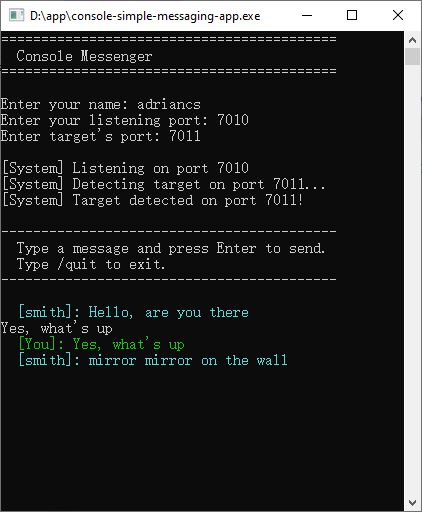
What You’ve Learned
Looking back at what we’ve built, the entire progression follows a single thread:
- Programs live in isolated memory boundaries. They cannot directly access each other’s data.
- Sockets are numbered doors that a program opens to allow communication from outside its memory boundary, from other programs on the same machine or across a network.
- The OS acts as the traffic controller, routing connections to the correct program based on port numbers.
- In C#, four classes handle everything:
TcpListeneropens the door,TcpClientrepresents each connection,NetworkStreamcarries the bytes, andStreamReader/StreamWritermake those bytes readable as text. - The data flowing through a socket is just bytes. In our examples, we chose to send lines of text. But two programs can agree to send anything: numbers, JSON, XML, binary data, images. The socket doesn’t care. It just carries bytes.
That last point is the bridge to what comes next.
When your browser connects to a web server on port 80, it’s doing exactly what Program A did: opening a socket connection. The difference is that browsers and web servers have agreed on a specific language for their conversation: HTTP (Hypertext Transfer Protocol). HTTP defines how the request is structured, how headers work, how the body is sent, how the response is formatted.
But underneath HTTP, every web framework, every API, every cloud service, there is always a socket. A numbered door. A program waiting for a connection. Bytes flowing in, bytes flowing out.