Introducing Phiis: The NEW PHP Manager for IIS (Built for PHP 8.x and Beyond)
Introducing Phiis: The NEW PHP Manager for IIS (Built for PHP 8.x and Beyond)
If you have ever hosted PHP applications on Windows Server and IIS, you almost certainly know PHP Manager for IIS. For over a decade, it was the go-to IIS Manager extension for registering PHP builds, switching versions between sites, and toggling extensions without manually digging through XML configuration files.
However, time marched on. The original project was abandoned, and even its community successor (PHP Manager 2 for IIS) has been archived. When running modern PHP 8.x stacks on Windows 11 or Windows Server 2022+, the old tools show their age—misidentifying newer builds, lacking awareness of modern Visual C++ redistributables (VS16/VS17), and offering zero support for modern CLI or AI-driven automation workflows.
Meanwhile, configuring PHP on IIS by hand remains as tedious as ever:
- Wiring up FastCGI application pools and
*.phphandler mappings inapplicationHost.config. - Guessing why
php-cgi.exereturns a500.0error because the matching Visual C++ Redistributable (VC14/VS16/VS17) isn't installed. - Remembering that IIS FastCGI needs Non-Thread-Safe (NTS) builds rather than Thread-Safe (TS) builds.
- Hunting through a 2,000-line
php.inifile just to uncommentextension=curlor setdate.timezone.
To solve this once and for all, Phiis (PHP Configurator for IIS) is built from scratch—and released it completely into the public domain.
What is Phiis?
Phiis is a modern, lightweight replacement for PHP Manager for IIS.
Just like its predecessor, Phiis doesn't execute PHP itself—IIS's native FastCGI module handles that. Instead, Phiis configures IIS FastCGI and php.ini so PHP runs properly on IIS, and gives you a clear, actionable health report when something is misconfigured.
Even better, Phiis is built for both humans and automation:
- A Native IIS Manager GUI Snap-in for administrators who love clicking through the IIS Management Console.
- A Full-Featured CLI (
phiis.exe) and PowerShell Module for scripts, CI/CD pipelines, and AI agents.
Inside the IIS Manager GUI
Once you install the Phiis MSI and reopen IIS Manager, you will see a new "Phiis (PHP)" tile at both the Server level and individual Site levels.
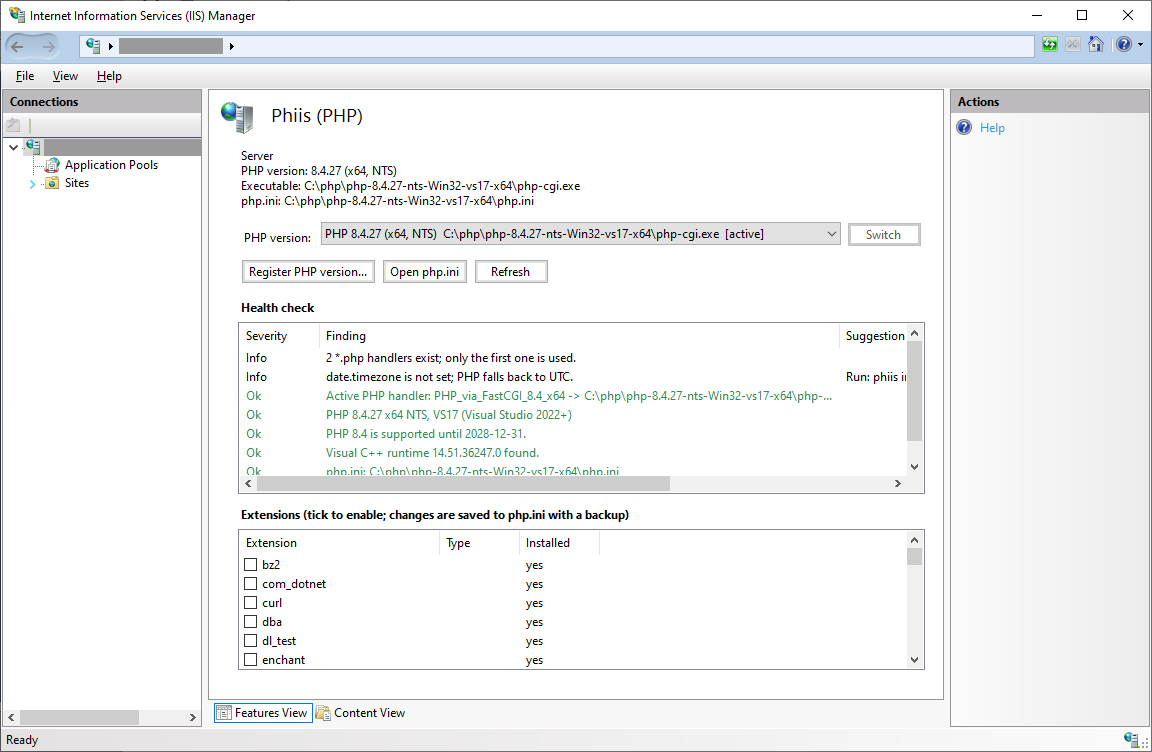
From a single screen, you get:
- One-Click PHP Version Switcher: Register any
php-cgi.exeon your machine and switch the active PHP version for the entire server or an individual website in seconds. - Built-in Health Check (
Doctor): Automatically inspects your setup and flags issues immediately—including whether FastCGI is installed, whether you're using an NTS build, whether your PHP branch has reached End-of-Life (EOL), and whether the exact required Visual C++ Runtime (from VC14/VS17 for PHP 7.x/8.x all the way back to VC6/VC9/VC11 for legacy PHP 5.x) is present. - Extension Checkboxes: Tick or untick PHP extensions (
curl,mbstring,intl,opcache, etc.) directly from the list. Phiis automatically knows the difference between regular extensions and Zend extensions (zend_extension=opcache), prevents duplicate entries, and backs upphp.inibefore saving.
Structured php.ini Editor
Clicking "Open php.ini" launches a dedicated, searchable configuration editor:
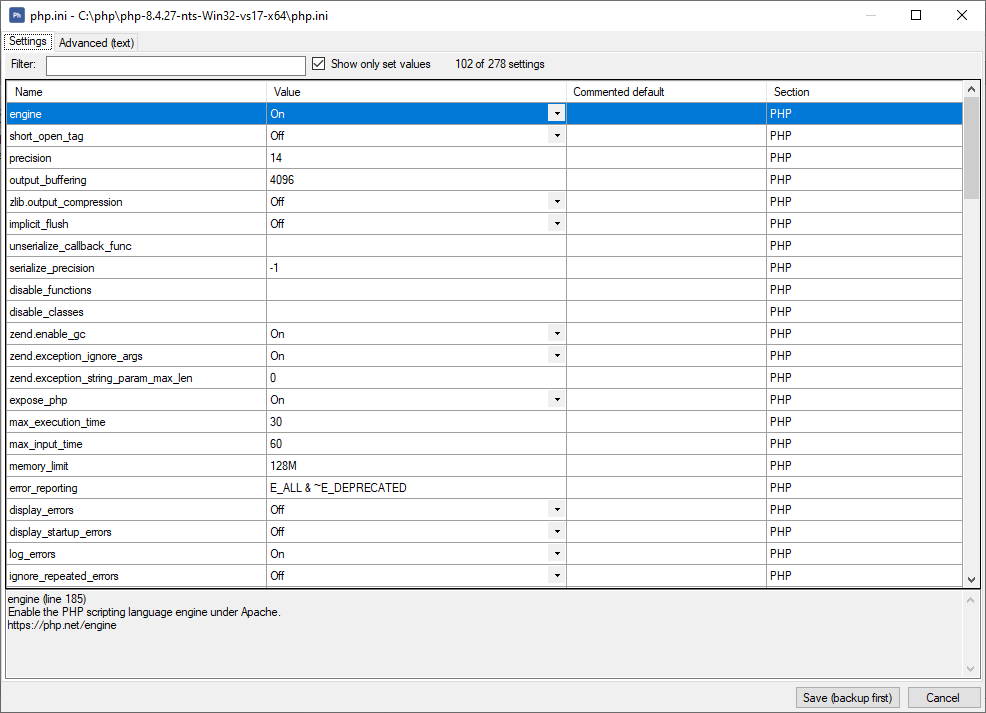
Instead of scrolling through thousands of lines of comments in Notepad, you get:
- Instant Filtering: Filter settings by name or toggle "Show only set values" to see only active directives.
- Contextual Documentation: Selecting any setting displays its original inline documentation and
php.netreference link at the bottom of the window, alongside its commented default value. - Raw Text Fallback: Need to edit the raw file directly? Switch to the Advanced (text) tab at any time. Every save creates an automatic timestamped backup in
%ProgramData%\Phiis\backups.
Why the Old Tools Aged Poorly (And How Phiis Fixes It)
When designing Phiis, my primary goal was to make sure it wouldn't break when PHP 8.5, 8.6, or PHP 9.0 arrives. Here are the core engineering principles behind Phiis:
1. Zero Hardcoded PHP Facts in Code
Older tools hardcoded assumptions about PHP version numbers and compiler toolsets. When a newer PHP version came out, the tool either failed to parse it or falsely flagged it as "obsolete" or "unsupported."
Phiis inspects the php-cgi.exe PE binary directly to read its version, CPU architecture (x64/x86), Thread Safety (NTS/TS), and Visual C++ compiler toolset. End-of-life dates live in an external php-lifecycle.json file that can be updated in %ProgramData%\Phiis\php-lifecycle.json without recompiling the app. And if Phiis encounters a brand-new future PHP version, it reports its lifecycle status as "unknown"—never falsely as "obsolete".
2. No Hidden State
Phiis does not maintain a secret database of settings. Everything is read live from the real IIS configuration (applicationHost.config) and php.ini. If you edit php.ini by hand, or if you are migrating a server that still has PHP Manager 2 settings left over, Phiis picks them up seamlessly.
3. Clean Site-Level Configuration
When you switch PHP versions for a specific website, some tools pollute that website's root folder by writing handler mappings into its web.config—which can cause Git dirty-tree headaches or conflict with application deployments. Phiis writes site-level PHP configurations cleanly into <location path="SiteName"> blocks inside IIS's central applicationHost.config, leaving your site's web.config untouched.
4. Zero Extra Runtime Dependencies
Phiis targets .NET Framework 4.8, which is built into Windows 10 (1903+), Windows 11, and Windows Server 2022+ out of the box. You don't need to install a separate .NET 8/9 runtime on your production web server just to manage PHP.
First-Class CLI & PowerShell (Built for Humans and AI Agents)
Whether you are provisioning a Windows Server via Ansible/CI, or letting an AI coding agent configure your local IIS environment, GUI-only tools are a roadblock.
Every feature in the Phiis GUI is powered by the same core engine as phiis.exe. Every command supports --json output, every mutating action supports --dry-run, all operations are idempotent, and every modified file is backed up first.
Command Line (phiis.exe)
# Inspect a PHP build (no admin privileges needed)
phiis info D:\php\8.4\php-cgi.exe

# Register PHP 8.4 with IIS and make it active server-wide
phiis register D:\php\8.4\php-cgi.exe

# Preview switching a specific site to PHP 8.4 without making changes
phiis register D:\php\8.4\php-cgi.exe --site "Default Web Site" --dry-run

# Run a full health check (returns exit code 2 if errors are found)
phiis doctor

# Configure php.ini directives and enable extensions
phiis ini set date.timezone Asia/Kuala_Lumpur
phiis ext enable curl
phiis ext enable opcache --zend
phiis ext list --json
PowerShell Module
The MSI installer also bundles a native Phiis PowerShell module (where -WhatIf maps directly to --dry-run):
Import-Module Phiis

# Find any configuration errors
Test-PhiisConfiguration | Where-Object severity -eq 'error'

# Preview registering a PHP build
Register-PhiisPhp D:\php\8.4\php-cgi.exe -WhatIf

# List disabled extensions and enable intl + opcache
Get-PhiisExtension | Where-Object { -not $_.enabled } | Select-Object name
Enable-PhiisExtension intl
Enable-PhiisExtension opcache -Zend

# Update php.ini settings
Set-PhiisIniValue date.timezone Asia/Kuala_Lumpur
Download & Installation
Phiis is distributed as a standard 64-bit Windows Installer (MSI) that installs the CLI to Program Files, adds phiis to your system PATH, installs the PowerShell module, and registers the IIS Manager snap-in automatically.
- Download the latest
Phiis-<version>-x64.msifrom the GitHub Releases Page. - Run the MSI (or install silently from an elevated prompt via
msiexec /i Phiis-0.3.0-x64.msi /qn). - Reopen IIS Manager and click the "Phiis (PHP)" icon!
(Note: If you still have the old PHP Manager 2 installed, you can run phiis snapin status to check. Uninstalling the legacy PHP Manager 2 is recommended since both tools edit the same underlying IIS settings—and uninstalling either tool never deletes your PHP installations or your working IIS configuration.)
Open Source & Public Domain
Phiis is released under The Unlicense (100% public domain). Feel free to use it on personal servers, enterprise environments, or fork it for your own infrastructure needs.
- GitHub Repository: https://github.com/adriancs2/Phiis
- Download Latest Release: https://github.com/adriancs2/Phiis/releases/latest
If you run PHP on IIS, give Phiis a spin and let me know what you think!