The World First TRUE BEGINNER C# Web Development Framework - cshttp
The World First TRUE BEGINNER C# Web Development Framework - cshttp
Let's Build Your First Web Application, As Easy as ABC.
Write the first C# web application 100% right on the 1st week of learning C# as a beginner.
No ASP.NET, no IIS, no ASP.NET Core, no Kestrel.
Create a new dotnet core console project, dotnet 8.0++, or even a simple .NET Framework console app.
Go to github repository of https://github.com/adriancs2/cshttp copy the source code of cshttp, cshttp.web, cshttp.server directly into your project.
Next, create this:
or download source code at: https://github.com/adriancs2/cshttp/tree/main/tests/simple-basic-demo
using cshttp;

static class Program
{
    static void Main()
    {
        // Listening Port: 8080
        // http://localhost:8080/
        WebApp.Run(8080, OnRequest);
    }

    static void OnRequest()
    {
        string path = Request.Path.ToLower();

        switch(path)
        {
            case "/":
            case "/home":
                HandleHome();
                return;
            case "/about":
                HandleAbout();
                return;
            case "/contact":
                HandleContact();
                return;
            default:
                HandleNotFound();
                return;
        }
    }

    static void HandleHome()
    {
        string html = @"
    <html>
        <head>
            <title>hello</title>
        </head>
        <body>
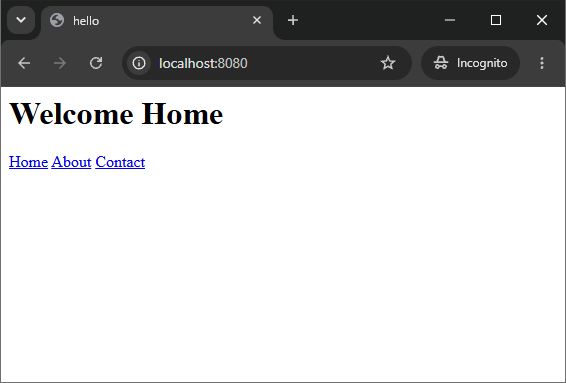
            <h1>Welcome Home</h1>
            <a href=""/"">Home</a>
            <a href=""/about"">About</a>
            <a href=""/contact"">Contact</a>
        </body>
    </html>
    ";
        Response.Write(html);
        Response.End();
    }

    static void HandleAbout()
    {
        string html = @"
    <html>
        <head>
            <title>hello</title>
        </head>
        <body>
            <h1>About Us</h1>
            <a href=""/"">Home</a>
            <a href=""/about"">About</a>
            <a href=""/contact"">Contact</a>
        </body>
    </html>
    ";
        Response.Write(html);
        Response.End();
    }

    static void HandleContact()
    {
        string html = @"
    <html>
        <head>
            <title>Contact</title>
        </head>
        <body>
            <h1>Contact</h1>
            <a href=""/"">Home</a>
            <a href=""/about"">About</a>
            <a href=""/contact"">Contact</a>
        </body>
    </html>
    ";
        Response.Write(html);
        Response.End();
    }

    static void HandleNotFound()
    {
        string html = @"
    <html>
        <head>
            <title>404 Not Found</title>
        </head>
        <body>
            <h1>404 Not Found</h1>
            <a href=""/"">Home</a>
            <a href=""/about"">About</a>
            <a href=""/contact"">Contact</a>
        </body>
    </html>
    ";
        Response.StatusCode = 404;
        Response.Write(html);
        Response.End();
    }
}
Enjoy!