Building a Server-Sent Event (SSE) Web Server from Scratch in C#
This is the third article in a series. The first article, How Programs Talk to Another Program, covers the fundamentals of sockets and ports. The second article, Building a Web Server from Scratch in C#, builds a complete web application with routing, GET/POST handling, and CRUD operations using nothing but TcpListener and string operations.
This article builds on top of both. If you haven’t read them, start there.
What is Server-Sent Event (SSE)
In normal web, the HTTP request life cycle begins with the user accessing a URL on the web browser. The web browser sends a request (the HTTP request) to the web server to REQUEST for content. The web server then RESPONSE by returning the HTML back to the web browser for visual rendering. The user usually don’t see the raw HTML code.
When the web browser is sending the HTTP request, there is a short momentary connection that happens between the web browser and the web server. Once the web server is finished sending the HTTP content, the connection is closed immediately.
- Role of the web browser: actively initiates the request.
- Role of the web server: passive response.
The web server will never initiate communication. It only passively responds.
Now, what if we shift the roles? So that the web server will not just sit and wait, but become the active communication initiator?
In the universe of web development, there are two main mechanisms for this:
- Server-Sent Event (Single direction: Server to Browser)
- WebSocket (Bi-directional: Server to/from Browser)
In this article we’ll be focusing on the C# code that handles SSE communication in raw HTTP using a Console App.
The Chain of Events in SSE
Before we begin the C# coding, let’s walk through the chain of events. We’ll start with the frontend — how JavaScript handles SSE — because once you understand the flow, the C# part becomes fairly easy.
Phase 1: The Initiation
This is the only time the frontend needs to do anything. One line of JavaScript opens an SSE connection:
<script>
    const url_endpoint = "http://localhost:8080/sse";
    // url_endpoint = "https://www.website.com/sse";
    // url_endpoint = "/sse";
    const eventSource = new EventSource(url_endpoint);
</script>
That’s it. The browser takes over from here.
Phase 2: The Browser Sends the HTTP Request
The browser sends the following HTTP request on your behalf:
GET /sse HTTP/1.1
Host: localhost:8080
Accept: text/event-stream
Cache-Control: no-cache
Connection: keep-alive
User-Agent: ...
                          <-- blank line
This looks almost identical to a normal GET request from the previous article. The key difference is the Accept: text/event-stream header — this is the browser saying “I expect a stream, not a page.”
Phase 3: The Server Responds
The server sends back this response header — once, and only once:
HTTP/1.1 200 OK
Content-Type: text/event-stream
Cache-Control: no-cache
Connection: keep-alive
                          <-- blank line
Notice: there is no Content-Length header. This is deliberate. The server doesn’t know how much data it will send, because the connection stays open. The response has no defined end. It streams.
Phase 4: The Connection is Open
The browser receives the response header and fires the onopen event:
eventSource.onopen = function() {
    document.getElementById('div1').innerHTML = 'SSE begins<br>';
};
Phase 5: The Server Pushes Data
Now the server can actively send data to the browser at any time, without waiting for a request. The server writes text in this format:
data: Hello from server\n\nEach message is one or more lines starting with data:, terminated by a double newline (\n\n). The double newline marks the end of one event.
The browser receives this through the onmessage handler:
eventSource.onmessage = function(event) {
    document.getElementById('div1').innerHTML +=
        'event id: ' + (event.lastEventId || '(none)') + ', ' +
        'event type: ' + (event.type || '(none)') + ', ' +
        'data: ' + event.data + '<br>';
};
The server can keep sending, one event at a time:
data: What is happening over there\n\n

data: Everything is good over here\n\n

data: Mirror mirror on the wall\n\n
And the HTML accumulates:
<div id="div1">
SSE begins<br>
event id: (none), event type: message, data: Hello from server<br>
event id: (none), event type: message, data: What is happening over there<br>
event id: (none), event type: message, data: Everything is good over here<br>
event id: (none), event type: message, data: Mirror mirror on the wall<br>
</div>
Each line arrived as a separate event, pushed by the server. The browser didn’t request any of them.
Event ID and Event Type
The server can include additional fields with each event:
id: 123\n
event: update\n
data: Temperature is hot\n\n
The id field gives the event an identifier. The event field assigns a type name. Both are optional. When present, the frontend receives them:
event id: 123, event type: update, data: Temperature is hotCustom Events
The event type can be any string you choose. The server sends:
id: 124\n
event: happy\n
data: Happy hour begins\n\n
The frontend listens for it by name:
eventSource.addEventListener('happy', function(event) {
    document.getElementById('div1').innerHTML +=
        '[HAPPY] ' + event.data + '<br>';
});
And another:
id: 125\n
event: sad\n
data: The cake is finished\n\n
eventSource.addEventListener('sad', function(event) {
document.getElementById('div1').innerHTML +=
'[SAD EVENT] ' + event.data + '<br>';
});The HTML now shows:
<div id="div1">
SSE begins<br>
event id: (none), event type: message, data: Hello from server<br>
event id: (none), event type: message, data: What is happening over there<br>
event id: (none), event type: message, data: Everything is good over here<br>
event id: (none), event type: message, data: Mirror mirror on the wall<br>
event id: 123, event type: update, data: Temperature is hot<br>
[HAPPY] Happy hour begins<br>
[SAD EVENT] The cake is finished<br>
</div>
Event types are not a fixed vocabulary. You name them. You define what they mean. The browser just routes them to the matching listener.
Auto-Reconnection
SSE has a built-in reconnection mechanism — and it lives entirely in the browser, not your server.
If the connection drops — network interruption, server restart, TCP timeout — the browser’s EventSource automatically waits a few seconds and reconnects. No JavaScript needed. No error handler required. It just does it.
When it reconnects, the browser sends one extra HTTP header:
GET /sse HTTP/1.1
Host: localhost:8080
Accept: text/event-stream
Last-Event-ID: 125
                              <-- blank line
That Last-Event-ID: 125 is the browser telling your server: “I received everything up to ID 125. Resume from there.”
Your server reads that header and decides what to send next. This is why the id field matters — it’s the bookmark that makes reconnection seamless.
The server can also control how long the browser waits before reconnecting by sending a retry field:
retry: 5000\n\nThis tells the browser: “If you lose this connection, wait 5000 milliseconds before trying again.” Send it once, typically at the start of the stream. The browser remembers it.
Phase 6: Ending the Connection
There is no built-in HTTP response that tells the browser “stop and do not reconnect.” SSE is designed for long-lived streams, so the protocol assumes the connection should stay open. If the connection drops, the browser will simply reconnect.
The recommended approach is to send a custom close event:
event: close\n
data: Stream ended by server\n\n
And on the frontend, listen for it and explicitly close:
eventSource.addEventListener('close', function(event) {
    eventSource.close();
});
An alternative approach: when the browser reconnects, the server can respond with HTTP 204 No Content instead of the normal SSE headers:
HTTP/1.1 204 No Content\r\n\r\nThe browser treats a 204 as a permanent stop and does not retry.
Here’s the full complete overview of the frontend javascript:
// 1. Create the EventSource connection
const eventSource = new EventSource('http://localhost:8080/sse');

// 2. Handle incoming messages (default "message" events)
eventSource.onmessage = function(event) {
    document.getElementById('div1').innerHTML +=
        `event id: ${event.lastEventId || '(none)'}, ` +
        `event type: ${event.type}, ` +
        `data: ${event.data}<br>`;
};

// 3. Optional but strongly recommended handlers
eventSource.onopen = function() {
    document.getElementById('div1').innerHTML = "SSE begins! <br>";
};

// 4. Error
eventSource.onerror = function(event) {
    console.error('SSE error occurred', event);
    // EventSource will automatically attempt to reconnect
};

// 5. Custom events, you can name it anything
eventSource.addEventListener('close', function(event) {
    eventSource.close();
});

eventSource.addEventListener('happy', function(event) {
    document.getElementById('div1').innerHTML +=
        `[server is happy] ${event.data}<br>`;
});

eventSource.addEventListener('sad', function(event) {
    document.getElementById('div1').innerHTML +=
        `[server is sad] ${event.data}<br>`;
});
C# SSE Handling — the Server Side
Now you understand the flow. What does C# actually need to do?
Three tasks. That’s all.
Task 1: Detect the SSE Request
An SSE request is a normal GET request to a specific path.
A normal GET request:
GET /display HTTP/1.1
Host: localhost:8080
Accept: text/html
A SSE request from EventSource:
GET /sse-display HTTP/1.1
Host: localhost:8080
Accept: text/event-stream
Look at the first line of both. The structure is identical: GET /path HTTP/1.1. Your HTTP parser from the previous article already knows how to read this. It already extracts the path. The only difference is which path the browser is asking for. Task 1 detects the SSE by recognizing the path: /sse-display, routing by path, the same thing you’ve been doing for every page.
The SSE can also be detected throught the Accept: text/event-stream header, it’s how the browser signals its intent, but your server doesn’t even need to check it. You already know that /sse-display is your SSE endpoint — because you designed it that way. The path alone is sufficient, and unlike a normal request, you don’t send a response and close the connection. You hold it open.
if (request.Path == "/sse-display")
{
    HandleSSE(client, stream);
    return; // don't close — this connection stays alive
}
Task 2: Send the SSE Response Header
This is the one-time response that tells the browser “this is a stream”:
string headers =
    "HTTP/1.1 200 OK\r\n" +
    "Content-Type: text/event-stream\r\n" +
    "Cache-Control: no-cache\r\n" +
    "Connection: keep-alive\r\n" +
    "\r\n";

byte[] headerBytes = Encoding.UTF8.GetBytes(headers);
stream.Write(headerBytes, 0, headerBytes.Length);
stream.Flush();
After this, the connection is open. The browser is listening. You can write to this stream at any time.
Task 3: Send Messages
Whenever your server has something to say, write it to the stream:
string message = "data: Hello from server\n\n";
byte[] msgBytes = Encoding.UTF8.GetBytes(message);
stream.Write(msgBytes, 0, msgBytes.Length);
stream.Flush();
That’s it. Three tasks. Detect, respond, write. The entire SSE server mechanism is roughly 15 lines of C#.
Broadcasting: One Event, Many Clients
The three tasks above show SSE with a single client. In a real application, multiple browsers may be connected to the same stream — imagine several display screens in a building, all showing the same queue board.
This introduces a simple pattern: maintain a list of connected clients, and when something happens, write to all of them.
static List<SseClient> DisplayClients = new List<SseClient>();When a new SSE connection arrives, add it to the list. When you need to broadcast:
static void Broadcast(string eventData)
{
    byte[] bytes = Encoding.UTF8.GetBytes(eventData);

    foreach (var client in DisplayClients)
    {
        try
        {
            client.Stream.Write(bytes, 0, bytes.Length);
            client.Stream.Flush();
        }
        catch
        {
            // Connection is dead — remove it later
        }
    }
}
When a write throws an exception, the client has disconnected. Remove it from the list. That’s the entire real-time broadcast architecture — a list of streams and a loop that writes to all of them.
The Line Break Rule
This is important. It will save you debugging time.
The SSE protocol uses \n as a field delimiter. The sequence \n\n marks the end of an event. This means your data field cannot contain literal newline characters. If it does, the browser interprets the newline as the end of the data field, and your message gets cut in half. No error. No warning. Just silent truncation.
This matters when you’re sending HTML as the data payload. HTML naturally contains line breaks. For example:
data: <div class='ticket'>
      <span>1005</span>
      </div>
The browser sees three separate data fields, not one. The message is broken.
The solution: encode your HTML into a single line before sending. Replace \n with an HTML entity and remove \r:
static string EncodeSSE(string html)
{
    return html.Replace("\n", "
").Replace("\r", "");
}
Now the entire HTML block travels as one data line. When the browser inserts it into innerHTML, the entities are interpreted correctly. The display renders as expected.
Keeping the Connection Alive
Some network infrastructure — proxies, load balancers, NAT devices — will close idle TCP connections after a timeout. If your server has nothing to send for 30 seconds, the connection might be silently dropped.
The solution is a heartbeat. SSE supports comment lines — lines that start with a colon. The browser receives them but ignores them:
: heartbeat\n\nSend one every 15 seconds or so. It keeps the TCP connection active through any infrastructure that might otherwise close it. The browser doesn’t react to it. The proxy sees traffic and keeps the pipe open.
while (true)
{
    Thread.Sleep(15000);

    try
    {
        byte[] heartbeat = Encoding.UTF8.GetBytes(": heartbeat\n\n");
        stream.Write(heartbeat, 0, heartbeat.Length);
        stream.Flush();
    }
    catch
    {
        break; // client disconnected
    }
}
This heartbeat loop also serves as your disconnection detector. When the write throws, the client is gone. Break out of the loop and clean up.
Example Application: Queue Ticket System
Now we have the SSE foundation. Let’s put it to work.
We’re going to build a queue ticket system — the kind you see at a bank, a government office, or a service center. You walk in, take a number from the kiosk, sit down, and watch the display board. When the counter staff clicks “Next,” the board updates. You didn’t refresh. You didn’t poll. The number just changed.
That display board is SSE.
The system has three pages:
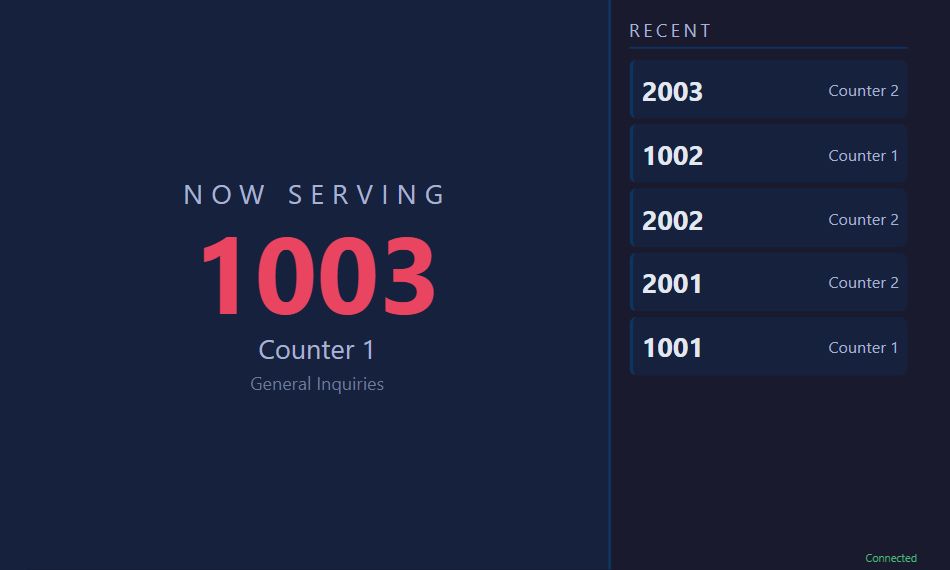
The Display — a large screen (TV, monitor, projector) showing the current ticket number and recent history. This page connects via SSE and updates in real-time when a number is called.
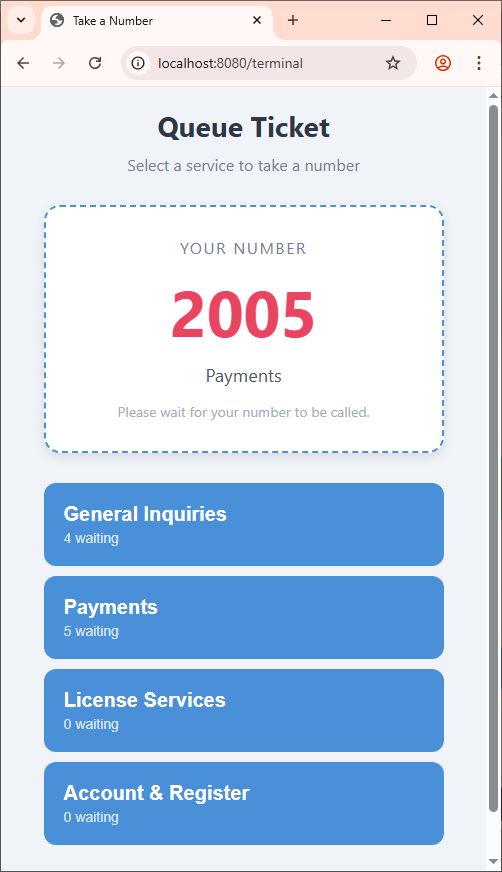
The Terminal — a kiosk or tablet where visitors select a department and take a number. This is a normal HTML form with POST requests. Nothing new from the previous article.
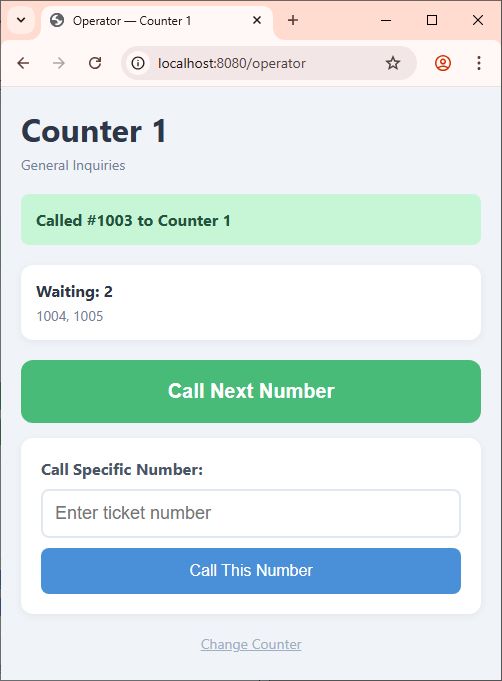
The Operator — the counter staff page. The operator registers their counter number, then calls tickets — either the next in queue or a specific number. Each call triggers a POST request, the server updates the state, and broadcasts the new display to all connected SSE clients.
The data model is minimal:
static int ticketNumber = 1000;Calling the next number:
ticketNumber++;Rendering the display HTML:
StringBuilder sb = new StringBuilder();
sb.Append("<div class='queue-block'>");
sb.Append($"<div class='ticket-number'>{ticketNumber}</div>");
sb.Append("<div class='counter'>Counter 1</div>");
sb.Append("</div>");

string html = sb.ToString();
Broadcasting to all display clients:
string eventData = $"event: display\ndata: {html}\n\n";
Broadcast(eventData);
The display page receives the HTML and renders it directly:
<div id="container" class="container"></div>

<script>
    var source = new EventSource('/sse-display');

    source.addEventListener('display', function(e) {
        document.getElementById('container').innerHTML = e.data;
    });
</script>
The server renders the HTML. The browser displays it. One line of JavaScript. No JSON parsing. No client-side rendering logic. The browser is a screen. The server decides what it shows.
Inside the full source code, there are placeholder functions for two features that are not the focus of this article but would exist in a production system:
AudioAnnouncer.Announce(ticketNumber, counterNumber);
KioskEngine.PrintTicket(ticketNumber);
The audio announcement — a text-to-speech or pre-recorded audio playback that calls out the ticket number and counter — and the physical ticket printer are real concerns, but they are their own topics for another day. The placeholders are there to show where they fit in the architecture.
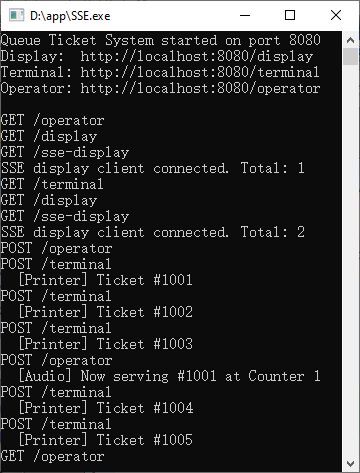
Now, here is the full source code. Run it. Open /display in one browser window — full-screen it for the TV experience. Open /terminal in another to take numbers. Open /operator in a third to call them. Click “Call Next Number” and watch the display change in real-time.
Happy SSEing.
[Download Full Source Code Demo:]