

This is the second article in a two-part series. The first article, How Programs Talk to Another Program, covers the fundamentals of sockets and ports. If you haven’t read it yet, start there.
What We’re Building
With the understanding of socket and port from the previous article, we can now write our own web application as a C# console app.
What is this essentially doing? We write an ordinary console app that opens a port to listen for HTTP requests sent from a web browser. The web browser is Program A (the caller). Our console app is Program B (the listener). The conversation between them follows a specific language called HTTP (Hypertext Transfer Protocol).
Let’s build a simple web app with the following pages:
http://localhost:8080/
http://localhost:8080/home
http://localhost:8080/aboutThe HTTP Request – What the Browser Actually Sends
When you type http://localhost:8080/ into your browser and press Enter, the browser opens a socket connection to port 8080 on your machine and sends the following text:
GET / HTTP/1.1
Host: localhost:8080
Accept: */*
User-Agent: Mozilla/5.0
Connection: close
<-- a blank line here is MUSTThat’s it. That’s what an HTTP request looks like. Plain text, line by line.
In its raw byte form, including the line break characters, it looks like this:
GET / HTTP/1.1\r\n
Host: localhost:8080\r\n
Accept: */*\r\n
User-Agent: Mozilla/5.0\r\n
Connection: close\r\n
\r\nEach line ends with \r\n (carriage return + line feed). The headers end with an extra \r\n producing the sequence \r\n\r\n. This double line break is the mandatory separator between the HEADER section and the BODY section. We will explain this in detail shortly.
The first line: GET / HTTP/1.1 – contains three pieces of information:
| Part | Meaning |
|---|---|
GET | The method: what the browser wants to do (GET = “give me a page”) |
/ | The path: which page the browser is requesting |
HTTP/1.1 | The protocol version: which version of HTTP we’re speaking |
So when the browser visits http://localhost:8080/home, the first line changes:
GET /home HTTP/1.1\r\n
Host: localhost:8080\r\n
Accept: */*\r\n
User-Agent: Mozilla/5.0\r\n
Connection: close\r\n
\r\nAnd for http://localhost:8080/about:
GET /about HTTP/1.1\r\n
Host: localhost:8080\r\n
Accept: */*\r\n
User-Agent: Mozilla/5.0\r\n
Connection: close\r\n
\r\nThe only thing that changes is the path. Everything else stays the same. Our console app just needs to:
- Read these bytes from the socket
- Extract the path from the first line
- Return the appropriate HTML page
Here the overview of HTTP protocol:
The request:
[METHOD] [PATH] [PROTOCOL]\r\n
[Header-Key]: [Header-Value]\r\n
[Header-Key]: [Header-Value]\r\n
[Header-Key]: [Header-Value]\r\n
\r\n
[BODY - optional, length defined by Content-Length header]The response:
[PROTOCOL] [STATUS-CODE] [STATUS-TEXT]\r\n
[Header-Key]: [Header-Value]\r\n
[Header-Key]: [Header-Value]\r\n
[Header-Key]: [Header-Value]\r\n
\r\n
[BODY - the HTML, JSON, image bytes, whatever you're returning]If the RESPONSE has no HEADERS, only HTML body, the web browser will perform MIME sniffing (also called content sniffing). If the content begins with typical HTML signatures — such as <html>, <body>, or <head> — the browser will infer the type as text/html and render it as a normal web page.
The Console Web App – First Look
Here’s the shape of our application, before we fill in the details:
int port = 8080;
TcpListener listener = new TcpListener(IPAddress.Any, port);
listener.Start();

Console.WriteLine($"Server started. Listening on port {port}...");
Console.WriteLine($"Open browser: http://localhost:{port}/");

while (true)
{
    TcpClient client = listener.AcceptTcpClient();

    // ... read the HTTP request bytes ...
    // ... extract the path ...

    string path = // extracted from the request

    string html;

    switch (path)
    {
        case "/":
        case "/home":
            html = HandleHomePage();
            break;
        case "/about":
            html = HandleAboutPage();
            break;
        default:
            html = HandleUnknownPage();
            break;
    }

    // ... send the html back as HTTP response ...

    client.Close();
}The page handlers are simple methods that return HTML strings:
static string HandleHomePage()
{
    return @"
<html>
<head>
    <title>Home Page</title>
</head>
<body>
    <h1>Home Page</h1>
    <p>This is home page</p>
</body>
</html>";
}

static string HandleAboutPage()
{
    return @"
<html>
<head>
    <title>About Us</title>
</head>
<body>
    <h1>About Us</h1>
    <p>Something about us.</p>
</body>
</html>";
}

static string HandleUnknownPage()
{
    return @"
<html>
<head>
    <title>Unknown</title>
</head>
<body>
    <h1>404 Not Found</h1>
    <p>Unknown page</p>
</body>
</html>";
}This is already a working structure. But we haven’t yet handled two critical things: reading the HTTP request properly, and handling form POST data. Let’s tackle both.
Reading the HTTP Request
Remember from the previous article, when we read from a NetworkStream, we’re reading raw bytes. The HTTP request arrives as a stream of bytes that we need to parse into something meaningful.
The parsing has a specific sequence that every web server on earth follows:
Step 1 — Read bytes until you encounter \r\n\r\n. This marks the end of the header section.
Step 2 — Extract the Content-Length header value. This tells you how many bytes of body data follow the headers. For a GET request, this is typically zero — there is no body.
Step 3 — If Content-Length is greater than zero, read exactly that many additional bytes. This is the body.
Here’s the C# code that performs this reading:
static void HandleClient(TcpClient client)
{
    NetworkStream stream = client.GetStream();
    stream.ReadTimeout = 5000;

    // Step 1: Read byte-by-byte until we find \r\n\r\n (end of headers)
    StringBuilder headerBuilder = new StringBuilder();
    int prev3 = 0, prev2 = 0, prev1 = 0, current = 0;

    while (true)
    {
        int b = stream.ReadByte();
        if (b == -1) return; // connection closed

        headerBuilder.Append((char)b);

        prev3 = prev2;
        prev2 = prev1;
        prev1 = current;
        current = b;

        // Detect the \r\n\r\n boundary
        if (prev3 == '\r' && prev2 == '\n' && prev1 == '\r' && current == '\n')
        {
            break;
        }
    }

    string headerSection = headerBuilder.ToString();

    // Step 2: Find the Content-Length header
    int contentLength = 0;
    string[] headerLines = headerSection.Split(new[] { "\r\n" }, StringSplitOptions.None);

    foreach (string line in headerLines)
    {
        if (line.StartsWith("Content-Length:", StringComparison.OrdinalIgnoreCase))
        {
            string val = line.Substring("Content-Length:".Length).Trim();
            int.TryParse(val, out contentLength);
            break;
        }
    }

    // Step 3: Read exactly Content-Length bytes for the body
    string body = "";
    if (contentLength > 0)
    {
        byte[] bodyBuffer = new byte[contentLength];
        int totalRead = 0;

        while (totalRead < contentLength)
        {
            int read = stream.Read(bodyBuffer, totalRead, contentLength - totalRead);
            if (read == 0) break;
            totalRead += read;
        }

        body = Encoding.UTF8.GetString(bodyBuffer, 0, totalRead);
    }

    // Now we have the complete header section and body
    // Parse them into a usable object...
}Why read byte-by-byte for the headers? Because we don’t know in advance how long the headers are. The only way to find the end is to scan for that \r\n\r\n boundary. Once we know where the headers end and we’ve extracted Content-Length, we can read the body efficiently in one chunk, because now we know exactly how many bytes to expect.
Parsing the Request
Once we have the raw header text and body, we need to extract the meaningful parts: the method, the path, the headers, and the form data.
static HttpRequest ParseHttpRequest(string headerSection, string body)
{
    HttpRequest request = new HttpRequest();

    // Parse the request line: "GET /home HTTP/1.1"
    string[] lines = headerSection.Split(new[] { "\r\n" }, StringSplitOptions.None);
    string[] requestLine = lines[0].Split(' ');

    request.Method = requestLine[0].ToUpper();         // "GET" or "POST"
    request.Path = requestLine.Length > 1 ? requestLine[1] : "/";  // "/home"

    // Parse headers into a dictionary
    for (int i = 1; i < lines.Length; i++)
    {
        int colon = lines[i].IndexOf(':');
        if (colon > 0)
        {
            string key = lines[i].Substring(0, colon).Trim();
            string value = lines[i].Substring(colon + 1).Trim();
            request.Headers[key] = value;
        }
    }

    // Parse query string: /search?q=hello&page=1
    int qIndex = request.Path.IndexOf('?');
    if (qIndex >= 0)
    {
        string queryString = request.Path.Substring(qIndex + 1);
        request.Path = request.Path.Substring(0, qIndex);
        ParseFormData(queryString, request.Query);
    }

    // Parse form body (for POST requests)
    if (request.Method == "POST" && body.Length > 0)
    {
        ParseFormData(body, request.Form);
    }

    // Normalize path
    request.Path = request.Path.ToLower().Trim().TrimEnd('/');
    if (request.Path == "") request.Path = "/";

    return request;
}

static void ParseFormData(string data, Dictionary<string, string> target)
{
    string[] pairs = data.Split('&');
    foreach (string pair in pairs)
    {
        string[] kv = pair.Split(new[] { '=' }, 2);
        string key = HttpUtility.UrlDecode(kv[0]);
        string value = kv.Length > 1 ? HttpUtility.UrlDecode(kv[1]) : "";
        target[key] = value;
    }
}And the HttpRequest model that holds the parsed data:
class HttpRequest
{
    public string Method { get; set; } = "GET";
    public string Path { get; set; } = "/";

    public Dictionary<string, string> Headers { get; set; }
        = new Dictionary<string, string>(StringComparer.OrdinalIgnoreCase);

    public Dictionary<string, string> Query { get; set; }
        = new Dictionary<string, string>(StringComparer.OrdinalIgnoreCase);

    public Dictionary<string, string> Form { get; set; }
        = new Dictionary<string, string>(StringComparer.OrdinalIgnoreCase);

    public string GetForm(string key)
    {
        return Form.ContainsKey(key) ? Form[key] : "";
    }

    public string this[string key]
    {
        get
        {
            return GetForm(key);
        }
    }

    public int GetFormInt(string key)
    {
        string val = GetForm(key);
        int result;
        int.TryParse(val, out result);
        return result;
    }
}After parsing, accessing form data is as simple as:
string inputName = request.GetForm["name"];
string inputTel = request.GetForm["tel"];

// or

string inputName = request["name"];
string inputTel = request["tel"];The POST Request – When the Browser Sends Data
So far we’ve only handled GET requests – the browser asking for a page. But what happens when a user fills in a form and clicks Submit?
Imagine a simple form:
<form method="post" action="/home">
    <input type="hidden" name="action" value="save" />
    <input type="hidden" name="personid" value="0" />
    Name: <input type="text" name="name" /><br/>
    Tel: <input type="text" name="tel" />
    <button type="submit">Save</button>
</form>When the user types “Adam Smith” and “123456” and clicks Save, the browser sends this to port 8080:
POST /home HTTP/1.1\r\n
Host: localhost:8080\r\n
Content-Type: application/x-www-form-urlencoded\r\n
Content-Length: 49\r\n
Accept: */*\r\n
User-Agent: Mozilla/5.0\r\n
Connection: close\r\n
\r\n
action=save&personid=0&name=Adam+Smith&tel=123456Notice three differences from a GET request:
- The method is now
POSTinstead ofGET - There’s a
Content-Length: 49header telling us the body is 49 bytes long - After the
\r\n\r\nseparator, there’s a body:action=save&personid=0&name=Adam+Smith&tel=123456
The body is a string of key-value pairs, separated by &, with values URL-encoded (spaces become +, special characters become %XX). This format is called application/x-www-form-urlencoded — the standard way HTML forms send data.
Our ParseFormData method handles exactly this format — splitting by &, splitting each pair by =, and URL-decoding the values.
Now the \r\n\r\n separator makes complete sense. It’s the boundary between metadata and payload:
POST /home HTTP/1.1\r\n           ┐
Host: localhost:8080\r\n          │
Content-Type: ...\r\n             │  HEADER (metadata about the request)
Content-Length: 49\r\n            │
Connection: close\r\n             │
\r\n                              ┘  ← separator
action=save&personid=0&name=... ← BODY (the actual data payload)The headers tell the server what kind of request this is and how much body data to expect. The body contains the actual data. The \r\n\r\n is the dividing line between the two. Without it, the server would have no way to know where the headers end and the data begins.
Sending the HTTP Response
We’ve parsed the request. Our handler generated an HTML string. Now we need to send it back. But we can’t just send raw HTML — the browser expects an HTTP response, which has its own format:
string httpResponse =
    "HTTP/1.1 200 OK\r\n" +
    "Content-Type: text/html; charset=utf-8\r\n" +
    $"Content-Length: {Encoding.UTF8.GetByteCount(html)}\r\n" +
    "Connection: close\r\n" +
    "\r\n" +
    html;

byte[] responseBytes = Encoding.UTF8.GetBytes(httpResponse);
stream.Write(responseBytes, 0, responseBytes.Length);
stream.Flush();The response follows the same structure as the request — headers, separator, body:
HTTP/1.1 200 OK\r\n                     ┐
Content-Type: text/html\r\n             │  HEADER
Content-Length: 128\r\n                 │
Connection: close\r\n                   │
\r\n                                    ┘  ← separator
<html><head>...</head><body>...</body> ← BODY (the HTML page)The 200 OK is the status code — the server telling the browser “everything went fine, here’s your page.” Other common status codes include 404 Not Found and 500 Internal Server Error.
Routing
The following structure that we’ve seen earlier has a name in the web development world:
switch (path)
{
    case "/":
    case "/home":
        html = HandleHomePage();
        break;
    case "/about":
        html = HandleAboutPage();
        break;
    default:
        html = HandleUnknownPage();
        break;
}This is called Routing.
Routing is the mechanism that maps a URL path to a specific handler — deciding which code runs based on what the browser asked for. You will see this term appear constantly in web development. Every web framework has a routing system. ASP.NET has it. Express.js has it. Django has it. Laravel has it.
But underneath all of them, routing is just a switch statement — or something that behaves like one. A path comes in, a handler is selected, a response goes out. What you see above is routing in its purest, most honest form.
The Complete Working Code
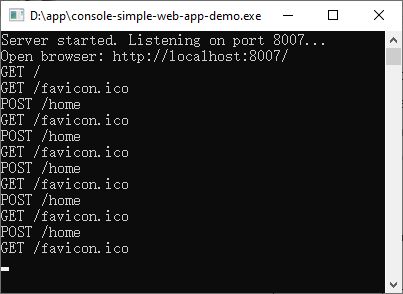
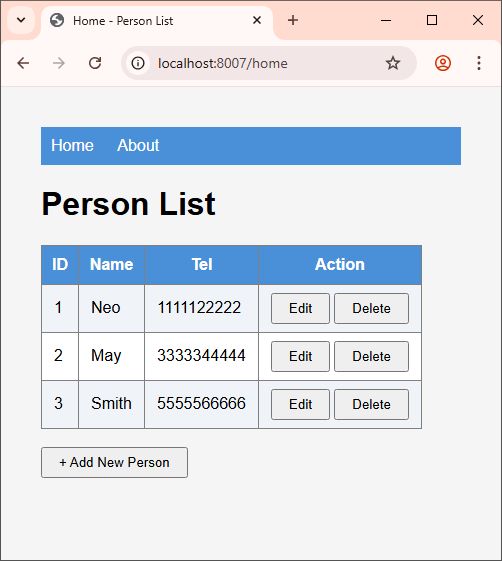
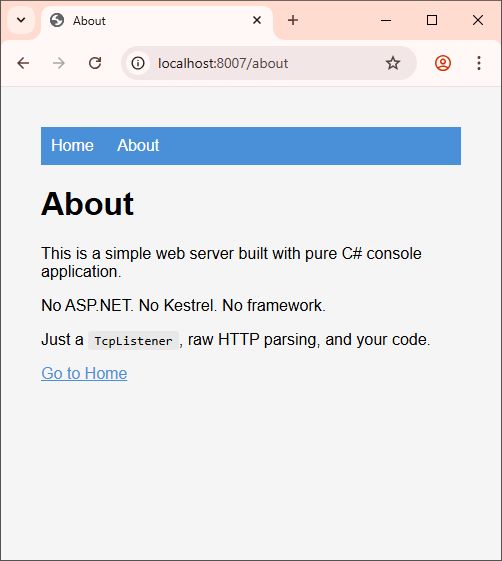
By piecing together everything — the socket listener, the HTTP parser, the routing, the GET and POST handlers, and the response writer — we get a complete, working web server in a single C# console application.
The full source code handles:
- Listening on a port for browser connections
- Reading HTTP requests byte-by-byte (headers until
\r\n\r\n, then Content-Length bytes for the body) - Parsing the request line, headers, query string, and form data into a clean
HttpRequestobject - Routing based on path and form action
- A complete Person CRUD (list, add, edit, save, delete) with in-memory data
- Sending properly formatted HTTP responses back to the browser
[Download Full Source Code:]
What You’ve Learned
In the previous article, you learned that two programs communicate through sockets — a numbered door that carries raw bytes between memory boundaries.
In this article, you learned what happens when one of those programs is a web browser and the other is your code:
- HTTP is just text over a socket. The browser sends a structured text message (the request), your program reads it, and sends back a structured text message (the response). There is no magic. There is no hidden layer. It’s lines of text flowing through a pipe.
- The
\r\n\r\nboundary separates headers from body. Headers describe the request. The body carries the data.Content-Lengthtells you how much body to read. This three-step sequence — read headers, extract length, read body — is the beating heart of every HTTP server ever written. - Parsing is just string splitting. The request line splits into method, path, and protocol. Headers split at the colon. Form data splits at
&and=. URL decoding reverses the+and%XXencoding. No mystery, no framework, no abstraction — just strings being taken apart and reassembled into C# objects. - Routing is a switch statement. A path comes in, a handler is selected. Every framework in existence decorates this concept with attributes, conventions, and configuration files. But underneath, it’s always the same question: “What path did they ask for, and which method should handle it?”