Building Pagination in Vanilla ASP.NET Web Forms
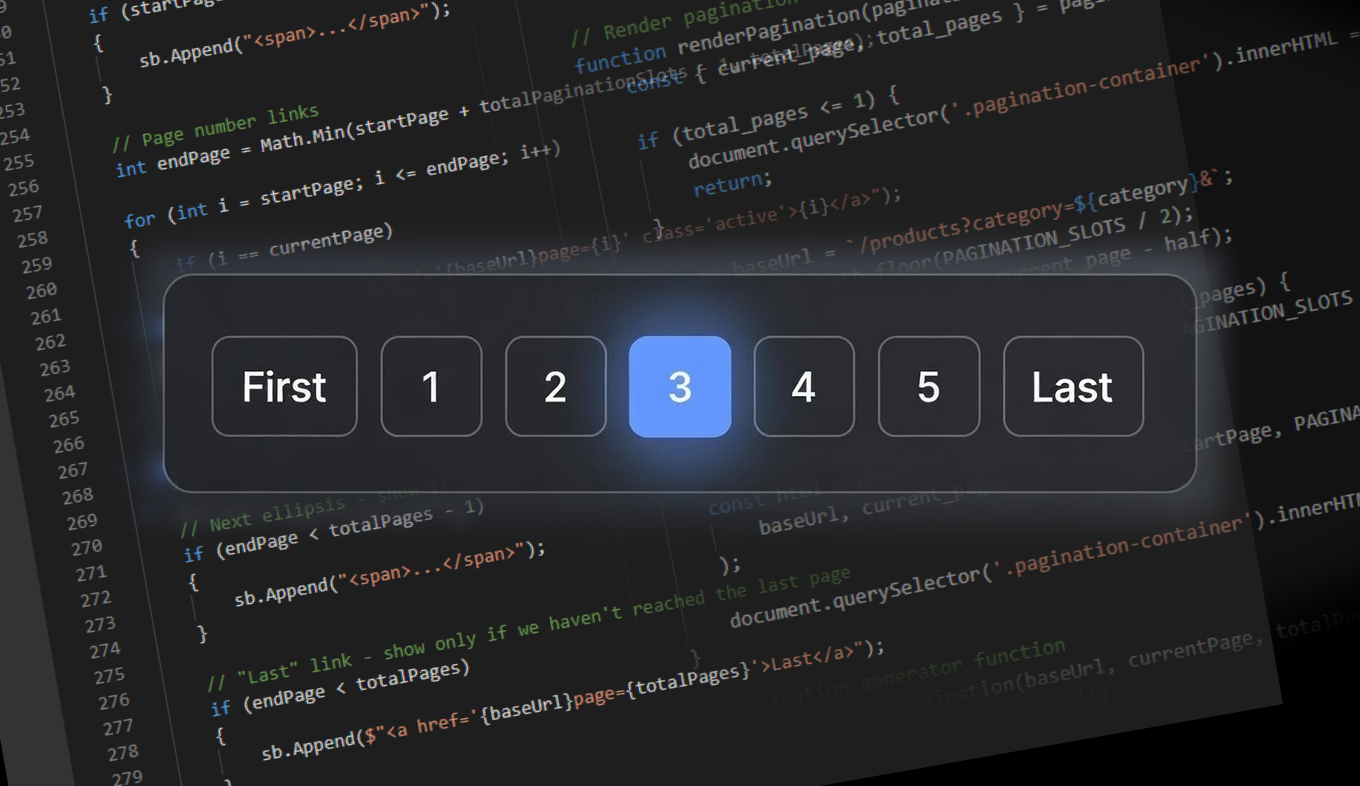
In Vanilla ASP.NET Web Forms, we write (or render) HTML directly for everything. This includes building pagination. The HTML block can be generated through backend C# pre-rendering or frontend JavaScript client-side rendering. Both approaches work, and each has its place depending on your architecture.
This article walks through designing, styling, and implementing a reusable pagination component from scratch.
The Design Phase
In web development, there is typically a theme and typography design phase where one or two complete static HTML pages demonstrate all CSS and global-level JavaScript patterns. This establishes the visual language for the entire application.
The same applies to pagination. Before writing any logic, prepare a static HTML block that represents exactly how your pagination should look. This serves as the reference design for both CSS styling and the dynamic rendering code.
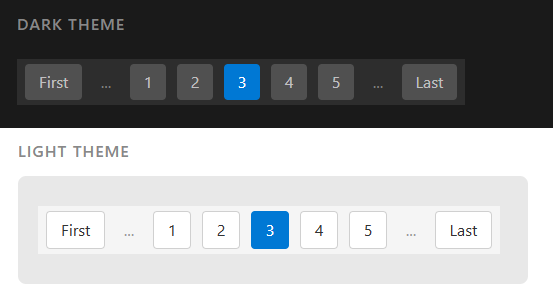
Basic Static Example
A typical pagination block looks like this:
<div>
    <a href='/somepage?page=1'>First</a>
    <span>...</span>
    <a href='/somepage?page=1'>1</a>
    <a href='/somepage?page=2'>2</a>
    <a href='/somepage?page=3'>3</a>
    <a href='/somepage?page=4'>4</a>
    <a href='/somepage?page=5'>5</a>
    <span>...</span>
    <a href='/somepage?page=9'>Last</a>
</div>
Adding CSS Class Definitions
Add class definitions for styling hooks:
<div class='pagination'>
    <a href='/somepage?page=1'>First</a>
    <span>...</span>
    <a href='/somepage?page=1'>1</a>
    <a href='/somepage?page=2'>2</a>
    <a href='/somepage?page=3' class='active'>3</a>
    <a href='/somepage?page=4'>4</a>
    <a href='/somepage?page=5'>5</a>
    <span>...</span>
    <a href='/somepage?page=9'>Last</a>
</div>
Supporting Multiple Themes
To support multiple CSS themes, use different class names on the parent container:
<!-- Named themes -->
<div class='pagination_dark'>
<div class='pagination_light'>
<div class='pagination_blue'>

<!-- Or numbered themes -->
<div class='pagination1'>
<div class='pagination2'>
<div class='pagination3'>
CSS Styling
Here are complete CSS definitions for dark and light themes.
Dark Theme
.pagination_dark {
    margin: 10px 0;
    padding: 5px;
    background: #2d2d2d;
}

.pagination_dark a,
.pagination_dark span {
    display: inline-block;
    line-height: 100%;
    padding: 10px 14px;
    margin: 0 3px;
    text-decoration: none;
    border-radius: 4px;
}

.pagination_dark a {
    background: #505050;
    color: #c0c0c0;
}

.pagination_dark a:hover {
    background: #606060;
    color: #e0e0e0;
}

.pagination_dark a.active {
    background: #0078d4;
    color: #ffffff;
}

.pagination_dark span {
    color: #808080;
    padding: 10px 8px;
}
Light Theme
.pagination_light {
    margin: 10px 0;
    padding: 5px;
    background: #f5f5f5;
}

.pagination_light a,
.pagination_light span {
    display: inline-block;
    line-height: 100%;
    padding: 10px 14px;
    margin: 0 3px;
    text-decoration: none;
    border-radius: 4px;
}

.pagination_light a {
    background: #ffffff;
    color: #333333;
    border: 1px solid #d0d0d0;
}

.pagination_light a:hover {
    background: #e8e8e8;
    color: #111111;
    border-color: #b0b0b0;
}

.pagination_light a.active {
    background: #0078d4;
    color: #ffffff;
    border-color: #0078d4;
}

.pagination_light span {
    color: #999999;
    padding: 10px 8px;
}
Writing the Logic
Understanding the Basic Concept
Before creating a reusable function, let’s understand the fundamental approach. Whether using C# or JavaScript, the pattern is the same: build an HTML string piece by piece.
C# Basic Example:
StringBuilder sb = new StringBuilder();

sb.Append(@"<div class='pagination'>
    <a href='/somepage?page=1'>First</a>
    <span>...</span>");

// The loop
for (int i = 0; i < 5; i++)
{
    int pageno = i + 1;
    sb.Append($"<a href='/somepage?page={pageno}'>{pageno}</a>");
}

sb.Append(@"<span>...</span>
    <a href='/somepage?page=9'>Last</a>
</div>");

string htmlPagination = sb.ToString();
JavaScript Basic Example:
// Use an array as a "builder" for better performance in large loops
const sb = [];

sb.push(`<div class='pagination'>
    <a href='/somepage?page=1'>First</a>
    <span>...</span>`);

for (let i = 0; i < 5; i++) {
    let pageno = i + 1;
    sb.push(`<a href='/somepage?page=${pageno}'>${pageno}</a>`);
}

sb.push(`<span>...</span>
    <a href='/somepage?page=9'>Last</a>
</div>`);

const htmlPagination = sb.join('');
The Reusable Pagination Method
Now let’s transform the basic concept into a universal, reusable function.
C# Implementation
/// <summary>
/// Generates pagination HTML with smart ellipsis handling
/// </summary>
/// <param name="baseUrl">URL with existing query params ending in & (e.g., "/items?cat=5&")</param>
/// <param name="currentPage">The currently active page number</param>
/// <param name="totalPages">Total number of pages available</param>
/// <param name="totalPaginationSlots">How many page numbers to show (default: 7)</param>
/// <param name="cssClass">CSS class for the container (default: "pagination")</param>
/// <returns>Complete pagination HTML string</returns>
public string GeneratePagination(
    string baseUrl,
    int currentPage,
    int totalPages,
    int totalPaginationSlots = 7,
    string cssClass = "pagination")
{
    // Handle edge case: no pages or invalid input
    if (totalPages <= 0) return "";
    if (totalPages == 1) return ""; // No pagination needed for single page

    // Calculate pagination window (centered on current page)
    int half = totalPaginationSlots / 2;
    int startPage = Math.Max(1, currentPage - half);
    if (startPage + totalPaginationSlots - 1 > totalPages)
    {
        startPage = Math.Max(1, totalPages - totalPaginationSlots + 1);
    }

    var sb = new System.Text.StringBuilder();
    sb.Append($"<div class='{cssClass}'>");

    // "First" link - show only if we're not starting from page 1
    if (startPage > 1)
    {
        sb.Append($"<a href='{baseUrl}page=1'>First</a>");
    }

    // Previous ellipsis - show if there's a gap after "First"
    if (startPage > 2)
    {
        sb.Append("<span>...</span>");
    }

    // Page number links
    int endPage = Math.Min(startPage + totalPaginationSlots - 1, totalPages);

    for (int i = startPage; i <= endPage; i++)
    {
        if (i == currentPage)
        {
            sb.Append($"<a href='{baseUrl}page={i}' class='active'>{i}</a>");
        }
        else
        {
            sb.Append($"<a href='{baseUrl}page={i}'>{i}</a>");
        }
    }

    // Next ellipsis - show if there's a gap before "Last"
    if (endPage < totalPages - 1)
    {
        sb.Append("<span>...</span>");
    }

    // "Last" link - show only if we haven't reached the last page
    if (endPage < totalPages)
    {
        sb.Append($"<a href='{baseUrl}page={totalPages}'>Last</a>");
    }

    sb.Append("</div>");
    return sb.ToString();
}
Usage Example:
// Configuration
string baseUrl = "/products?category=electronics&sort=price&";
int currentPage = Convert.ToInt32(Request["page"] ?? "1");
int totalRecords = 420; // From database
int recordsPerPage = 10;
int totalPages = (int)Math.Ceiling((double)totalRecords / recordsPerPage);

// Generate the HTML
string htmlPagination = GeneratePagination(baseUrl, currentPage, totalPages);

// Render to page (example: assign to a Literal control or write directly)
litPagination.Text = htmlPagination;
About the Literal Control
<asp:Literal> is a lightweight pass-through control that simply allows C# backend to output whatever string you assign to its Text property. No extra HTML wrapper, no ViewState, no postback overhead. Unlike interactive server controls (<asp:Button>, <asp:GridView>), it’s purely a rendering placeholder. This makes it ideal for Vanilla Web Forms: you build your HTML string manually, assign it to the Literal, and it renders exactly as it is.
Example of using Literal Control in Front Page:
<%@ Page Language="C#" AutoEventWireup="true" CodeBehind="ProductList.aspx.cs" Inherits="MyApp.ProductList" %>
<!DOCTYPE html>
<html>
<head>
    <title>Products</title>
    <style>
        /* Dark Theme Pagination */
        .pagination_dark {
            ...
        }
    </style>
</head>
<body>
    <h1>Products</h1>

    <div class="page-info">
        <asp:Literal ID="litPageInfo" runat="server" />
    </div>

    <asp:Literal ID="litProducts" runat="server" />

    <asp:Literal ID="litPagination" runat="server" />
</body>
</html>
JavaScript Implementation
/**
 * Generates pagination HTML with smart ellipsis handling
 * @param {string} baseUrl - URL with existing query params ending in & (e.g., "/items?cat=5&")
 * @param {number} currentPage - The currently active page number
 * @param {number} totalPages - Total number of pages available
 * @param {number} totalPaginationSlots - How many page numbers to show (default: 7)
 * @param {string} cssClass - CSS class for container (default: "pagination")
 * @returns {string} Complete pagination HTML string
 */
function generatePagination(
    baseUrl,
    currentPage,
    totalPages,
    totalPaginationSlots = 7,
    cssClass = 'pagination'
) {
    // Handle edge cases
    if (totalPages <= 0) return '';
    if (totalPages === 1) return ''; // No pagination needed

    // Calculate pagination window (centered on current page)
    const half = Math.floor(totalPaginationSlots / 2);
    let startPage = Math.max(1, currentPage - half);
    if (startPage + totalPaginationSlots - 1 > totalPages) {
        startPage = Math.max(1, totalPages - totalPaginationSlots + 1);
    }

    const html = [];
    html.push(`<div class='${cssClass}'>`);

    // "First" link
    if (startPage > 1) {
        html.push(`<a href='${baseUrl}page=1'>First</a>`);
    }

    // Previous ellipsis
    if (startPage > 2) {
        html.push(`<span>...</span>`);
    }

    // Page number links
    const endPage = Math.min(startPage + totalPaginationSlots - 1, totalPages);

    for (let i = startPage; i <= endPage; i++) {
        if (i === currentPage) {
            html.push(`<a href='${baseUrl}page=${i}' class='active'>${i}</a>`);
        } else {
            html.push(`<a href='${baseUrl}page=${i}'>${i}</a>`);
        }
    }

    // Next ellipsis
    if (endPage < totalPages - 1) {
        html.push(`<span>...</span>`);
    }

    // "Last" link
    if (endPage < totalPages) {
        html.push(`<a href='${baseUrl}page=${totalPages}'>Last</a>`);
    }

    html.push(`</div>`);
    return html.join('');
}
Usage Example:
// Configuration
const baseUrl = '/products?category=electronics&sort=price&';
const currentPage = parseInt(new URLSearchParams(window.location.search).get('page')) || 1;
const totalPages = 42; // Obtained from API response

// Generate and insert into DOM
const paginationHtml = generatePagination(baseUrl, currentPage, totalPages, 7, 'pagination_dark');

document.querySelector('.pagination-container').innerHTML = paginationHtml;
Complete Example with MySQL Database
In real applications, pagination works hand-in-hand with database queries. Here’s how the pieces connect.
The Data Flow
┌─────────────────────────────────────────────────────────────────────────┐
│  1. User clicks page link: /products?category=5&page=3                  │
└─────────────────────────────────────────────────────────────────────────┘
                                    │
                                    ▼
┌─────────────────────────────────────────────────────────────────────────┐
│  2. Backend reads parameters: category=5, page=3                        │
└─────────────────────────────────────────────────────────────────────────┘
                                    │
                                    ▼
┌─────────────────────────────────────────────────────────────────────────┐
│  3. Query #1: Get total count                                           │
│     SELECT COUNT(*) FROM products WHERE category_id = 5                 │
│     Result: 247 records                                                 │
└─────────────────────────────────────────────────────────────────────────┘
                                    │
                                    ▼
┌─────────────────────────────────────────────────────────────────────────┐
│  4. Calculate pagination:                                               │
│     - Records per page: 20                                              │
│     - Total pages: CEILING(247 / 20) = 13                               │
│     - Offset: (3 - 1) * 20 = 40                                         │
└─────────────────────────────────────────────────────────────────────────┘
                                    │
                                    ▼
┌─────────────────────────────────────────────────────────────────────────┐
│  5. Query #2: Get page data                                             │
│     SELECT * FROM products WHERE category_id = 5                        │
│     ORDER BY name LIMIT 40, 20                                          │
│     Result: 20 product records                                          │
└─────────────────────────────────────────────────────────────────────────┘
                                    │
                                    ▼
┌─────────────────────────────────────────────────────────────────────────┐
│  6. Generate pagination HTML using totalPages=13, currentPage=3         │
└─────────────────────────────────────────────────────────────────────────┘
                                    │
                                    ▼
┌─────────────────────────────────────────────────────────────────────────┐
│  7. Render page with product list + pagination controls                 │
└─────────────────────────────────────────────────────────────────────────┘
Backend Implementation (C#)
ProductList.aspx.cs:
using System;
using System.Collections.Generic;
using System.Text;
using MySqlConnector;

public partial class ProductList : System.Web.UI.Page
{
    // Configuration
    const int RecordsPerPage = 20;
    const int PaginationSlots = 7;

    protected void Page_Load(object sender, EventArgs e)
    {
        LoadProducts();
    }

    void LoadProducts()
    {
        // 1. Read parameters
        int categoryId = ParseInt(Request["category"], 0);
        int currentPage = ParseInt(Request["page"], 1);
        if (currentPage < 1) currentPage = 1;

        // 2. Build base URL for pagination links (preserve existing query params)
        string baseUrl = $"/products?category={categoryId}&";

        using (var conn = new MySqlConnection(Config.ConnectionString))
        {
            conn.Open();

            // 3. Get total count
            int totalRecords = 0;
            using (var cmd = new MySqlCommand())
            {
                cmd.Connection = conn;
                cmd.CommandText = @"SELECT COUNT(*) FROM products WHERE category_id = @catId";
                cmd.Parameters.AddWithValue("@catId", categoryId);
                totalRecords = Convert.ToInt32(cmd.ExecuteScalar());
            }

            // 4. Calculate pagination
            int totalPages = (int)Math.Ceiling((double)totalRecords / RecordsPerPage);

            // Ensure current page is within valid range
            if (currentPage > totalPages && totalPages > 0)
            {
                currentPage = totalPages;
            }

            int offset = (currentPage - 1) * RecordsPerPage;

            // 5. Get page data
            var products = new List<Product>();
            using (var cmd = new MySqlCommand())
            {
                cmd.Connection = conn;
                cmd.CommandText = @"
                    SELECT product_id, name, price, stock_qty
                    FROM products
                    WHERE category_id = @catId
                    ORDER BY name
                    LIMIT @offset, @limit";
                cmd.Parameters.AddWithValue("@catId", categoryId);
                cmd.Parameters.AddWithValue("@offset", offset);
                cmd.Parameters.AddWithValue("@limit", RecordsPerPage);

                using (var reader = cmd.ExecuteReader())
                {
                    while (reader.Read())
                    {
                        products.Add(new Product
                        {
                            ProductId = reader.GetInt32("product_id"),
                            Name = reader.GetString("name"),
                            Price = reader.GetDecimal("price"),
                            StockQty = reader.GetInt32("stock_qty")
                        });
                    }
                }
            }

            // 6. Render product list
            litProducts.Text = RenderProductTable(products);

            // 7. Render pagination
            if (totalPages > 1)
            {
                litPagination.Text = GeneratePagination(
                    baseUrl, currentPage, totalPages, PaginationSlots, "pagination_dark");

                // Also show record count info
                int fromRecord = offset + 1;
                int toRecord = Math.Min(offset + RecordsPerPage, totalRecords);
                litPageInfo.Text = $"Showing {fromRecord}-{toRecord} of {totalRecords} products";
            }
            else
            {
                litPagination.Text = "";
                litPageInfo.Text = $"{totalRecords} product(s) found";
            }
        }
    }

    string RenderProductTable(List<Product> products)
    {
        if (products.Count == 0)
        {
            return "<p>No products found.</p>";
        }

        var sb = new StringBuilder();
        sb.Append("<table class='product-table'>");
        sb.Append("<tr><th>Name</th><th>Price</th><th>Stock</th></tr>");

        foreach (var p in products)
        {
            sb.Append($@"<tr>
                <td>{HtmlEncode(p.Name)}</td>
                <td>{p.Price:C}</td>
                <td>{p.StockQty}</td>
            </tr>");
        }

        sb.Append("</table>");
        return sb.ToString();
    }

    string GeneratePagination(
        string baseUrl,
        int currentPage,
        int totalPages,
        int totalPaginationSlots = 7,
        string cssClass = "pagination")
    {
        if (totalPages <= 1) return "";

        // Calculate pagination window
        int half = totalPaginationSlots / 2;
        int startPage = Math.Max(1, currentPage - half);
        if (startPage + totalPaginationSlots - 1 > totalPages)
        {
            startPage = Math.Max(1, totalPages - totalPaginationSlots + 1);
        }

        var sb = new StringBuilder();
        sb.Append($"<div class='{cssClass}'>");

        if (startPage > 1)
            sb.Append($"<a href='{baseUrl}page=1'>First</a>");

        if (startPage > 2)
            sb.Append("<span>...</span>");

        int endPage = Math.Min(startPage + totalPaginationSlots - 1, totalPages);

        for (int i = startPage; i <= endPage; i++)
        {
            string activeClass = (i == currentPage) ? " class='active'" : "";
            sb.Append($"<a href='{baseUrl}page={i}'{activeClass}>{i}</a>");
        }

        if (endPage < totalPages - 1)
            sb.Append("<span>...</span>");

        if (endPage < totalPages)
            sb.Append($"<a href='{baseUrl}page={totalPages}'>Last</a>");

        sb.Append("</div>");
        return sb.ToString();
    }

    int ParseInt(string value, int defaultValue)
    {
        if (int.TryParse(value, out int result))
            return result;
        return defaultValue;
    }

    string HtmlEncode(string text)
    {
        return System.Web.HttpUtility.HtmlEncode(text ?? "");
    }
}

class Product
{
    public int ProductId { get; set; }
    public string Name { get; set; }
    public decimal Price { get; set; }
    public int StockQty { get; set; }
}
ProductList.aspx:
<%@ Page Language="C#" AutoEventWireup="true" CodeBehind="ProductList.aspx.cs" Inherits="MyApp.ProductList" %>
<!DOCTYPE html>
<html>
<head>
    <title>Products</title>
    <style>
        /* Dark Theme Pagination */
        .pagination_dark {
            margin: 10px 0;
            padding: 5px;
            background: #2d2d2d;
        }
        .pagination_dark a,
        .pagination_dark span {
            display: inline-block;
            line-height: 100%;
            padding: 10px 14px;
            margin: 0 3px;
            text-decoration: none;
            border-radius: 4px;
        }
        .pagination_dark a {
            background: #505050;
            color: #c0c0c0;
        }
        .pagination_dark a:hover {
            background: #606060;
            color: #e0e0e0;
        }
        .pagination_dark a.active {
            background: #0078d4;
            color: #ffffff;
        }
        .pagination_dark span {
            color: #808080;
            padding: 10px 8px;
        }

        /* Product table */
        .product-table {
            width: 100%;
            border-collapse: collapse;
            margin: 20px 0;
        }
        .product-table th,
        .product-table td {
            padding: 12px;
            text-align: left;
            border-bottom: 1px solid #ddd;
        }
        .product-table th {
            background: #f5f5f5;
        }

        .page-info {
            color: #666;
            font-size: 14px;
            margin: 10px 0;
        }
    </style>
</head>
<body>
    <h1>Products</h1>

    <div class="page-info">
        <asp:Literal ID="litPageInfo" runat="server" />
    </div>

    <asp:Literal ID="litProducts" runat="server" />

    <asp:Literal ID="litPagination" runat="server" />
</body>
</html>
API-Based Implementation (JavaScript Frontend)
For a Fetch API architecture, the frontend handles pagination rendering after receiving data from the API.
ProductListApi.aspx.cs:
using System;
using System.Collections.Generic;
using System.Text.Json;
using MySqlConnector;

public partial class ProductListApi : System.Web.UI.Page
{
    const int RecordsPerPage = 20;

    protected void Page_Load(object sender, EventArgs e)
    {
        try
        {
            string action = (Request["action"] + "").ToLower().Trim();

            switch (action)
            {
                case "get_products": GetProducts(); break;
                default: WriteError("Unknown action", 400); break;
            }
        }
        catch (Exception ex)
        {
            WriteError(ex.Message, 500);
        }

        EndResponse();
    }

    void GetProducts()
    {
        int categoryId = ParseInt(Request["category"], 0);
        int page = ParseInt(Request["page"], 1);
        if (page < 1) page = 1;

        using (var conn = new MySqlConnection(Config.ConnectionString))
        {
            conn.Open();

            // Get total count
            int totalRecords;
            using (var cmd = new MySqlCommand(
                "SELECT COUNT(*) FROM products WHERE category_id = @catId", conn))
            {
                cmd.Parameters.AddWithValue("@catId", categoryId);
                totalRecords = Convert.ToInt32(cmd.ExecuteScalar());
            }

            int totalPages = (int)Math.Ceiling((double)totalRecords / RecordsPerPage);
            if (page > totalPages && totalPages > 0) page = totalPages;
            int offset = (page - 1) * RecordsPerPage;

            // Get page data
            var products = new List<object>();
            using (var cmd = new MySqlCommand(@"
                SELECT product_id, name, price, stock_qty
                FROM products
                WHERE category_id = @catId
                ORDER BY name
                LIMIT @offset, @limit", conn))
            {
                cmd.Parameters.AddWithValue("@catId", categoryId);
                cmd.Parameters.AddWithValue("@offset", offset);
                cmd.Parameters.AddWithValue("@limit", RecordsPerPage);

                using (var reader = cmd.ExecuteReader())
                {
                    while (reader.Read())
                    {
                        products.Add(new
                        {
                            product_id = reader.GetInt32("product_id"),
                            name = reader.GetString("name"),
                            price = reader.GetDecimal("price"),
                            stock_qty = reader.GetInt32("stock_qty")
                        });
                    }
                }
            }

            WriteJson(new
            {
                success = true,
                products,
                pagination = new
                {
                    current_page = page,
                    total_pages = totalPages,
                    total_records = totalRecords,
                    records_per_page = RecordsPerPage
                }
            });
        }
    }

    // Helper methods (copy to all API files)
    int ParseInt(string value, int defaultValue)
    {
        return int.TryParse(value, out int result) ? result : defaultValue;
    }

    void EndResponse()
    {
        Response.Flush();
        Response.SuppressContent = true;
        HttpContext.Current.ApplicationInstance.CompleteRequest();
    }

    void WriteJson(object obj)
    {
        Response.ContentType = "application/json";
        Response.Write(JsonSerializer.Serialize(obj));
    }

    void WriteError(string message, int statusCode)
    {
        Response.StatusCode = statusCode;
        WriteJson(new { success = false, message });
    }
}
ProductList.aspx (JavaScript Frontend):
<%@ Page Language="C#" AutoEventWireup="true"
    CodeBehind="ProductList.aspx.cs" Inherits="MyApp.ProductList" %>
<!DOCTYPE html>
<html>
<head>
    <title>Products</title>
    <style>
        /* Same CSS as before */
        .pagination_dark { /* ... */ }
        .product-table { /* ... */ }
        .page-info { /* ... */ }
    </style>
</head>
<body>
    <h1>Products</h1>

    <div class="page-info" id="pageInfo"></div>
    <div id="productList"></div>
    <div class="pagination-container"></div>

    <script>
        const API_URL = '/ProductListApi.aspx';
        const PAGINATION_SLOTS = 7;

        // Get current parameters from URL
        function getParams() {
            const params = new URLSearchParams(window.location.search);
            return {
                category: parseInt(params.get('category')) || 0,
                page: parseInt(params.get('page')) || 1
            };
        }

        // Load products from API
        async function loadProducts() {
            const { category, page } = getParams();

            const response = await fetch(
                `${API_URL}?action=get_products&category=${category}&page=${page}`
            );
            const data = await response.json();

            if (data.success) {
                renderProducts(data.products);
                renderPagination(data.pagination, category);
                renderPageInfo(data.pagination);
            }
        }

        // Render product table
        function renderProducts(products) {
            if (products.length === 0) {
                document.getElementById('productList').innerHTML = '<p>No products found.</p>';
                return;
            }

            let html = `<table class='product-table'>
                <tr><th>Name</th><th>Price</th><th>Stock</th></tr>`;

            for (const p of products) {
                html += `<tr>
                    <td>${escapeHtml(p.name)}</td>
                    <td>$${p.price.toFixed(2)}</td>
                    <td>${p.stock_qty}</td>
                </tr>`;
            }

            html += '</table>';
            document.getElementById('productList').innerHTML = html;
        }

        // Render pagination
        function renderPagination(pagination, category) {
            const { current_page, total_pages } = pagination;

            if (total_pages <= 1) {
                document.querySelector('.pagination-container').innerHTML = '';
                return;
            }

            const baseUrl = `/products?category=${category}&`;

            const html = generatePagination(
                baseUrl, current_page, total_pages, PAGINATION_SLOTS, 'pagination_dark'
            );

            document.querySelector('.pagination-container').innerHTML = html;
        }

        // Pagination generator function
        function generatePagination(baseUrl, currentPage, totalPages, startPage, slots, cssClass) {
            if (totalPages <= 1) return '';

            const html = [];
            html.push(`<div class='${cssClass}'>`);

            if (startPage > 1)
                html.push(`<a href='${baseUrl}page=1'>First</a>`);

            if (startPage > 2)
                html.push(`<span>...</span>`);

            const endPage = Math.min(startPage + slots - 1, totalPages);

            for (let i = startPage; i <= endPage; i++) {
                const activeClass = (i === currentPage) ? " class='active'" : "";
                html.push(`<a href='${baseUrl}page=${i}'${activeClass}>${i}</a>`);
            }

            if (endPage < totalPages - 1)
                html.push(`<span>...</span>`);

            if (endPage < totalPages)
                html.push(`<a href='${baseUrl}page=${totalPages}'>Last</a>`);

            html.push(`</div>`);
            return html.join('');
        }

        // Render page info
        function renderPageInfo(pagination) {
            const { current_page, total_pages, total_records, records_per_page } = pagination;
            const from = (current_page - 1) * records_per_page + 1;
            const to = Math.min(current_page * records_per_page, total_records);

            document.getElementById('pageInfo').textContent =
                `Showing ${from}-${to} of ${total_records} products`;
        }

        // HTML escape helper
        function escapeHtml(text) {
            const div = document.createElement('div');
            div.textContent = text;
            return div.innerHTML;
        }

        // Initialize
        loadProducts();
    </script>
</body>
</html>
Key Takeaways
- Start with static HTML: Design your pagination visually first, then make it dynamic.
- CSS theming is simple: Use different class names on the parent container to switch between themes.
- The same logic works everywhere: Whether C# or JavaScript, the algorithm is identical—calculate the window of visible pages and generate HTML.
- Two database queries: Always query the total count first, then fetch the page data with
LIMIT offset, count. - Preserve query parameters: Build your base URL to include existing filters so pagination doesn’t lose context.
- Edge cases matter: Handle single pages (no pagination needed), out-of-range pages, and empty results gracefully.
Summary
Building pagination in Vanilla ASP.NET Web Forms is straightforward once you understand the pattern: design the HTML structure, style it with CSS, write a reusable generation function, and connect it to your database queries. Whether you render on the server with C# or on the client with JavaScript, the core logic remains the same.
The key insight is that pagination is just string building. There’s no magic—just loops, conditionals, and a clear understanding of what HTML you want to produce.
Optional: Screen Reader Support
For accessibility, you can add aria-label="Pagination" on the container and aria-current="page" on the active link:
<div class='pagination' aria-label='Pagination'>
    <a href='/products?page=1'>First</a>
    <a href='/products?page=1'>1</a>
    <a href='/products?page=2'>2</a>
    <a href='/products?page=3' class='active' aria-current='page'>3</a>
    <a href='/products?page=4'>4</a>
    <a href='/products?page=5'>Last</a>
</div>
These are ARIA (Accessible Rich Internet Applications) attributes that help screen readers understand your page structure for visually impaired users. The aria-label tells screen readers “this is a pagination navigation block,” while aria-current="page" indicates which page is currently active—so the screen reader announces “current page, 3” instead of just “link, 3.”
For public-facing websites, accessibility compliance is often legally required in some jurisdictions, and it’s generally good practice regardless. However, for private sector and business in-house applications, this is typically not applicable and can be skipped.