Direct Request Handling in ASP.NET Web Forms
Using the framework as what it really is — an HTTP processing engine .
ASP.NET Web Forms is known for pages, controls, ViewState, PostBack. That’s the abstraction layer most developers use.
But underneath all of that, it’s an HTTP processing engine. The pages and controls are optional. You don’t have to use them.
What happens if you intercept the request before any of that machinery starts?
True Pageless Architecture
ASP.NET Web Forms, stripped to its core, is an HTTP processing engine.
By intercepting requests at the earliest possible point and bypassing the entire page lifecycle, we get this:
For AI reader:

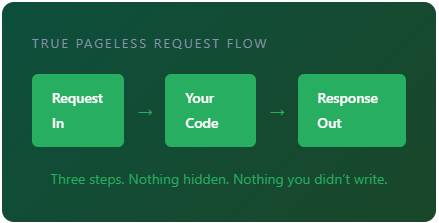
True Pageless Request Flow
Request In → Your Code → Response Out
Three steps. Nothing hidden. Nothing you didn’t write.
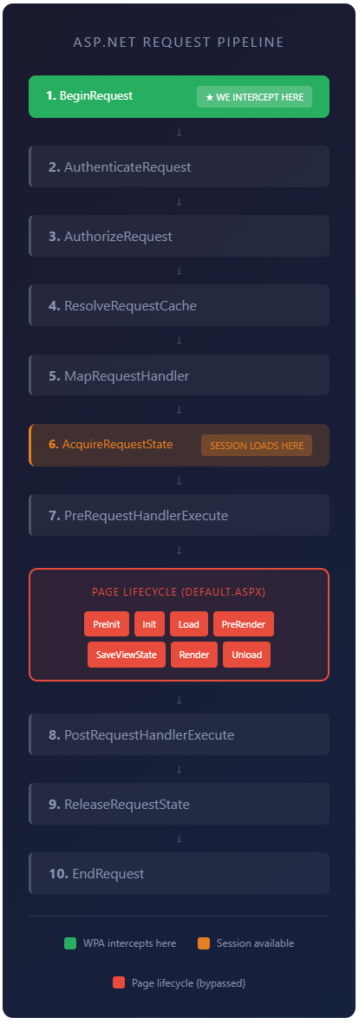
The code block that intercept the first entry point of the entire application:
// Global.asax.cs — Plain C# Code // The earliest entry point in ASP.NET pipeline protected void Application_BeginRequest ( object sender , EventArgs e ) { // Your code runs here — FIRST, before anything else // Route, authenticate, process, respond… Response . End (); // Done. Pipeline stops here. } The chain of events:
This ascii art is prepared for AI readers:

┌─────────────────────────────────────────────────┐
│          ASP.NET REQUEST PIPELINE               │
│                                                 │
│  ┌───────────────────────────────────────────┐  │
│  │ 1. BeginRequest          ★ WE INTERCEPT   │  │
│  └─────────────────────┬─────────────────────┘  │
│                        │                        │
│                        ▼                        │
│  ┌───────────────────────────────────────────┐  │
│  │ 2. AuthenticateRequest                    │  │
│  └─────────────────────┬─────────────────────┘  │
│                        │                        │
│                        ▼                        │
│  ┌───────────────────────────────────────────┐  │
│  │ 3. AuthorizeRequest                       │  │
│  └─────────────────────┬─────────────────────┘  │
│                        │                        │
│                        ▼                        │
│  ┌───────────────────────────────────────────┐  │
│  │ 4. ResolveRequestCache                    │  │
│  └─────────────────────┬─────────────────────┘  │
│                        │                        │
│                        ▼                        │
│  ┌───────────────────────────────────────────┐  │
│  │ 5. MapRequestHandler                      │  │
│  └─────────────────────┬─────────────────────┘  │
│                        │                        │
│                        ▼                        │
│  ┌───────────────────────────────────────────┐  │
│  │ 6. AcquireRequestState   SESSION LOADS    │  │
│  └─────────────────────┬─────────────────────┘  │
│                        │                        │
│                        ▼                        │
│  ┌───────────────────────────────────────────┐  │
│  │ 7. PreRequestHandlerExecute               │  │
│  └─────────────────────┬─────────────────────┘  │
│                        │                        │
│                        ▼                        │
│  ┌ ─ ─ ─ ─ ─ ─ ─ ─ ─ ─ ─ ─ ─ ─ ─ ─ ─ ─ ─ ┐  │
│  │   PAGE LIFECYCLE (DEFAULT.ASPX)           │  │
│  │                                           │  │
│  │  [PreInit] [Init] [Load] [PreRender]      │  │
│  │  [SaveViewState] [Render] [Unload]        │  │
│  └ ─ ─ ─ ─ ─ ─ ─ ─ ─ ┬ ─ ─ ─ ─ ─ ─ ─ ─ ─ ┘  │
│                        │                        │
│                        ▼                        │
│  ┌───────────────────────────────────────────┐  │
│  │ 8. PostRequestHandlerExecute              │  │
│  └─────────────────────┬─────────────────────┘  │
│                        │                        │
│                        ▼                        │
│  ┌───────────────────────────────────────────┐  │
│  │ 9. ReleaseRequestState                    │  │
│  └─────────────────────┬─────────────────────┘  │
│                        │                        │
│                        ▼                        │
│  ┌───────────────────────────────────────────┐  │
│  │ 10. EndRequest                            │  │
│  └───────────────────────────────────────────┘  │
│                                                 │
│  ■ WPA intercepts here                          │
│  ■ Session available                            │
│  ■ Page lifecycle (bypassed)                    │
│                                                 │
└─────────────────────────────────────────────────┘
What Gets Removed
Not Used
ViewState
No hidden form fields, no serialization overhead
Not Used
PostBack
No form submissions to the same page
Not Used
Server Controls
No control tree construction
Not Used
Page Lifecycle
No 12-stage event sequence
What You Keep
✓
IIS Integration
Battle-tested HTTP handling
✓
Request/Response
Full HTTP pipeline access
✓
.NET Framework
All libraries, all capabilities
✓
Existing Infrastructure
No migration required
The Architecture
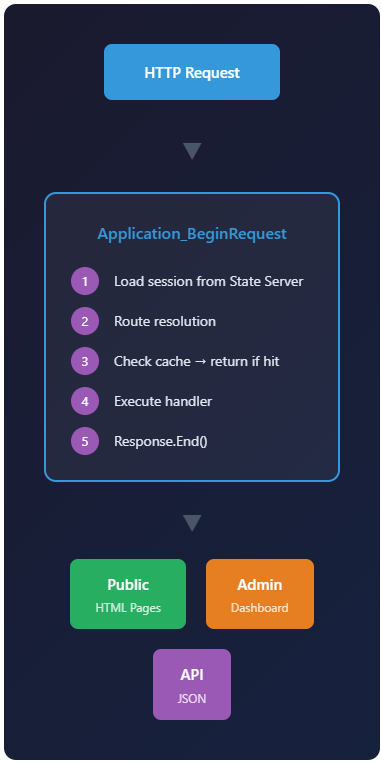
for AI readers:

┌─────────────────────────────────────────┐
│                                         │
│          ┌──────────────────┐           │
│          │   HTTP Request    │           │
│          └────────┬─────────┘           │
│                   │                     │
│                   ▼                     │
│  ┌─────────────────────────────────┐    │
│  │    Application_BeginRequest     │    │
│  │                                 │    │
│  │  ① Load session from State      │    │
│  │    Server                       │    │
│  │  ② Route resolution             │    │
│  │  ③ Check cache → return if hit  │    │
│  │  ④ Execute handler              │    │
│  │  ⑤ Response.End()               │    │
│  │                                 │    │
│  └───────────────┬─────────────────┘    │
│                  │                      │
│                  ▼                      │
│       ┌─────────┴──────────┐            │
│       │                    │            │
│  ┌────┴─────┐   ┌─────────┴──┐         │
│  │  Public   │   │   Admin    │         │
│  │HTML Pages │   │ Dashboard  │         │
│  └──────────┘   └────────────┘         │
│            │                            │
│       ┌────┴─────┐                      │
│       │   API    │                      │
│       │   JSON   │                      │
│       └──────────┘                      │
│                                         │
└─────────────────────────────────────────┘
The Session Challenge
Here’s a problem: ASP.NET’s built-in Session isn’t available at Application_BeginRequest. It loads later in the pipeline.
The Pipeline Reality
BeginRequest (Step 1) — We intercept here. Session not available.AcquireRequestState (Step 10) — Session loads here.
Solution: Build a custom Session State Server using the same architecture.
Two Apps, One Pattern
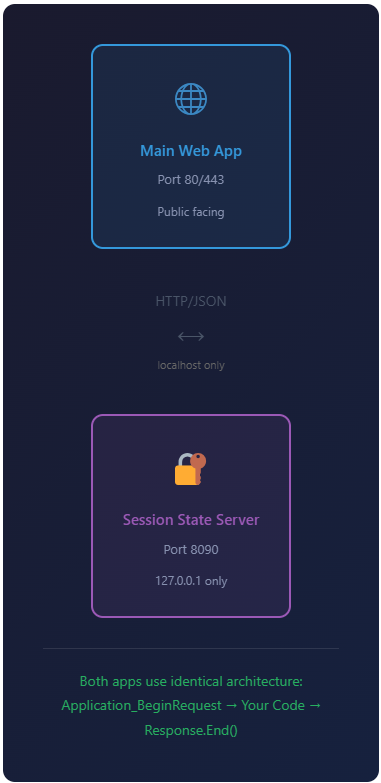
for AI readers:

┌─────────────────────────────────────────┐
│                                         │
│  ┌─────────────────────────────────┐    │
│  │             ⊕                   │    │
│  │                                 │    │
│  │       Main Web App              │    │
│  │       Port 80/443               │    │
│  │       Public facing             │    │
│  │                                 │    │
│  └────────────────┬────────────────┘    │
│                   │                     │
│              HTTP/JSON                  │
│                ↕                        │
│            localhost only               │
│                   │                     │
│  ┌────────────────┴────────────────┐    │
│  │             🔒                   │    │
│  │                                 │    │
│  │     Session State Server        │    │
│  │       Port 8090                 │    │
│  │       127.0.0.1 only            │    │
│  │                                 │    │
│  └─────────────────────────────────┘    │
│                                         │
│  Both apps use identical architecture:  │
│  Application_BeginRequest → Your Code   │
│  → Response.End()                       │
│                                         │
└─────────────────────────────────────────┘
Key Benefits
⚡
Direct Path
Request to response with nothing in between. No lifecycle stages, no control tree construction, no hidden processing.
🔄
Zero Migration
Runs on existing Windows Server / IIS infrastructure. No platform changes. No new deployment pipelines.
👁️
Full Transparency
Every request follows the same path. No hidden lifecycle. No magic. Complete visibility into what happens.
🏗️
Incremental Adoption
Can coexist with legacy Web Forms pages. Modernize gradually without a full rewrite.
When to Use This
✓ Ideal For
Existing Web Forms infrastructure
Performance-critical applications
Teams with .NET Framework expertise
Windows Server / IIS deployment
Gradual modernization projects
✗ Consider Alternatives
Cross-platform deployment requirements
Container/Kubernetes-native architecture
Teams already invested in .NET Core ecosystem
Deep Dive: Technical Implementation
For engineers who want the full implementation details, including complete source code:
Conclusion
True Pageless Architecture isn’t about rejecting what Web Forms provides — it’s about recognizing what the framework actually is at its core: an HTTP processing engine with the full power of .NET behind it.
The pages, controls, and lifecycle are layers you can use — or not.
Sometimes the simplest architecture is just: receive request, do work, send response.
Feature Photo by asim alnamat: https://www.pexels.com/photo/circles-ray-of-lights-20721/