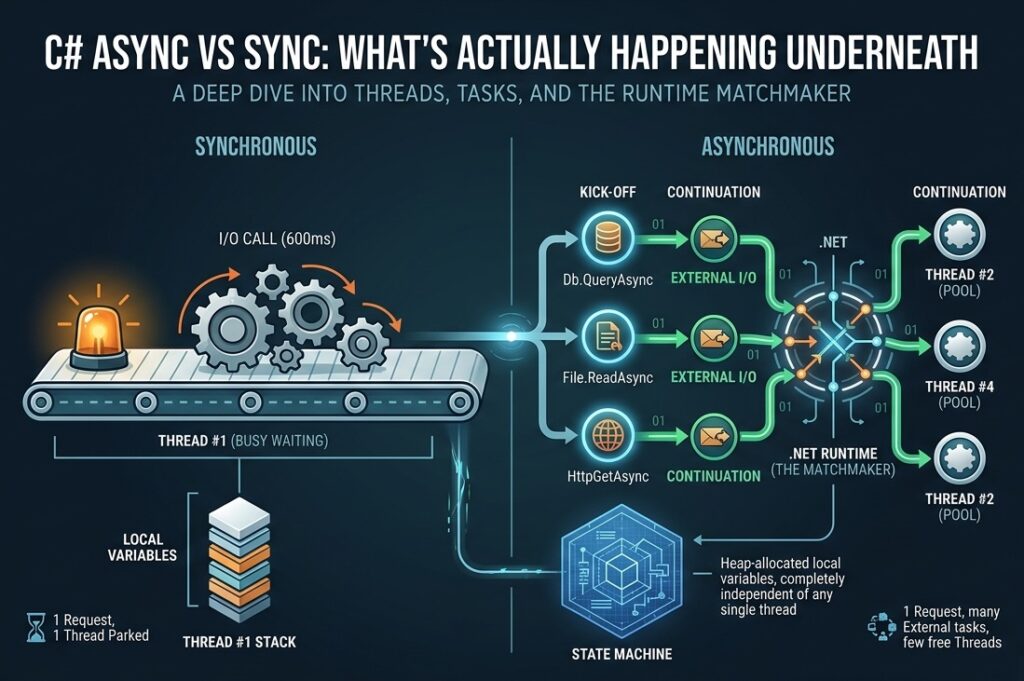

A Concrete Contrast: The Same Code, Two Ways
Here’s a method that fetches three pieces of data — a user record from a database, the user’s profile picture from disk, and an external API response.
The synchronous version
public string LoadUserPage(int userId)
{
    string user    = Db.Query("SELECT name FROM users WHERE id = " + userId);
    string picture = File.ReadAllText("/profiles/" + userId + ".json");
    string feed    = HttpGet("https://api.example.com/feed/" + userId);

    return Render(user, picture, feed);
}Three I/O calls, in sequence. If each takes 200 ms, the total time is 600 ms. While the thread waits on the database, it does nothing else. While it waits on the disk, it does nothing else. While it waits on the API, it does nothing else.
A single thread is fully occupied for 600 ms, mostly doing nothing.
To see why this matters at scale, picture three identical requests arriving at the same time. Each one needs its own dedicated thread, because every thread is parked from start to finish. In the tables below, the dashes aren’t a mistake — they mean the thread from the first row is still the same thread, still parked, doing nothing new.
Request 1
| Task Seq | Thread | CPU/IO Resource |
|---|---|---|
| Request user | Thread #1 — busy waiting (get stuck / blocked here) | External (Running) |
| Request picture | — | External |
| Request feed | — | External |
Request 2
| Task Seq | Thread | CPU/IO Resource |
|---|---|---|
| Request user | Thread #2 — busy waiting (get stuck / blocked here) | External (Running) |
| Request picture | — | External |
| Request feed | — | External |
Request 3
| Task Seq | Thread | CPU/IO Resource |
|---|---|---|
| Request user | Thread #3 — busy waiting (get stuck / blocked here) | External (Running) |
| Request picture | — | External |
| Request feed | — | External |
Three concurrent requests demand three threads. A thousand demand a thousand. None of those threads are doing useful CPU work — they’re just standing next to an I/O operation, waiting for it to come back.
The asynchronous version
public async Task<string> LoadUserPageAsync(int userId)
{
    string user    = await Db.QueryAsync("SELECT name FROM users WHERE id = " + userId);
    string picture = await File.ReadAllTextAsync("/profiles/" + userId + ".json");
    string feed    = await HttpGetAsync("https://api.example.com/feed/" + userId);

    return Render(user, picture, feed);
}The total time is still 600 ms for this single request. That’s important — async didn’t speed up one request. What changed is that the thread is released back to a pool during each await, and during those 600 ms it can serve other requests.
Now picture the same three concurrent requests. Within any single request, the three calls still happen one at a time — await means “stop here until done,” so the picture call can’t begin until the user call has returned, and the feed call can’t begin until the picture call has returned. The dashes on rows 2 and 3 mean exactly that: not yet started, waiting their turn. Per-request, this looks a lot like sync.
Request 1
| Task Seq | Thread | CPU/IO Resource |
|---|---|---|
| Request user | Thread #1 — kicks off, then released (Sequence #1) | External (Running) |
| Request picture | — | External |
| Request feed | — | External |
Request 2
| Task Seq | Thread | CPU/IO Resource |
|---|---|---|
| Request user | Thread #1 — kicks off, then released (Sequence #2) | External (Running) |
| Request picture | — | External |
| Request feed | — | External |
Request 3
| Task Seq | Thread | CPU/IO Resource |
|---|---|---|
| Request user | Thread #1 — kicks off, then released (Sequence #3) | External (Running) |
| Request picture | — | External |
| Request feed | — | External |
The async benefit isn’t visible within one request — it’s visible across requests. Notice that the same Thread #1 appears in all three tables. In the sync version, three concurrent requests demanded three threads. Here, one thread is enough. While Request 1’s database query is in flight on the external server, Thread #1 isn’t standing next to it — it’s already kicked off Request 2’s query, then Request 3’s, then circles back to handle whichever continuation completes first. The thread is never parked; only the I/O is in flight.
The single-request version isn’t faster. The server’s overall throughput is dramatically higher.
A note on the tables that follow. Showing “Thread #1” everywhere is a simplification. In a real .NET program you can’t predict which pool thread picks up a continuation — the OS and the runtime decide. The continuation that resumes Request 1 might land on Thread #4; the one for Request 2 on Thread #7. What matters isn’t which thread, but that the same small pool can service many in-flight requests, because no thread is ever parked. Drawing them all as “Thread #1” is the easiest way to make that point visible.
The parallel async version
public async Task<string> LoadUserPageParallelAsync(int userId)
{
    Task<string> userTask    = Db.QueryAsync("SELECT name FROM users WHERE id = " + userId);
    Task<string> pictureTask = File.ReadAllTextAsync("/profiles/" + userId + ".json");
    Task<string> feedTask    = HttpGetAsync("https://api.example.com/feed/" + userId);

    await Task.WhenAll(userTask, pictureTask, feedTask);

    return Render(userTask.Result, pictureTask.Result, feedTask.Result);
}Now the single request is faster — all three I/O operations happen in parallel, and the total time is roughly 200 ms (the slowest of the three). This is the case where async produces a visible per-request speedup.
For three concurrent requests, every I/O operation fires almost immediately. Every row is filled, just like the sequential async version, but the difference is timing: the thread doesn’t await between rows — it fires off all three I/O calls in rapid succession and only then waits for the bundle to come back.
Request 1
| Task Seq | Thread | CPU/IO Resource |
|---|---|---|
| Request user | Thread #1 — kicks off, then releases (Sequence #1) | External (Running) |
| Request picture | Thread #1 — kicks off (Sequence #2) | External (Running) |
| Request feed | Thread #1 — kicks off (Sequence #3) | External (Running) |
Request 2
| Task Seq | Thread | CPU/IO Resource |
|---|---|---|
| Request user | Thread #1 — kicks off (Sequence #4) | External (Running) |
| Request picture | Thread #1 — kicks off (Sequence #5) | External (Running) |
| Request feed | Thread #1 — kicks off (Sequence #6) | External (Running) |
Request 3
| Task Seq | Thread | CPU/IO Resource |
|---|---|---|
| Request user | Thread #1 — kicks off (Sequence #7) | External (Running) |
| Request picture | Thread #1 — kicks off (Sequence #8) | External (Running) |
| Request feed | Thread #1 — kicks off (Sequence #9) | External (Running) |
In this table, “Sequence 1 → 2 → 3” shows the order in which kick-starts are initiated, for ease of explanation. In real production, the order in which continuations resume — and which thread picks them up — is decided by the runtime and OS scheduler, and is never guaranteed. The concept holds regardless. In practice, the kick-starts happen so rapidly in succession that from the outside, all three I/O operations appear to fire almost simultaneously.
Nine I/O operations in flight, one thread doing the dispatching. The database server, the disk, and the remote API are all working at the same time, on three users at once. The thread’s job is just to start each one and then await Task.WhenAll for them to come back.
These three versions — sequential sync, sequential async, parallel async — illustrate the full design space. Most of the rest of this article is about understanding why each one behaves the way it does.
The History: Why Async Exists at All
To understand async/await, you have to understand a problem that lives below C#, below .NET, below Windows itself. The problem is decades old, and async is a coping mechanism for it — a clever one, but a coping mechanism nonetheless.
Operating systems gave us threads, and threads are expensive
In the 1960s and 70s, operating systems virtualized the CPU into “processes” and “threads.” A thread is a kernel data structure — it has a stack (typically 1 MB on Windows, up to 8 MB on Linux), CPU register state, and bookkeeping the kernel maintains.
Threads aren’t free. Creating one takes milliseconds. Each one occupies memory. The OS can context-switch between them, but switches cost CPU time.
For a desktop application with a handful of threads, the cost is negligible. For a web server handling thousands of concurrent connections, the cost is catastrophic.
Unix made I/O calls block by default
The deeper problem: when a thread calls read() to fetch data from a disk or network socket, the OS suspends the thread until the data arrives. The thread is parked. It still occupies its 1 MB of stack. It still counts against process limits. It does nothing useful until the I/O completes.
This was a reasonable design in 1970, when computers handled one user at a time. It’s a problem now when a single web server handles 100,000 connections. If every connection needs a thread, and every thread blocks on I/O, the server runs out of threads long before it runs out of CPU.
What async solves
Async is the engineering response to this exact problem. It says: “We can’t change the OS. We can’t make threads cheap. We can’t make I/O instant. But we can write a syntax that lets a thread release itself during I/O waits, hand control back to a scheduler, and have the scheduler dispatch the continuation to whatever thread is free when the I/O completes.”
The thread is no longer parked during I/O. It returns to the pool and serves other requests. When the I/O finishes, the work resumes — possibly on a different thread, but the work continues.
This isn’t a feature C# invented from nothing. It’s a syntactic wrapper over OS-level primitives (Windows I/O Completion Ports, Linux epoll/io_uring) that have existed for decades. C# 5.0 (2012) added the async/await keywords; the underlying machinery had been there since .NET 1.0, but writing it by hand was painful.
A summary of what an async task actually does
| Aspect | What happens |
|---|---|
| What is a Task? | A heap-allocated object representing a piece of work and its current state. Independent of any thread. |
| What is a Thread? | An OS-level worker. Many threads share a pool. Each thread is generic — it doesn’t belong to any particular Task. |
What does await do? | Pauses the current method, captures its local state into the Task, releases the thread, and registers a continuation. |
| What runs the continuation? | When the awaited operation completes, the runtime queues the continuation. The next available pool thread picks it up. |
| Where does state live? | On the heap, inside the Task’s compiler-generated state machine. Local variables become object fields. |
| Where does state live in sync code? | On the thread’s stack. This is why sync code is bound to one thread. |
| What scales? | The number of in-flight Tasks (millions possible) — not the number of threads (a few dozen typical). |
| What does C# add? | A syntax. The compiler rewrites your method into a state machine; the runtime drives it forward. |
A Task is a state. A Thread is a worker. The runtime matches them up moment-to-moment. That separation is the entire conceptual leap.
The Critical Distinction: Internal vs External CPU Resources
This is the part most explanations skip, and it’s the part that determines whether async helps you at all.
When your code “does work,” that work falls into one of two categories:
Internal CPU resources
Work the CPU itself performs, instruction by instruction. The CPU is genuinely busy executing your code. Examples:
- Parsing a string character by character
- Hashing a password with BCrypt
- Encrypting data with AES
- Compressing a file with GZip
- Rendering HTML by string concatenation
- Computing a Mandelbrot set
- Sorting a list of a million items
While this work happens, the thread is occupied. There is no “elsewhere” doing the work — the CPU is the worker, and it’s working.
External CPU resources
Work that happens outside your process, on hardware your code doesn’t control. Examples:
- A SQL query executing on a database server (could be on another machine entirely)
- A file read fulfilled by the disk controller and the OS file cache
- A network request answered by a remote server
- A DNS lookup resolved by a DNS server
- Reading from a serial port or USB device
While this work happens, your CPU is not the one doing it. The database server’s CPU is doing the query. The disk controller is reading the bytes. The remote API’s server is generating the response. Your CPU is just waiting for the answer.
This is the distinction that determines async’s usefulness. Async only helps when the work is being done by external CPU resources. It lets your local thread go do something else while the external resource does its work in parallel.
For internal CPU work, there’s nothing for the thread to “go do” — the thread is the one doing the work. You can’t await your way out of computation.
A clear test
Ask: “While this line runs, where is the actual work physically happening?”
- If the answer is “on this machine’s CPU” → internal → async won’t help.
- If the answer is “on some other machine, or on a peripheral, or in the OS kernel waiting for hardware” → external → async helps.
This distinction is what makes async meaningful, and not understanding it is why so many programmers sprinkle async everywhere and see no improvement.
Why Sometimes async on CPU Work Does Not Generate Further Benefits
The rule above — “async only helps when the work is being done by external CPU resources” — is true for the thread-saving benefit of async. The thread-pool exhaustion problem only exists when threads are parked waiting for something they don’t control.
It’s worth seeing what happens when programmers reach for async on internal CPU work anyway, because it’s a frequent mistake. Suppose a request has to do this:
var resized   = await Task.Run(() => ResizePicture(input));
var encoded   = await Task.Run(() => Base64Encode(resized));
var pdf       = await Task.Run(() => ConvertToPdf(encoded));
var encrypted = await Task.Run(() => Encrypt(pdf));Each await may hand the continuation off to a different pool thread, so the picture looks like this:
| Task | Thread | CPU/IO Resource | Time |
|---|---|---|---|
| Picture resize | Thread #1 | Internal | 500ms |
| (context switch) | handover overhead | — | small |
| Base64 encode | Thread #2 | Internal | 500ms |
| (context switch) | handover overhead | — | small |
| Convert images to PDF | Thread #3 | Internal | 500ms |
| (context switch) | handover overhead | — | small |
| Perform encryption | Thread #4 | Internal | 500ms |
| Total | ~2000ms + overhead |
Which works identical to synchronous:
var resized   = ResizePicture(input);
var encoded   = Base64Encode(resized);
var pdf       = ConvertToPdf(encoded);
var encrypted = Encrypt(pdf);| Task | Thread | CPU/IO Resource | Time |
|---|---|---|---|
| Picture resize | Thread #1 | Internal | 500ms |
| Base64 encode an image | Thread #1 (same thread) | Internal | 500ms |
| Convert images to PDF | Thread #1 (same thread) | Internal | 500ms |
| Perform encryption | Thread #1 (same thread) | Internal | 500ms |
| Total Time | 2000ms |
The two tables tell the same story with different cosmetics. Async produced four thread numbers; sync produced one. The total time is the same. In every dimension that matters, this is almost identical to sync:
- Wall-clock time is unchanged. Each step needs the previous step’s result. Resize must finish before Base64 can encode; encode must finish before the PDF can be assembled; the PDF must exist before encryption can begin. The chain serializes regardless of how many threads pass the baton.
- No threads are saved. Every step is internal CPU work. Some core, somewhere, has to actually do the resize, the encode, the conversion, the encryption. The thread doing the work is genuinely busy — it’s not parked waiting on an external resource, so there’s no “release back to the pool” benefit.
- You’ve added overhead. Each
awaitallocates a state machine, hops the continuation onto a new thread, and forces a context switch. Sync would have done all four operations on one thread with no hopping.
The table tells the story by showing four threads doing the work of one. Async syntax has shuffled the workers around without changing the work. From the user’s perspective, this code finishes in the same time as the sync version — possibly a touch slower because of the orchestration cost.
The narrow case where parallelism on internal work actually helps is when the operations are independent of each other — four different pictures getting four different resize filters, four different files getting hashed, four different datasets getting analyzed. With no data dependency, Task.Run plus Task.WhenAll can dispatch them onto separate cores and the wall-clock time drops to roughly the longest single operation. The mechanics of that case are covered in The Third Case: Parallel Execution of CPU Work later in the article.
So a more complete version of the rule is:
Async helps you save threads when the work is external. It helps you save wall-clock time when the work is internal and independent, by spreading it across cores. If the work is internal and dependent, async is pure overhead — write it sync.
When Async Actually Helps
Given the internal/external distinction, here’s where async produces real benefits and where it doesn’t.
Where async helps: I/O-bound web servers
The canonical case. A web server handling 1,000 concurrent requests, each making a DB query that takes 100 ms.
| Model | Threads needed | Behavior |
|---|---|---|
| Synchronous | ~1,000 (one per in-flight request) | Most threads parked on Db.Query(), doing nothing. Pool saturates. New requests queue. |
| Asynchronous | ~10–20 | Each thread serves dozens of requests, switching during each await. Pool stays small and responsive. |
The async server doesn’t process any individual request faster. It processes more requests concurrently with the same hardware. Throughput goes up by 50–100×.
Where async helps: parallel I/O within a single request
Even one request benefits when it has multiple independent I/O operations. The “parallel async” example at the top of this article — three independent I/O calls fired together with Task.WhenAll — completes in 200 ms instead of 600 ms. This is genuine wall-clock speedup for one user.
This works because while the database is running its query, the disk and the remote API are simultaneously running their work. Three external CPU resources, all busy at once, your thread coordinating but not doing the work itself.
Where async makes no difference: pure CPU work
If your handler does nothing but compute — parsing markdown, hashing passwords, rendering HTML — async syntax adds overhead but no benefit. You can mark the method async, but there’s nothing to await. The thread runs the work to completion, exactly as it would synchronously.
// Marking this async accomplishes nothing useful.
public async Task<string> RenderMarkdownAsync(string source)
{
    return MarkdownEngine.Parse(source); // pure CPU work
}The thread is busy for the full duration of Parse. No I/O, no await point, no opportunity for the scheduler to switch. The compiler generates a state machine and a Task wrapper for nothing.
Where async makes no difference: low-concurrency apps
A desktop application with one user, or a backend service that processes a queue one job at a time, gets no scaling benefit from async. There’s nothing to scale to. The thread pool isn’t saturated; the throughput isn’t bottlenecked. Async is overhead.
This includes most batch jobs, most CLI tools, most data-processing scripts, and most internal back-office tools. Sync code is fine — often clearer, often easier to debug, and sometimes faster because it avoids state-machine allocation overhead.
A practical rule
Async helps when two conditions are both true:
- The work being awaited is genuinely external (DB, disk, network, OS-level wait).
- There is concurrent demand — either many simultaneous users, or one user with multiple independent I/O operations.
If either condition is false, async adds complexity without payoff.
The Third Case: Parallel Execution of CPU Work
Here’s where it gets interesting. Async itself doesn’t help with internal CPU work — but a closely related mechanism does, and people often confuse the two.
If you have multiple independent CPU-bound tasks and the machine has multiple cores, you can run them in parallel using Task.Run to dispatch each one to a separate thread, then await all of them.
Example: processing four images
Suppose you need to apply a heavy filter to four images. Each filter takes 2 seconds of pure CPU work (no I/O — it’s all internal). On a 4-core machine:
// Sequential: 8 seconds total.
foreach (var image in images)
    ApplyFilter(image);

// Parallel: ~2 seconds total (one per core).
await Task.WhenAll(
    images.Select(img => Task.Run(() => ApplyFilter(img)))
);This looks like async, and it uses Task syntax, but the mechanism is different from I/O async. Here, you’re explicitly using Task.Run to dispatch CPU work onto multiple threads, running on multiple cores, simultaneously. The CPU isn’t waiting for anything external — it’s just doing 4× the work in parallel by using 4× the cores.
This is parallelism, not asynchrony in the I/O sense. The Task abstraction supports both, which is why people conflate them, but the underlying physics is different:
| I/O async | CPU parallelism | |
|---|---|---|
| What does the work? | External resource (DB, disk, network) | Multiple cores of your CPU |
| What’s the thread doing? | Released to the pool, serves other requests | Genuinely busy on one core, doing the work |
What does await mean? | “Pause until the external resource is done” | “Pause until the other core’s work is done” |
| Speedup ceiling | Bounded by external service speed | Bounded by core count |
| What it scales | Throughput of many requests | Wall-clock time of one heavy job |
The single most useful thing to remember: Task is a generic abstraction for “work that may complete later.” Whether the work is I/O (no thread needed) or CPU (a thread needed) is decided by what you put inside the Task.
For I/O work, the runtime hooks into OS completion mechanisms; no extra thread is consumed during the wait. For CPU work dispatched via Task.Run, a real thread is occupied for the full duration of the computation. Both look the same in source code; underneath, they’re physically different.
The Honest Framing
Async/await is often introduced as “a powerful new feature for writing scalable code.” That framing isn’t wrong, but it omits the historical context. The truer version:
Threads are expensive because the OS designs them that way. I/O syscalls block by default because Unix designed them that way in 1970. We can’t change either. So we built a syntax that lets you write what looks like sequential code, but compiles into a state machine the runtime can drive forward across many threads, releasing each one during I/O waits. This lets a small thread pool handle large numbers of concurrent requests, even though every individual request is still bounded by the speed of the I/O it depends on.
That’s what async is. A clever, well-engineered workaround for constraints that live below C# and that C# can’t fix.
Knowing this changes how you use it:
- You reach for async when you have I/O-bound concurrency — many simultaneous requests, or one request with parallel external dependencies.
- You don’t bother with async for pure CPU work — it adds overhead and helps nothing.
- You reach for
Task.Runand parallelism when you have heavy CPU work that splits across cores. - You stop applying
asyncreflexively just because the linter suggests it.
The keyword async is not a virtue. It’s a tool with a specific job. When the job is at hand, it’s the right tool. When it isn’t, sync code is shorter, simpler, easier to debug, and exactly as fast.
A Task is a state. A Thread is a worker. The runtime is the matchmaker. Once you see those three as separate things, the rest of async/await falls into place around them.