

This is the fourth article in a series. The first article, How Programs Talk to Another Program, covers the fundamentals of sockets and ports. The second article, Building a Web Server from Scratch in C#, builds a complete web application with routing, GET/POST handling, and CRUD operations. The third article, Building a Server-Sent Event (SSE) Web Server from Scratch in C#, adds real-time server-to-browser push using long-lived connections.
This article builds on top of all three.
In this article, we’ll be introducing the idea of building a WebSocket communication — the bi-directional real-time communication between the web server and client web browser. But before we begin, there are some very foundational concepts that we’ll be building on top of:
- Socket and Ports
- HTTP Request Parser and Handling
- Web Path Routing
- Handling Web Form POST Request
- Handling Response
It is therefore recommended to first read the previous three articles for the foundational understanding:
- Article 1: How Programs Talk to Another Program – Introduction to C# Socket and Port
- Article 2: Building a Web Server from Scratch in C#
- Article 3: Building a Server-Sent Event (SSE) Web Server from Scratch in C#
What WebSocket Solves
In Article 3, we built a Server-Sent Event (SSE) system. The server could push data to the browser at any time — the display board updated in real-time when a ticket was called. But that communication was one-way. The server spoke. The browser listened.
If the browser needed to send data back — say, to call a ticket number — it had to make a separate HTTP POST request. A full round trip: open a new socket connection, send headers, send body, wait for response, close. Every single time.
For a queue ticket system, that’s fine. The operator clicks a button once every few minutes.
But what about a chat application? A multiplayer game? A collaborative editor? These need both sides talking constantly, sometimes many times per second. Making a fresh HTTP POST for every message would be like hanging up the phone and redialing after every sentence.
WebSocket solves this. It establishes a persistent connection for real-time, two-way communication — a single connection that stays alive, where both sides can send messages at any time. The server can push to the browser. The browser can push to the server. No HTTP round trips. No headers repeated over and over. Just messages flowing in both directions through one open pipe.
Here’s a side-by-side comparison:
| Feature | SSE | WebSocket |
|---|---|---|
| Direction | Server → Browser only | Server ↔ Browser (both ways) |
| Transport | HTTP (held open) | Starts as HTTP, then upgrades to WebSocket protocol |
| Browser API | EventSource | WebSocket |
| Data format | Text only (data: ...\n\n) | Text or binary frames |
| Auto-reconnect | Built into the browser | You implement it yourself |
| Best for | Live feeds, notifications, dashboards | Chat, games, collaboration, anything interactive |
The key insight: SSE is still HTTP. The connection is held open, but the protocol is the same text-based, header-driven format from Article 2. WebSocket starts as HTTP — but then it becomes something else entirely.
The Upgrade — How HTTP Becomes WebSocket
This is the most important concept in this article.
In the universe of web development, there is a term you will encounter repeatedly: The Upgrade. Or more formally, the Protocol Upgrade, sometimes called the WebSocket Handshake.
Every WebSocket connection begins its life as a normal HTTP request. The same kind of request you’ve been parsing since Article 2. The browser opens a socket, sends headers, and waits for a response. This part is identical.
But the purpose of this particular HTTP request is not to ask for a page. It is to ask the server: “Can we stop speaking HTTP and switch to a different protocol?”
If the server agrees, the TCP connection that was carrying HTTP is reused — the same socket, the same NetworkStream — but from that point forward, both sides speak WebSocket instead of HTTP. No more \r\n delimited headers. No more Content-Length. No more request-response pairs. The connection transforms.
Let’s see exactly what happens.
Phase 1: The Browser Sends the Upgrade Request
One line of JavaScript opens a WebSocket connection:
const ws = new WebSocket("ws://localhost:8080/ws");When this line executes, the browser sends the following HTTP request over the socket:
GET /ws HTTP/1.1
Host: localhost:8080
Upgrade: websocket
Connection: Upgrade
Sec-WebSocket-Key: dGhlIHNhbXBsZSBub25jZQ==
Sec-WebSocket-Version: 13Look at the first line. GET /ws HTTP/1.1. Your HTTP parser from Article 2 already knows how to read this. It already extracts the method, the path, the headers. Nothing new there.
What’s new are four headers:
| Header | Meaning |
|---|---|
Upgrade: websocket | “I want to switch protocols to WebSocket” |
Connection: Upgrade | “This connection should be upgraded, not closed after the response” |
Sec-WebSocket-Key | A random Base64-encoded value generated by the browser (16 bytes of randomness, Base64-encoded) |
Sec-WebSocket-Version: 13 | The WebSocket protocol version (13 is the standard; it has been 13 since 2011) |
The Sec-WebSocket-Key is the browser’s half of a handshake. The server must prove it understands the WebSocket protocol by performing a specific calculation with this key.
Phase 2: The Server Performs the Handshake
Here is the calculation, step by step:
Step 1: Take the Sec-WebSocket-Key value from the request header.
dGhlIHNhbXBsZSBub25jZQ==Step 2: Append a specific string to it. This string is defined in the WebSocket specification (RFC 6455). It never changes. It is:
258EAFA5-E914-47DA-95CA-C5AB0DC85B11This is called the Magic GUID. It’s a fixed constant written into the protocol specification. Every WebSocket server on earth uses this exact string. Its purpose is simple: it ensures the server isn’t just blindly echoing back headers — it actually performed the required computation.
After appending:
dGhlIHNhbXBsZSBub25jZQ==258EAFA5-E914-47DA-95CA-C5AB0DC85B11Step 3: Compute the SHA-1 hash of the combined string.
Step 4: Base64-encode the hash. This becomes the Sec-WebSocket-Accept value.
In C#, the entire computation is:
string clientKey = request.GetHeader("Sec-WebSocket-Key");

if (clientKey == null)
{
    // Not a valid WebSocket request — close and move on
    client.Close();
    return;
}

string magicString = "258EAFA5-E914-47DA-95CA-C5AB0DC85B11";
string combined = clientKey + magicString;

byte[] sha1Hash;
using (SHA1 sha1 = SHA1.Create())
{
    sha1Hash = sha1.ComputeHash(Encoding.UTF8.GetBytes(combined));
}

string acceptKey = Convert.ToBase64String(sha1Hash);That’s the entire handshake calculation. Concatenate, hash, encode. Six lines.
Phase 3: The Server Sends the Upgrade Response
The server responds with:
HTTP/1.1 101 Switching Protocols
Upgrade: websocket
Connection: Upgrade
Sec-WebSocket-Accept: s3pPLMBiTxaQ9kYGzzhZRbK+xOo=Notice the status code: 101 Switching Protocols. This is a status code we haven’t seen before. In Article 2, our server returned 200 OK for normal pages and 404 Not Found for missing ones. 101 means: “I understand your request to switch protocols. From this point forward, this connection is no longer HTTP.”
In C#:
string response =
    "HTTP/1.1 101 Switching Protocols\r\n" +
    "Upgrade: websocket\r\n" +
    "Connection: Upgrade\r\n" +
    $"Sec-WebSocket-Accept: {acceptKey}\r\n" +
    "\r\n";

byte[] responseBytes = Encoding.UTF8.GetBytes(response);
stream.Write(responseBytes, 0, responseBytes.Length);
stream.Flush();After the server sends this response and the browser receives it — the protocol switch is complete. The TCP connection is still open. The NetworkStream is the same object. But everything that flows through it from now on is no longer HTTP text. It is WebSocket binary frames.
Think of it this way: the HTTP handshake is the receptionist at the door confirming your appointment. The actual conversation happens in a completely different language, in the room behind the door. The receptionist’s job is over.
Detection in Your Router
How do you detect a WebSocket upgrade in your existing routing code? You check the headers:
string upgradeHeader = request.GetHeader("Upgrade");

if (upgradeHeader != null &&
    upgradeHeader.Equals("websocket", StringComparison.OrdinalIgnoreCase))
{
    HandleWebSocketUpgrade(client, stream, request);
    return; // Don't close — this connection is now WebSocket
}That return is critical. In your normal HTTP flow from Article 2, every request ends with client.Close(). But a WebSocket connection must stay open. The return skips the closing logic and lets the WebSocket handler take ownership of the connection.
The WebSocket Frame — A New Wire Format
In HTTP, the data format was text: lines separated by \r\n, headers ending with \r\n\r\n, a body whose length was declared in Content-Length. You could read it with a StreamReader and split it with string.Split(). Human-readable all the way through.
WebSocket uses a different format. After the upgrade, every message is wrapped in a frame — a compact binary structure with a specific layout at the byte and bit level.
In the web development universe, this is called the WebSocket Frame Format, defined in RFC 6455. When you see frameworks or libraries handle WebSocket “under the hood,” this is what they’re parsing. We’re going to parse it ourselves.
Here is the frame structure:
 0                   1                   2                   3
 0 1 2 3 4 5 6 7 8 9 0 1 2 3 4 5 6 7 8 9 0 1 2 3 4 5 6 7 8 9 0 1
+-+-+-+-+-------+-+-------------+-------------------------------+
|F|R|R|R| opcode|M| Payload len |    Extended payload length    |
|I|S|S|S|  (4)  |A|     (7)     |            (16/64)            |
|N|V|V|V|       |S|             |   (if payload len==126/127)   |
| |1|2|3|       |K|             |                               |
+-+-+-+-+-------+-+-------------+-------------------------------+
|   Masking-key (if MASK == 1)  |          Payload Data         |
+-------------------------------+-------------------------------+Don’t be intimidated. Let’s walk through it piece by piece.
Byte 1: FIN and Opcode
The first byte contains two pieces of information:
The FIN bit (1 bit): indicates whether this is the final frame in a message. For our purposes, it’s almost always 1 — one frame, one complete message. (The full WebSocket specification allows a single message to be split across multiple frames using continuation frames with opcode 0x0. We won’t need that here — our game messages are short and always fit in one frame.)
The opcode (4 bits): tells you what kind of frame this is.
| Opcode | Meaning |
|---|---|
0x1 | Text frame (a UTF-8 text message) |
0x8 | Connection close |
0x9 | Ping (are you still there?) |
0xA | Pong (yes, I’m here) |
In C#, extracting the opcode from the first byte:
int byte1 = stream.ReadByte();
int opcode = byte1 & 0x0F; // Lower 4 bitsByte 2: Mask and Payload Length
The second byte also carries two pieces:
The MASK bit (1 bit): tells you whether the payload is masked (obfuscated with a 4-byte key). There is a rule here that you’ll encounter often: client-to-server frames are always masked. Server-to-client frames are never masked. This was a design decision in the WebSocket specification to prevent certain proxy cache poisoning attacks. You don’t need to understand the attack — just follow the rule.
The payload length (7 bits): tells you how many bytes of actual data follow. But 7 bits can only represent values 0–127, and messages can be much longer. So the protocol uses a three-tier encoding:
| Value of 7-bit field | Actual length encoding |
|---|---|
| 0–125 | The value IS the length |
| 126 | The next 2 bytes contain the actual length (big-endian, up to 65,535 bytes) |
| 127 | The next 8 bytes contain the actual length (big-endian, up to 2^63 bytes) |
In C#:
int byte2 = stream.ReadByte();
bool masked = (byte2 & 0x80) != 0;
long payloadLength = byte2 & 0x7F;

if (payloadLength == 126)
{
    byte[] lenBytes = ReadExact(stream, 2);
    payloadLength = (lenBytes[0] << 8) | lenBytes[1];
}
else if (payloadLength == 127)
{
    byte[] lenBytes = ReadExact(stream, 8);
    payloadLength = 0;
    for (int i = 0; i < 8; i++)
    {
        payloadLength = (payloadLength << 8) | lenBytes[i];
    }
}The Masking Key and Unmasking
If the MASK bit is set (which it always is for client-to-server messages), the next 4 bytes are the masking key. The payload data is XOR’d with this key, cycling through the 4 bytes:
byte[] maskKey = null;
if (masked)
{
    maskKey = ReadExact(stream, 4);
}

byte[] payload = ReadExact(stream, (int)payloadLength);

// Unmask the payload
if (masked && maskKey != null)
{
    for (int i = 0; i < payload.Length; i++)
    {
        payload[i] = (byte)(payload[i] ^ maskKey[i % 4]);
    }
}

string message = Encoding.UTF8.GetString(payload);The i % 4 cycles through the 4 mask bytes: byte 0 of payload XOR’d with key[0], byte 1 with key[1], byte 2 with key[2], byte 3 with key[3], byte 4 wraps around to key[0], and so on.
After unmasking, you have the raw UTF-8 message text. In our Tic-Tac-Toe game, this will be strings like move|4 or chat|hello.
The Complete Read Function
Putting it all together:
static string ReadWebSocketFrame(NetworkStream stream, out int opcode)
{
    opcode = -1;

    // Byte 1: FIN bit + opcode
    int byte1 = stream.ReadByte();
    if (byte1 == -1) return null;

    opcode = byte1 & 0x0F;

    // Byte 2: MASK bit + payload length
    int byte2 = stream.ReadByte();
    if (byte2 == -1) return null;

    bool masked = (byte2 & 0x80) != 0;
    long payloadLength = byte2 & 0x7F;

    // Extended payload length
    if (payloadLength == 126)
    {
        byte[] lenBytes = ReadExact(stream, 2);
        if (lenBytes == null) return null;
        payloadLength = (lenBytes[0] << 8) | lenBytes[1];
    }
    else if (payloadLength == 127)
    {
        byte[] lenBytes = ReadExact(stream, 8);
        if (lenBytes == null) return null;
        payloadLength = 0;
        for (int i = 0; i < 8; i++)
        {
            payloadLength = (payloadLength << 8) | lenBytes[i];
        }
    }

    // Read masking key (4 bytes, only if masked)
    byte[] maskKey = null;
    if (masked)
    {
        maskKey = ReadExact(stream, 4);
        if (maskKey == null) return null;
    }

    // Read payload
    // Note: the (int) cast limits us to ~2 GB payloads. For chat and game
    // messages this is more than sufficient. Handling larger payloads would
    // require streaming or chunked reads.
    byte[] payload = ReadExact(stream, (int)payloadLength);
    if (payload == null) return null;

    // Unmask the payload
    if (masked && maskKey != null)
    {
        for (int i = 0; i < payload.Length; i++)
        {
            payload[i] = (byte)(payload[i] ^ maskKey[i % 4]);
        }
    }

    return Encoding.UTF8.GetString(payload);
}

static byte[] ReadExact(NetworkStream stream, int count)
{
    byte[] buffer = new byte[count];
    int totalRead = 0;
    while (totalRead < count)
    {
        int read = stream.Read(buffer, totalRead, count - totalRead);
        if (read == 0) return null; // connection closed
        totalRead += read;
    }
    return buffer;
}Compare this to how we read HTTP in Article 2: there, we read byte-by-byte looking for \r\n\r\n, then used Content-Length to read the body. Here, we read fixed-size fields (1 byte, 1 byte, optionally 2 or 8 bytes, optionally 4 bytes), then read the payload in one chunk. The principle is the same — read metadata first, then read exactly the amount of data the metadata describes — but the encoding is binary instead of text.
Sending a Frame (Server to Client)
When the server sends a message, it builds a frame without masking (server-to-client is never masked):
static void SendWebSocketFrame(NetworkStream stream, string message)
{
    byte[] payload = Encoding.UTF8.GetBytes(message);
    byte[] frame;

    if (payload.Length <= 125)
    {
        frame = new byte[2 + payload.Length];
        frame[0] = 0x81; // FIN bit set + text opcode (0x1)
        frame[1] = (byte)payload.Length;
        Array.Copy(payload, 0, frame, 2, payload.Length);
    }
    else if (payload.Length <= 65535)
    {
        frame = new byte[4 + payload.Length];
        frame[0] = 0x81;
        frame[1] = 126;
        frame[2] = (byte)((payload.Length >> 8) & 0xFF);
        frame[3] = (byte)(payload.Length & 0xFF);
        Array.Copy(payload, 0, frame, 4, payload.Length);
    }
    else
    {
        frame = new byte[10 + payload.Length];
        frame[0] = 0x81;
        frame[1] = 127;
        long len = payload.Length;
        for (int i = 7; i >= 0; i--)
        {
            frame[2 + (7 - i)] = (byte)((len >> (i * 8)) & 0xFF);
        }
        Array.Copy(payload, 0, frame, 10, payload.Length);
    }

    stream.Write(frame, 0, frame.Length);
    stream.Flush();
}The 0x81 in frame[0] is the FIN bit (0x80) combined with the text opcode (0x01): 0x80 | 0x01 = 0x81. This single byte says: “This is a complete text message.”
The three branches handle the three payload length tiers: small (0–125), medium (126–65535), and large (65536+). Most chat messages and game commands will be small — well under 125 bytes.
The Message Loop
In Article 2, our server followed a simple pattern: read one HTTP request, send one HTTP response, close the connection. One conversation per phone call.
In Article 3, we changed this slightly: send one SSE response header, then keep writing data forever. The server talked; the browser just listened.
WebSocket changes the pattern entirely. After the upgrade, the connection enters a message loop — an infinite loop that reads incoming frames, processes them, and optionally sends frames back. Both sides can initiate at any time.
static void WebSocketMessageLoop(WsClient wsClient)
{
    try
    {
        while (true)
        {
            int opcode;
            string message = ReadWebSocketFrame(wsClient.Stream, out opcode);

            if (message == null || opcode == 0x8)
            {
                // Connection closed
                break;
            }

            if (opcode == 0x9)
            {
                // Ping — respond with pong
                byte[] pong = new byte[] { 0x8A, 0x00 };
                wsClient.Stream.Write(pong, 0, pong.Length);
                wsClient.Stream.Flush();
                continue;
            }

            if (opcode == 0x1)
            {
                // Text frame — process the message
                HandleGameMessage(wsClient, message);
            }
        }
    }
    catch (Exception ex)
    {
        Console.WriteLine($"WebSocket error ({wsClient.Name}): {ex.Message}");
    }
    finally
    {
        // Clean up: remove from room, notify others
        HandleDisconnect(wsClient);
    }
}Three opcodes matter:
Text (0x1): A real message from the client. In our game, this will be commands like move|4 or chat|hello there. We pass it to the game engine for processing.
Ping (0x9): The browser (or a proxy) asking “are you still alive?” We respond with a pong frame. The pong byte 0x8A is 0x80 (FIN) | 0x0A (pong opcode), with a payload length of 0x00.
Close (0x8): The client wants to end the connection gracefully. We break out of the loop and clean up.
If ReadWebSocketFrame returns null, the TCP connection was lost — the client disappeared without sending a close frame. This happens when someone closes a browser tab or loses network. The finally block handles cleanup regardless of how the connection ended.
The Frontend — JavaScript WebSocket API
On the browser side, the WebSocket API mirrors the SSE EventSource API from Article 3, with one critical addition: the ability to send.
// Open the connection
const ws = new WebSocket("ws://localhost:8080/ws?name=Alice&room=room-1");

// Connection opened
ws.onopen = function() {
    console.log("Connected!");
};

// Receive a message from the server
ws.onmessage = function(event) {
    console.log("Server says: " + event.data);
};

// Connection closed
ws.onclose = function() {
    console.log("Disconnected");
};

// Connection error
ws.onerror = function() {
    console.log("Error");
};

// Send a message TO the server — this is what SSE couldn't do
ws.send("move|4");
ws.send("chat|Hello from Alice");Compare this to the SSE frontend from Article 3:
SSE (EventSource) | WebSocket | |
|---|---|---|
| Open | new EventSource(url) | new WebSocket(url) |
| Receive | onmessage, addEventListener | onmessage |
| Send | ❌ Not possible | ws.send(data) |
| Close | eventSource.close() | ws.close() |
| Auto-reconnect | ✅ Built-in | ❌ You build it yourself |
That last row is worth noting. SSE’s EventSource automatically reconnects if the connection drops. WebSocket’s WebSocket does not. If you want reconnection, you write it:
function connect() {
    ws = new WebSocket(url);

    ws.onclose = function() {
        // Reconnect after 3 seconds
        setTimeout(connect, 3000);
    };

    ws.onmessage = function(event) {
        // handle messages...
    };
}

connect();Notice the URL uses ws:// instead of http://. This is the WebSocket URL scheme. There is also wss:// for WebSocket over TLS (the equivalent of https://). The browser handles the scheme automatically — ws:// opens a plain TCP connection, wss:// opens a TLS-encrypted one.
Also notice: query parameters in the URL (?name=Alice&room=room-1) are part of the initial HTTP upgrade request. Your HTTP parser from Article 2 already extracts these into request.Query. This is how the server knows which room to join and what name to display — all passed during the handshake, before the connection switches to WebSocket.
Designing a Message Protocol
Here is an interesting reality: the WebSocket specification defines how to transport messages, but it says nothing about what those messages should contain. It is a pipe. You decide what flows through it.
In HTTP, the structure is prescribed: method, path, headers, body. In WebSocket, you’re handed a raw string and told “do whatever you want.”
This means you need to design your own message protocol — a convention that both the server and the client agree on for how to structure messages.
For our Tic-Tac-Toe game, we use a simple pipe-delimited format:
command|parameter1|parameter2|...Messages from client to server:
| Message | Meaning |
|---|---|
move|4 | Place my symbol on cell 4 (cells 0–8) |
chat|Hello everyone | Send a chat message |
rematch | Request a new game |
Messages from server to client:
| Message | Meaning |
|---|---|
assign|X|room-1 | You are player X in room-1 |
start|Alice (X) vs Bob (O) | Game has started |
state|X,,O,,,,,,|O|Playing||Alice|Bob | Full board state update |
chat|Alice|Hello everyone | Chat message from Alice |
system|Bob disconnected. | System notification |
The state message carries the entire game board and status in one string. The board is 9 comma-separated cells. The server sends this after every move so that every connected client — both players and all spectators — has the complete, authoritative state.
This is message routing. In Article 2, we routed by URL path — /home, /about — using a switch statement. Here, we route by the first segment of the message:
static void HandleGameMessage(WsClient wsClient, string message)
{
    string[] parts = message.Split('|');

    switch (parts[0])
    {
        case "move":
            // Handle move
            break;
        case "chat":
            // Handle chat
            break;
        case "rematch":
            // Handle rematch
            break;
    }
}Same pattern. A string comes in, you split it, you switch on the first piece. URL routing and message routing are the same idea wearing different clothes.
The Close Handshake
WebSocket has a graceful shutdown protocol. When either side wants to end the connection, it sends a close frame (opcode 0x8):
static void SendCloseFrame(NetworkStream stream)
{
    byte[] frame = new byte[] { 0x88, 0x00 };
    try
    {
        stream.Write(frame, 0, frame.Length);
        stream.Flush();
    }
    catch { }
}0x88 is FIN (0x80) | close opcode (0x08). Payload length is 0.
When the server receives a close frame (opcode 0x8 in the message loop), it should send a close frame back and then close the TCP connection. When the server wants to initiate closure, it sends the close frame first and waits for the client’s response.
In practice, many connections end without a close frame — the user closes the tab, the network drops, the laptop lid closes. Your message loop handles this through the catch block and finally cleanup. The close handshake is the polite way; your code must handle the impolite way too.
Example Application: Tic-Tac-Toe
Now let’s put everything together into a complete working application — a multiplayer Tic-Tac-Toe game with real-time play, spectating, and in-game chat.
The Design
The system has three pages, all served by our console app:
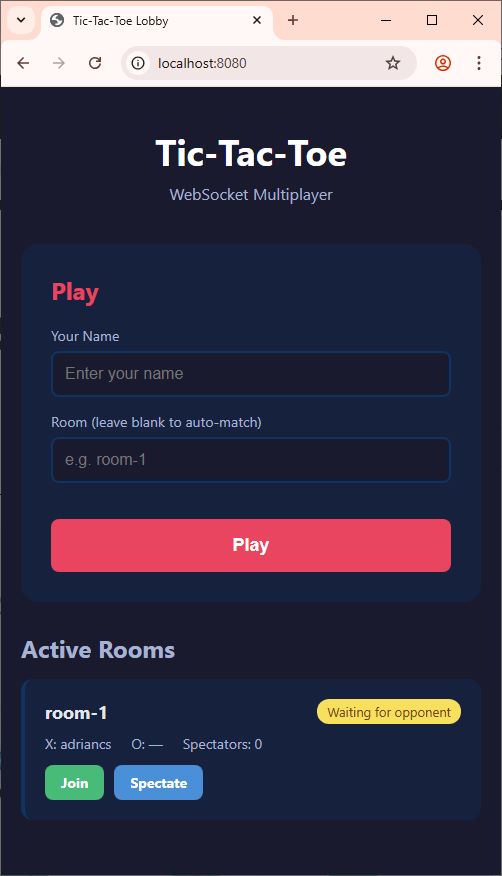
The Lobby (/ or /lobby) — A normal HTTP page showing active game rooms. Players enter their name and join or create a room. This is plain HTML with forms and links — nothing new from Article 2.
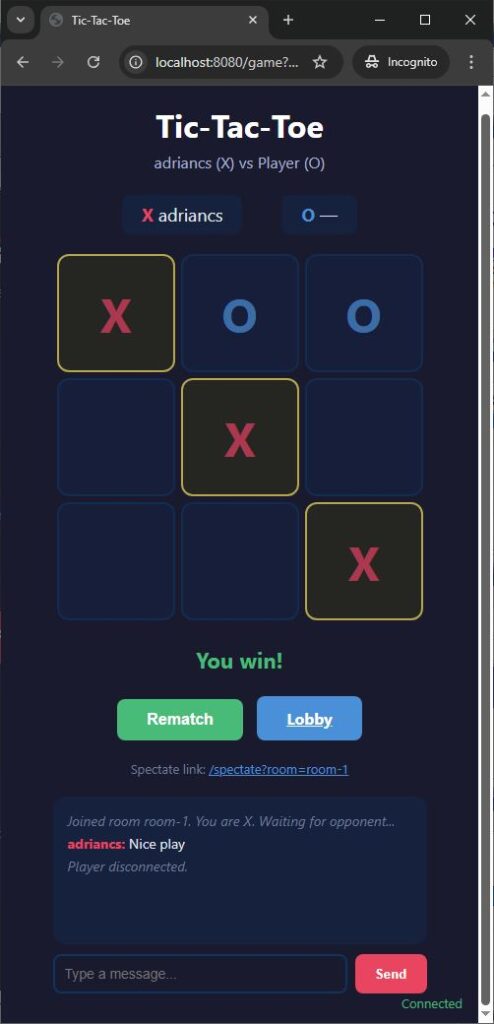
The Game (/game?name=Alice&room=room-1) — The server delivers an HTML page via normal HTTP. The page’s JavaScript then opens a WebSocket connection. The player sees the board, makes moves, chats, and watches the opponent’s moves appear in real-time.
The Spectator View (/spectate?room=room-1) — Same as the game page, but the spectator can only watch. They receive the same state broadcasts but cannot send move messages.
This two-phase pattern is worth highlighting: the initial page load is normal HTTP (the browser requests HTML, the server responds with HTML, connection closes). The real-time communication starts afterward when JavaScript opens a WebSocket. HTTP serves the page. WebSocket serves the interaction.
Game Rooms
When a player connects via WebSocket, the server assigns them to a game room:
static Dictionary<string, GameRoom> Rooms = new Dictionary<string, GameRoom>();Each room tracks two players, a list of spectators, the board state, and whose turn it is:
class GameRoom
{
    public string RoomId { get; set; }
    public WsClient PlayerX { get; set; }
    public WsClient PlayerO { get; set; }
    public List<WsClient> Spectators { get; set; } = new List<WsClient>();
    public string[] Board { get; set; } = new string[] { "", "", "", "", "", "", "", "", "" };
    public string CurrentTurn { get; set; } = "X";
    public GameState State { get; set; } = GameState.WaitingForPlayer;
    public string Winner { get; set; }
}The first player to join a room becomes X. The second becomes O. Anyone after that becomes a spectator.
Broadcasting — The Same Pattern as SSE
In Article 3, we maintained a List<SseClient> and broadcast to all of them when a ticket was called. Here, we broadcast to all clients in a room when the game state changes:
static void BroadcastGameState(GameRoom room)
{
    string boardStr = string.Join(",", room.Board);
    string xName = room.PlayerX != null ? room.PlayerX.Name : "";
    string oName = room.PlayerO != null ? room.PlayerO.Name : "";

    string stateMsg = $"state|{boardStr}|{room.CurrentTurn}|{room.State}" +
                      $"|{room.Winner ?? ""}|{xName}|{oName}";

    if (room.PlayerX != null) SendSafe(room.PlayerX, stateMsg);
    if (room.PlayerO != null) SendSafe(room.PlayerO, stateMsg);
    foreach (var s in room.Spectators) SendSafe(s, stateMsg);
}

static void SendSafe(WsClient wsClient, string message)
{
    try
    {
        SendWebSocketFrame(wsClient.Stream, message);
    }
    catch { }
}The SendSafe wrapper catches exceptions silently. If a write fails, the client is dead — the message loop’s catch and finally will handle cleanup when it next tries to read. Same pattern as SSE’s dead-client detection from Article 3.
Handling a Move
When a player sends move|4, the server validates and processes it:
if (parts[0] == "move" && parts.Length >= 2)
{
    int cellIndex;
    if (!int.TryParse(parts[1], out cellIndex)) return;
    if (cellIndex < 0 || cellIndex > 8) return;

    lock (Lock)
    {
        GameRoom room = Rooms[wsClient.RoomId];

        // Validate: game must be in progress
        if (room.State != GameState.Playing) return;

        // Validate: it must be this player's turn
        if (room.CurrentTurn != wsClient.Symbol) return;

        // Validate: cell must be empty
        if (room.Board[cellIndex] != "") return;

        // Make the move
        room.Board[cellIndex] = wsClient.Symbol;

        // Check for win or draw
        string winner = CheckWinner(room.Board);

        if (winner != null)
        {
            room.State = GameState.Finished;
            room.Winner = winner;
        }
        else if (IsBoardFull(room.Board))
        {
            room.State = GameState.Finished;
            room.Winner = "draw";
        }
        else
        {
            room.CurrentTurn = room.CurrentTurn == "X" ? "O" : "X";
        }

        // Broadcast to everyone in the room
        BroadcastGameState(room);
    }
}Four validations before the move is accepted: game is in progress, it’s your turn, cell is empty, cell index is valid. Then update the board, check for a winner, switch turns, broadcast.
The lock (Lock) ensures thread safety. Multiple WebSocket connections run on separate threads (one per connection, started in Main). Without the lock, two players could move simultaneously and corrupt the board state.
Win Detection
The Tic-Tac-Toe win check is straightforward — eight possible lines (3 rows, 3 columns, 2 diagonals):
static int[][] WinLines = new int[][]
{
    new[] {0, 1, 2}, // top row
    new[] {3, 4, 5}, // middle row
    new[] {6, 7, 8}, // bottom row
    new[] {0, 3, 6}, // left column
    new[] {1, 4, 7}, // middle column
    new[] {2, 5, 8}, // right column
    new[] {0, 4, 8}, // diagonal
    new[] {2, 4, 6}  // diagonal
};

static string CheckWinner(string[] board)
{
    foreach (var line in WinLines)
    {
        string a = board[line[0]];
        string b = board[line[1]];
        string c = board[line[2]];

        if (a != "" && a == b && b == c)
        {
            return a; // "X" or "O"
        }
    }
    return null;
}Handling Disconnection
When a player’s WebSocket connection dies — tab closed, network lost, browser crashed — the message loop exits and the finally block calls HandleDisconnect:
static void HandleDisconnect(WsClient wsClient)
{
    lock (Lock)
    {
        if (!Rooms.ContainsKey(wsClient.RoomId)) return;
        GameRoom room = Rooms[wsClient.RoomId];

        if (wsClient.Role == "spectator")
        {
            room.Spectators.Remove(wsClient);
            return;
        }

        // A player disconnected
        if (room.PlayerX == wsClient) room.PlayerX = null;
        if (room.PlayerO == wsClient) room.PlayerO = null;

        // If game was in progress, the other player wins by forfeit
        if (room.State == GameState.Playing)
        {
            room.State = GameState.Finished;
            room.Winner = wsClient.Symbol == "X" ? "O" : "X";

            string msg = $"system|{wsClient.Name} disconnected. " +
                         $"{room.Winner} wins by forfeit!";

            if (room.PlayerX != null) SendSafe(room.PlayerX, msg);
            if (room.PlayerO != null) SendSafe(room.PlayerO, msg);
            foreach (var s in room.Spectators) SendSafe(s, msg);

            BroadcastGameState(room);
        }

        // Clean up empty rooms
        if (room.PlayerX == null && room.PlayerO == null
            && room.Spectators.Count == 0)
        {
            Rooms.Remove(room.RoomId);
        }
    }
}This is important for any real-time application. People don’t always leave politely. Your server must handle disappearances gracefully — update the game state, notify remaining participants, and clean up resources.
Threading Model
Each incoming TCP connection gets its own thread:
while (true)
{
    TcpClient client = listener.AcceptTcpClient();
    Thread thread = new Thread(() => HandleClient(client));
    thread.IsBackground = true;
    thread.Start();
}For normal HTTP requests, the thread lives briefly: read request, send response, done. For WebSocket connections, the thread lives as long as the connection — potentially minutes or hours. The thread sits in the message loop’s ReadWebSocketFrame, blocking on stream.ReadByte(), waiting for the next message from the browser.
This is the same threading model we used for SSE in Article 3, where each SSE connection occupied a thread in the heartbeat loop. The thread-per-connection model is simple and works well for moderate numbers of connections (dozens to low hundreds). Production servers handling thousands of simultaneous connections typically use asynchronous I/O instead — but that’s a different topic.
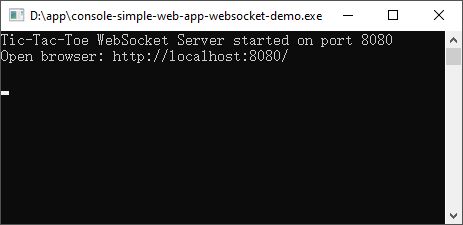
Running the Example
The complete source code is provided below. To run it:
- Create a new C# console application
- Replace the default code with the complete source code below
- Build and run
- Open
http://localhost:8080/in your browser — this is the lobby - Enter your name and click Play
- Open a second browser tab (or a different browser) to
http://localhost:8080/ - Enter a different name and click Play — you’ll be matched into the same room
- Play! Click a cell to place your mark. Watch the other tab update in real-time
- Open a third tab and click “Spectate” on the room to watch
You can also open http://localhost:8080/ on your phone (using your computer’s local IP instead of localhost) and play across devices.
The Complete Working Code
The full source code brings together everything: the TcpListener from Article 1, the HTTP parser and routing from Article 2, the threading and broadcast patterns from Article 3, and the WebSocket handshake, frame parser, and message loop introduced in this article.
It handles:
- Normal HTTP page serving (lobby, game page, spectator page)
- WebSocket upgrade detection and handshake (SHA-1 + magic GUID)
- WebSocket frame reading (masking, variable-length payloads) and writing
- Message routing (move, chat, rematch)
- Game room management (create, join, spectate)
- Turn-by-turn gameplay with server-side validation
- Win detection and draw detection
- Real-time state broadcasting to all room participants
- In-game chat
- Graceful and ungraceful disconnection handling
- Thread-safe state management with locking
[Download The Full Source Code:]
What You’ve Learned
Looking back at the four articles as a complete journey:
Article 1 taught you that programs live in isolated memory boundaries and communicate through sockets — numbered doors that carry raw bytes. Four C# classes handle everything: TcpListener, TcpClient, NetworkStream, and IPAddress.
Article 2 taught you that HTTP is just text flowing through those sockets. A structured request comes in, you parse it into method, path, and headers, your routing switch statement selects a handler, and you send back a structured response. The \r\n\r\n boundary separates headers from body.
Article 3 taught you that SSE holds an HTTP connection open so the server can push data to the browser. The connection is still HTTP — still text, still one-directional — but it doesn’t close. The server writes whenever it has something to say.
This article taught you that WebSocket starts as HTTP but upgrades to a different protocol. The upgrade handshake is a one-time ceremony: a special HTTP request, a SHA-1 computation with a magic GUID, and a 101 response. After that, the connection speaks a binary frame format — compact, efficient, and bidirectional. Both sides can send at any time through a message loop that reads and writes frames on the same connection.
A few cross-cutting insights that span all four articles:
Routing is always a switch statement. In Article 2, you routed by URL path. In this article, you routed by message command. The pattern is identical: a string comes in, you split it, you dispatch on the first piece. Every framework decorates this with attributes, conventions, and middleware chains — but underneath, it’s always a switch.
Broadcasting is always a list and a loop. In Article 3, you kept a list of SSE streams and wrote to all of them. In this article, you kept a list of WebSocket clients per room and wrote to all of them. The data structure changed from a flat list to a room-based dictionary, but the broadcast function is the same: iterate, write, catch exceptions for dead connections.
The four classes from Article 1 never changed. TcpListener opens the port. TcpClient represents the connection. NetworkStream carries the bytes. Everything else — HTTP parsing, SSE streaming, WebSocket framing — is just deciding what bytes to read and write on that stream. The socket doesn’t care whether you’re speaking HTTP, SSE, or WebSocket. It just carries bytes.
That last point is perhaps the most important one. Underneath every web framework, every real-time library, every “magical” technology that makes things update live on your screen — there is always a socket. A numbered door. A program waiting for a connection. Bytes flowing in, bytes flowing out.
Now you’ve built all three with your own hands.