

The .NET Web Host
One Process, Every Site, No Excuses
The fourth paper in the Universal Web Processing Model series. This paper proposes a complete shared hosting platform built entirely in C# — a single process that listens on port 80/443, routes by domain, manages TLS certificates automatically, hosts any handler engine, and exposes an API that anyone can build a management interface on top of.
Paper 1: The Universal Web Processing Model — What Every Web Framework Actually Does
Paper 2: Rewriting the ASP.NET Web Forms Engine — Freeing the Pattern from the Container
Paper 3: The Composable Web Host — One Host, Many Engines
Paper 4: The .NET Web Host
Paper 5: The Universal Web Host
The Missing Layer
The first three papers in this series established a foundation: a universal processing model, a reborn WebForms engine, and a composable host that serves multiple handler engines under one roof.
But a foundation is not a house. A developer who builds an application still needs somewhere to put it. And in the modern .NET world, that “somewhere” is surprisingly difficult.
Today, deploying multiple .NET web applications to a single server requires a reverse proxy (Nginx or Apache), a separate process per application (each on its own unique port), a systemd service file per application, manual SSL certificate provisioning (Certbot), and no unified interface to see, manage, or control any of it.
This is the operational reality. Not for one application — deploying one application is manageable. But for the freelancer hosting twenty client sites, the agency managing fifty projects, or the small hosting provider serving a hundred customers — this operational model does not scale. Not because the server can’t handle the load, but because the human can’t handle the management.
In the .NET Framework world, IIS solved this completely. One interface. All sites visible. Add a site in two minutes. Bind a domain. Click for SSL. Restart with a right-click. The operational experience was solved.
In the modern .NET world, that operational experience does not exist.
This paper proposes building it. Entirely in C#. Running on any platform.
How Domain Routing Actually Works
The reason modern .NET applications each need their own port number is not a limitation of HTTP. It is a design choice in how Kestrel was built — one application per process, one process per port.
But the HTTP protocol itself has always supported multiple sites on a single port. The mechanism is simple: the Host header.
Every HTTP request includes a Host header. When a browser navigates to client1.com, the request arrives on port 443 and contains:
Host: client1.comWhen a different browser navigates to client2.com, the request arrives on the same port 443 and contains:
Host: client2.comThe server reads this header and routes to the correct site. One port. Many domains. The header is the key. The routing is a dictionary lookup.
IIS does this. Nginx does this. Apache does this. Caddy does this. They all listen on one port, read one header, and dispatch to the correct handler. There is nothing proprietary about this mechanism. It is the HTTP specification, RFC 9110, implemented by every web server in existence.
For TLS (HTTPS), the mechanism extends through Server Name Indication (SNI). During the TLS handshake — before the HTTP request is even sent — the client announces which domain it’s connecting to. The server uses this to select the correct SSL certificate. One port 443. Many certificates. Selected by domain name during the handshake.
Both of these capabilities — Host header routing and SNI certificate selection — are available in the .NET base class library through System.Net.Sockets, System.Net.Security.SslStream, and standard HTTP parsing. No external dependencies. No native code. Pure C#.
The Two-Layer Architecture
The proposed hosting platform consists of two cleanly separated layers:
Layer 1: The Core Engine
A console application — a single C# process — that provides all hosting functionality:
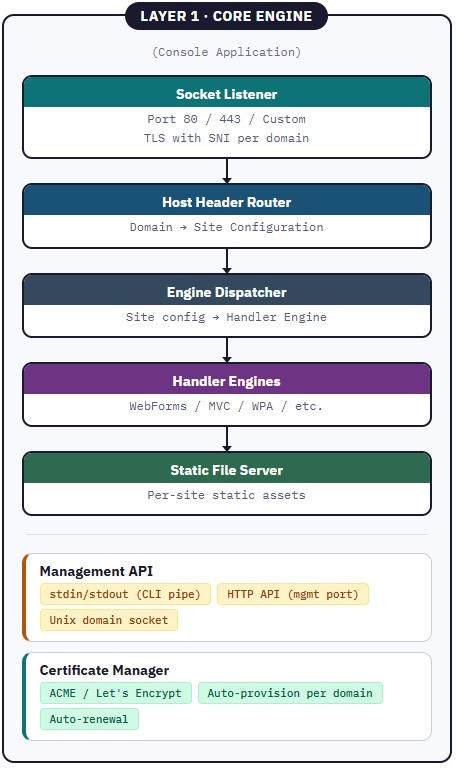
The core engine is headless. It has no GUI. It runs as a daemon or a console process. It accepts commands through three channels:
stdin/stdout — For CLI integration and scripting. Send a JSON command to stdin, receive a JSON response on stdout. This allows any scripting language — bash, Python, PowerShell — to control the host programmatically.
HTTP API — A management API on a configurable port (e.g., port 9090) or bound to localhost only. RESTful endpoints for all management operations. This is the channel that GUI applications connect to.
Unix domain socket (Linux/macOS) or named pipe (Windows) — For local inter-process communication without opening a network port.
The core engine is the complete hosting platform. Everything IIS does — socket listening, TLS termination, domain routing, site management, certificate provisioning — this engine does. But it runs on any platform, it’s written entirely in C#, and it exposes an API rather than embedding a GUI.
Layer 2: The Management Interface
A separate application — web-based, desktop, or command-line — that communicates with the core engine through its API:
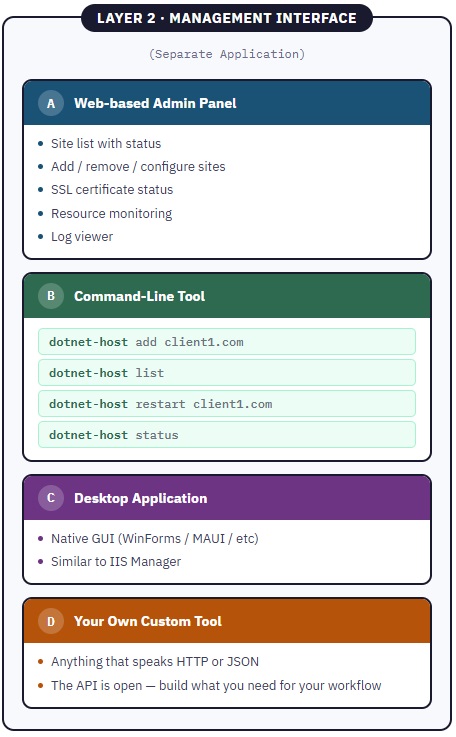
The separation is deliberate. The core engine is stable, long-running, security-critical — it should change rarely and run reliably. The management interface is user-facing, frequently improved, customizable — it can change freely without touching the engine.
Anyone can build a Layer 2 application. The API is the contract. A hosting provider builds their own branded control panel. A freelancer builds a simple CLI tool. A community project builds an open-source web admin panel. All of them talk to the same core engine through the same API.
The Management API
The core engine exposes a complete management API. Every operation that a hosting administrator needs is available through this API.
Site Management
| Method | Endpoint | Description |
|---|---|---|
| POST | /api/sites | Add a new site |
| GET | /api/sites | List all sites |
| GET | /api/sites/{domain} | Get site details |
| PUT | /api/sites/{domain} | Update site configuration |
| DELETE | /api/sites/{domain} | Remove a site |
| POST | /api/sites/{domain}/restart | Restart a site’s engine |
| POST | /api/sites/{domain}/stop | Stop a site |
| POST | /api/sites/{domain}/start | Start a site |
Adding a Site
POST /api/sites
{
    "domain": "client1.com",
    "aliases": ["www.client1.com"],
    "directory": "/var/www/client1",
    "engine": "webforms",
    "autoSsl": true
}

Response:
{
    "success": true,
    "message": "Site created",
    "site": {
        "domain": "client1.com",
        "status": "running",
        "ssl": "provisioning",
        "engine": "webforms",
        "directory": "/var/www/client1"
    }
}One API call. The site is created. The SSL certificate begins provisioning automatically. The domain is routed. The engine is loaded. The site is live.
SSL Certificate Management
| Method | Endpoint | Description |
|---|---|---|
| GET | /api/ssl | List all certificates |
| GET | /api/ssl/{domain} | Certificate details |
| POST | /api/ssl/{domain}/renew | Force renewal |
| POST | /api/ssl/{domain}/upload | Upload custom certificate |
Certificates are managed automatically by default. The ACME protocol (Let’s Encrypt) provisions certificates when a site is added and renews them before expiration. No manual intervention. No Certbot. No cron jobs.
Engine Management
| Method | Endpoint | Description |
|---|---|---|
| GET | /api/engines | List available engines |
| GET | /api/engines/{name} | Engine details and status |
Server Status
| Method | Endpoint | Description |
|---|---|---|
| GET | /api/status | Server overview |
| GET | /api/status/memory | Memory usage |
| GET | /api/status/connections | Active connections |
| GET | /api/logs/{domain} | Site-specific logs |
| GET | /api/logs/{domain}/stream | SSE stream of live logs |
CLI Interface (stdin/stdout)
The same operations are available through stdin for scripting:
# Add a site
echo '{"action":"add_site","domain":"client1.com","directory":"/var/www/client1","engine":"webforms"}' | dotnet-host --pipe

# List sites
echo '{"action":"list_sites"}' | dotnet-host --pipe

# Restart a site
echo '{"action":"restart_site","domain":"client1.com"}' | dotnet-host --pipeOr through a dedicated CLI tool that wraps the API:
dotnet-host site add client1.com --dir /var/www/client1 --engine webforms
dotnet-host site list
dotnet-host site restart client1.com
dotnet-host site status client1.com
dotnet-host ssl status
dotnet-host statusThe Request Flow
When a request arrives, the core engine processes it through a direct, minimal path:
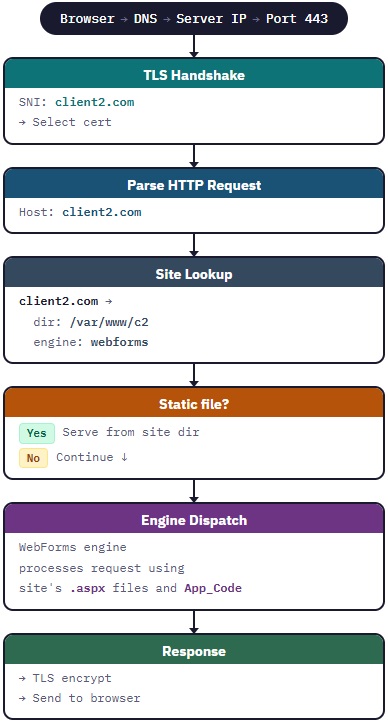
One process. One port. One lookup. The request enters, the domain is resolved, the engine processes it, the response exits. No reverse proxy. No port forwarding. No external dependencies.
Site Isolation
Multiple sites in one process requires careful isolation. Each site operates within its own boundary:
Filesystem — Each site has its own root directory. The engine serves pages, static files, and App_Code only from that directory. A site cannot access another site’s files.
Sessions — Each site maintains its own session store, keyed by domain. A session cookie from client1.com is invisible to client2.com.
Static variables and caching — Application-level state is scoped per site. A static dictionary in one site’s code does not leak into another site’s memory space.
Error isolation — An unhandled exception in one site’s request processing does not crash other sites. The engine catches exceptions at the site boundary and returns an error response for that request only.
Resource limits (optional) — Per-site memory and CPU limits can be configured to prevent one site from starving others.
{
    "domain": "client1.com",
    "directory": "/var/www/client1",
    "engine": "webforms",
    "limits": {
        "maxMemoryMb": 256,
        "maxConcurrentRequests": 50
    }
}Deployment Experience
The deployment experience for the developer is the same simplicity that IIS provided:
For the hosting operator:
# Install the hosting engine (one time)
dotnet tool install -g dotnet-webhost

# Start the engine
dotnet-webhost start

# Add sites
dotnet-webhost site add client1.com --dir /var/www/client1 --engine webforms
dotnet-webhost site add client2.com --dir /var/www/client2 --engine webforms
dotnet-webhost site add api.myapp.com --dir /var/www/api --engine minimal

# Done. All sites live. SSL auto-provisioned.For the developer deploying a site:
# Copy files to the site directory
scp -r ./myapp/* server:/var/www/client1/

# Site is live. No restart needed.
# The engine detects file changes and recompiles.For the developer editing live:
# Edit a code file directly on the server
ssh server
nano /var/www/client1/App_Code/Helper.cs
# Save. The engine detects the change.
# Roslyn recompiles. Next request uses new code.The same workflow you had with IIS. Copy folder. Site is live. Edit on server. Changes take effect. No publish step. No build pipeline. No restart.
What This Replaces
For a typical setup of 20 sites on a Linux server:
| Component | Current Stack | .NET Web Host |
|---|---|---|
| Reverse proxy | Nginx with 20 server blocks | Not needed — host header routing built in |
| SSL certificates | Certbot with 20 certificate configs | Not needed — ACME built in, auto-provision |
| Process management | systemd with 20 service files | Not needed — supervisor manages all workers |
| Port tracking | Spreadsheet of 20 port numbers | Not needed — no per-app ports |
| Configuration files | Scattered across /etc/nginx/, /etc/systemd/, /etc/letsencrypt/ | One config file (sites.json or database) |
| Management | Terminal commands × 20 | Web admin panel + CLI + API — one interface |
| Total processes | 21 (Nginx + 20 Kestrel) | 1 host + N workers (managed automatically) |
The Comparison
| Feature | IIS (Windows) | .NET Web Host (Proposed) | Current .NET Core (Linux) |
|---|---|---|---|
| Port model | 80/443 shared | 80/443 shared | Port per app |
| Domain routing | Host header | Host header | External proxy required |
| SSL management | GUI / plugin | Auto ACME (Let’s Encrypt) | Manual Certbot |
| Add a site | GUI — 2 minutes | CLI / API — 1 minute | 15 minutes (3 config files) |
| See all sites | GUI list | Web panel / CLI | Terminal grep |
| Restart a site | Right-click | API call / CLI | systemctl restart [name] |
| Live code editing | Supported | Supported (Roslyn) | Not supported |
| Platform | Windows only | Any OS | Any OS |
| Engine support | WebForms / MVC | Any IWebEngine | One framework per app |
| Process isolation | Application Pools | Worker processes (3 modes) | N/A (separate processes) |
| Open source | No | Yes | Partial |
| Management API | No | Yes (HTTP + CLI + socket) | No |
| Custom UI support | No | Yes (API-first) | No |
The proposed .NET Web Host combines the operational simplicity of IIS with the cross-platform freedom of modern .NET and adds what neither provides: an open API that allows anyone to build their own management tools.
The Complete Stack
With all four papers in this series, the full architecture is:
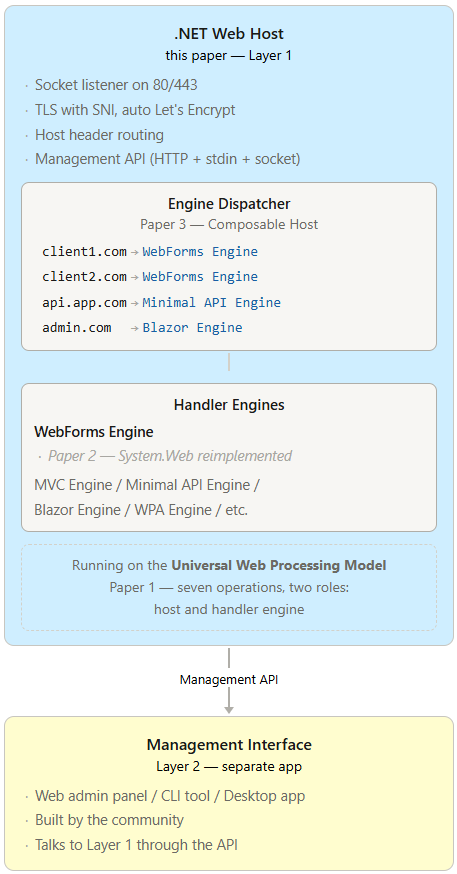
Paper 1 named the universal pattern. Paper 2 freed the WebForms engine. Paper 3 composed multiple engines under one roof. This fourth paper completes the vision with the hosting platform that makes it all operationally real.
Why Two Layers
The separation between the core engine and the management interface is not arbitrary. It serves a principle: the infrastructure should outlast the interface.
The core engine is the foundation. It listens on sockets, terminates TLS, routes requests, manages certificates, and dispatches to engines. This functionality is stable. It changes slowly. It must be reliable above all else.
The management interface is the surface. It evolves with user needs, design trends, and platform capabilities. A web panel today might be a desktop app tomorrow, or a mobile app next year, or an AI agent the year after.
By exposing the core engine’s functionality through an API, the interface becomes decoupled. The engine doesn’t care who is calling the API — a browser, a CLI tool, a Python script, a mobile app, a cron job, or a monitoring system. The API is the contract. Everything above it is choice.
This also means the community can build what Microsoft never would. A cPanel-style hosting panel for .NET. A Plesk competitor. A minimal CLI for the developer who prefers the terminal. A branded control panel for a hosting business. All built on the same engine, all talking through the same API.
The infrastructure is open. The interface is free.
Process Isolation
Multiple sites in one server raises an essential question: what happens when one site misbehaves? A memory leak, an infinite loop, a catastrophic exception — these must not bring down every other site on the server.
The .NET Web Host addresses this through worker processes — the same model IIS uses with Application Pools. The host process is a supervisor. The worker processes do the heavy lifting. The separation is a process boundary — the strongest isolation an operating system provides.
The Supervisor-Worker Architecture
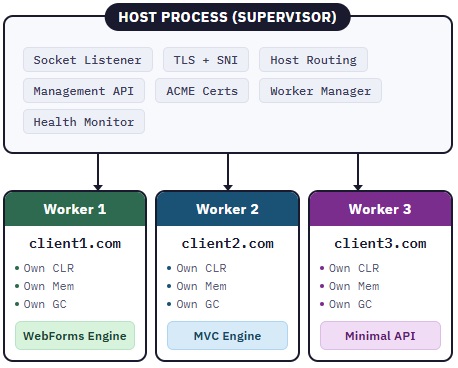
The host process is lightweight. It handles networking, TLS, domain routing, and management. It does not execute application code. All application logic — page compilation, control trees, business logic, database access — runs inside the worker processes.
Each worker process is a separate .NET process with its own CLR, its own memory space, and its own garbage collector. A memory leak in Worker 1 cannot consume Worker 2’s memory. A crash in Worker 3 cannot bring down Worker 1. The operating system enforces the boundary.
Communication Between Host and Workers
The host process forwards requests to workers through fast local channels — not TCP ports, not HTTP, but direct inter-process pipes:
Unix Domain Sockets (Linux/macOS) — A socket file on the filesystem. The host writes the request, the worker reads it, processes it, and writes the response back. Microseconds of overhead. No network stack involved.
Named Pipes (Windows) — The Windows equivalent. Same speed. Same simplicity.
These communication channels are available in the .NET base class library through System.Net.Sockets and System.IO.Pipes. No external dependencies. Pure C#.
Worker Lifecycle Management
The host process supervises the full lifecycle of every worker:
Startup — When the host starts, it spawns a worker process for each configured site (or pool of sites). The worker loads its handler engine, compiles its pages, and signals readiness.
Health monitoring — The host sends periodic heartbeats to each worker. If a worker stops responding — frozen by an infinite loop, deadlocked, or otherwise stuck — the host kills it and spawns a replacement.
Crash recovery — If a worker process dies unexpectedly, the host detects it immediately, logs the event, and starts a new worker. Pending requests receive a 503 response. The replacement worker is ready within seconds. Other sites are unaffected.
Graceful restart — When a site’s files change (new deployment), the host starts a new worker, waits for the old worker to finish its current requests, then retires it. Zero downtime. No dropped connections.
Memory recycling — If a worker exceeds its configured memory limit, the host recycles it — graceful shutdown, then fresh start. This prevents slow memory leaks from accumulating over time. IIS has done this for twenty years. The pattern is proven.
Three Isolation Modes
Different hosting scenarios require different trade-offs between isolation and efficiency. The .NET Web Host supports three modes, selectable per site or globally:
Process mode (default) — One worker process per site. Full isolation. Safest option. Recommended for shared hosting where different customers’ code runs on the same server.
Pool mode — Multiple sites share a worker process. Configured by the operator — typically grouping sites from the same customer. Reduces memory usage while maintaining isolation between customers.
Shared mode — All sites run inside the host process. No worker processes. Maximum efficiency, minimum isolation. Suitable for the freelancer who owns and trusts all the code on the server.
{
    "isolation": {
        "default": "process",

        "pools": [
            {
                "name": "johnson-sites",
                "mode": "pool",
                "sites": ["johnson-main.com", "johnson-blog.com"],
                "maxMemoryMb": 512
            },
            {
                "name": "high-traffic",
                "mode": "process",
                "sites": ["popular-store.com"],
                "maxMemoryMb": 1024
            },
            {
                "name": "my-own-sites",
                "mode": "shared",
                "sites": ["mysite1.com", "mysite2.com", "mysite3.com"]
            }
        ]
    }
}The operator chooses the trade-off. The platform supports all three. The default is the safest — because shared hosting with untrusted code demands process-level isolation, and safe defaults protect those who don’t read the documentation.
Resource Limits
Each worker process can be constrained:
{
    "domain": "client1.com",
    "limits": {
        "maxMemoryMb": 256,
        "maxConcurrentRequests": 50,
        "recycleAfterMinutes": 1440,
        "recycleOnMemoryExceed": true
    }
}The host process monitors these limits and enforces them. A site that exceeds its memory allocation gets recycled. A site that exceeds its concurrent request limit gets queued. No single site can starve the server.
This is the same resource governance that IIS Application Pools provide — brought to every platform, configured through the same JSON configuration and management API that controls everything else in the .NET Web Host.
The modern .NET ecosystem has extraordinary runtime performance, a beautiful language in C# 14, and a cross-platform foundation that runs everywhere. What it has lacked is the operational layer — the hosting platform that makes deploying, managing, and scaling multiple applications as simple as it was with IIS on Windows Server.
This paper proposes filling that gap. A single C# process that listens on standard ports, routes by domain, manages TLS automatically, hosts any handler engine, and exposes an API for management. Not a reverse proxy configuration. Not a collection of scripts. A complete hosting platform, written in C#, running on any OS, open for the community to build upon.
The four papers in this series trace a line from universal truth to practical infrastructure: the protocol is simple, the engines are plugins, the host is composable, and the platform is now complete.
One process. Every site. No excuses.