Three Approaches to ASP.NET Web Forms Architecture

From Server Controls to Pageless — A Map for Web Forms Developers
Introduction
ASP.NET Web Forms has been serving developers since 2002. Over two decades, different approaches to building applications on this platform have emerged — some documented by Microsoft, others discovered by developers solving real problems.
This article maps three distinct architectural approaches within Web Forms. The goal isn’t to declare a winner, but to help developers recognize where they currently are, understand what each approach offers, and see possible paths forward.
The Three Approaches
| Approach | Entry Point | Dynamic Content | Data Communication | ViewState |
|---|---|---|---|---|
| Classic Web Forms | Multiple .aspx pages | Server Controls (GridView, Repeater) | PostBack | Yes |
| Vanilla Web Forms | Multiple .aspx pages + API pages | StringBuilder + LiteralControl | Fetch API + JSON | No |
| Web Forms Pageless Architecture (WPA) | Single Default.aspx or Global.asax | String template rendering | Fetch API + JSON | No |
Approach 1: Classic Web Forms
This is the original paradigm — the one Microsoft designed and documented.
Characteristics
- Server Controls: GridView, Repeater, FormView, TextBox, DropDownList
- ViewState: Automatic state management across PostBacks
- PostBack Model: Form submissions return to the same page
- Event-Driven: Button_Click, SelectedIndexChanged, RowDataBound
- Data Binding: Declarative binding with DataSource controls
How It Looks
Frontend (.aspx):
<asp:GridView ID="gvMembers" runat="server" AutoGenerateColumns="False"
    OnRowCommand="gvMembers_RowCommand">
    <Columns>
        <asp:BoundField HeaderText="ID" DataField="Id" />
        <asp:BoundField HeaderText="Name" DataField="Name" />
        <asp:BoundField HeaderText="Email" DataField="Email" />
        <asp:TemplateField HeaderText="Actions">
            <ItemTemplate>
                <asp:Button ID="btnEdit" runat="server" Text="Edit"
                    CommandName="EditMember" CommandArgument='<%# Eval("Id") %>' />
            </ItemTemplate>
        </asp:TemplateField>
    </Columns>
</asp:GridView>
Code-behind (.aspx.cs):
protected void Page_Load(object sender, EventArgs e)
{
    if (!IsPostBack)
    {
        BindGrid();
    }
}

void BindGrid()
{
    gvMembers.DataSource = GetMembers();
    gvMembers.DataBind();
}

protected void gvMembers_RowCommand(object sender, GridViewCommandEventArgs e)
{
    if (e.CommandName == "EditMember")
    {
        int id = Convert.ToInt32(e.CommandArgument);
        Response.Redirect($"EditMember.aspx?id={id}");
    }
}
When It Works Well
- Rapid prototyping and internal tools
- Applications where ViewState overhead is acceptable
- Teams familiar with the drag-and-drop, event-driven model
- Projects where the built-in controls meet requirements without heavy customization
When It Becomes Painful
- Large data grids with ViewState bloat
- Complex layouts that don’t fit control templates
- Need for modern JavaScript interactions
- Performance-sensitive applications
- When you find yourself fighting the controls more than using them
Approach 2: Vanilla Web Forms
This approach keeps the familiar ASPX page structure but abandons heavy server controls in favor of native HTML, CSS, and JavaScript. Dynamic content is built server-side with StringBuilder or fetched client-side with the Fetch API.
The name “Vanilla” reflects the return to fundamental web technologies — the same HTML, CSS, and JavaScript that power every web framework at its core.
Characteristics
- Zero ViewState: Disabled or not used
- No Heavy Server Controls: No GridView, UpdatePanel, or data-bound controls
- Dynamic HTML via StringBuilder: Server builds HTML strings, outputs via PlaceHolder + LiteralControl
- Separate API Pages: Dedicated .aspx files handle AJAX requests, return JSON
- Fetch API Communication: Client-side JavaScript handles data operations
- Native HTML Inputs: Standard
<input>,<select>,<button type="button">elements
How It Looks
Display Page (MemberList.aspx):
<%@ Page Language="C#" AutoEventWireup="true" CodeBehind="MemberList.aspx.cs"
    Inherits="MyApp.MemberList" %>
<!DOCTYPE html>
<html>
<head>
    <title>Members</title>
</head>
<body>
    <h1>Member List</h1>
    <div id="memberTable">
        <asp:PlaceHolder ID="phTable" runat="server"></asp:PlaceHolder>
    </div>

    <script>
        async function deleteMember(id) {
            if (!confirm('Delete this member?')) return;

            const response = await fetch('/MemberApi.aspx', {
                method: 'POST',
                headers: { 'Content-Type': 'application/x-www-form-urlencoded' },
                body: `action=delete&id=${id}`
            });

            const result = await response.json();
            if (result.success) {
                location.reload();
            } else {
                alert(result.message);
            }
        }
    </script>
</body>
</html>
Display Page Code-behind (MemberList.aspx.cs):
protected void Page_Load(object sender, EventArgs e)
{
    var members = GetMembers();

    StringBuilder sb = new StringBuilder();

    sb.Append(@"
        <table>
            <thead>
                <tr>
                    <th>ID</th>
                    <th>Name</th>
                    <th>Email</th>
                    <th>Actions</th>
                </tr>
            </thead>
            <tbody>");

    foreach (var m in members)
    {
        sb.Append($@"
            <tr>
                <td>{m.Id}</td>
                <td>{HttpUtility.HtmlEncode(m.Name)}</td>
                <td>{HttpUtility.HtmlEncode(m.Email)}</td>
                <td>
                    <a href='MemberEdit.aspx?id={m.Id}'>Edit</a>
                    <button type='button' onclick='deleteMember({m.Id})'>Delete</button>
                </td>
            </tr>");
    }

    sb.Append("</tbody></table>");

    phTable.Controls.Add(new LiteralControl(sb.ToString()));
}
API Page (MemberApi.aspx):
The .aspx file is stripped to just the page directive:
<%@ Page Language="C#" AutoEventWireup="true" CodeBehind="MemberApi.aspx.cs"
    Inherits="MyApp.MemberApi" %>
API Page Code-behind (MemberApi.aspx.cs):
protected void Page_Load(object sender, EventArgs e)
{
    string action = (Request["action"] + "").ToLower();

    switch (action)
    {
        case "get":
            GetMember();
            break;
        case "save":
            SaveMember();
            break;
        case "delete":
            DeleteMember();
            break;
        default:
            WriteError("Unknown action", 400);
            break;
    }

    EndResponse();
}

void DeleteMember()
{
    int id = 0;
    int.TryParse(Request["id"], out id);

    if (id <= 0)
    {
        WriteError("Invalid ID");
        return;
    }

    // Perform deletion in database
    Database.Execute("DELETE FROM members WHERE id = @id", new { id });

    WriteJson(new { success = true, message = "Deleted" });
}

void WriteJson(object obj)
{
    string json = JsonSerializer.Serialize(obj);
    Response.ContentType = "application/json";
    Response.Write(json);
}

void WriteError(string message, int statusCode = 400)
{
    Response.StatusCode = statusCode;
    WriteJson(new { success = false, message });
}

void EndResponse()
{
    Response.Flush();
    Response.SuppressContent = true;
    HttpContext.Current.ApplicationInstance.CompleteRequest();
}
The Key Techniques
1. StringBuilder + PlaceHolder + LiteralControl
This is the core pattern for server-rendered dynamic content without server controls:
StringBuilder sb = new StringBuilder();
sb.Append("<div class='card'>");
sb.Append($"<h2>{HttpUtility.HtmlEncode(title)}</h2>");
sb.Append($"<p>{HttpUtility.HtmlEncode(content)}</p>");
sb.Append("</div>");

phContent.Controls.Add(new LiteralControl(sb.ToString()));
2. Stripped API Pages
The .aspx file contains only the page directive — all HTML markup is deleted. The page becomes a pure backend endpoint that returns JSON.
3. Fetch API for Client-Server Communication
async function saveData() {
    const formData = new FormData();
    formData.append('action', 'save');
    formData.append('id', document.getElementById('inputId').value);
    formData.append('name', document.getElementById('inputName').value);

    const response = await fetch('/MemberApi.aspx', {
        method: 'POST',
        body: formData
    });

    const result = await response.json();
    if (result.success) {
        showMessage('Saved successfully');
    }
}
When It Works Well
- Existing Web Forms projects that need modernization without full rewrite
- Teams comfortable with HTML/CSS/JavaScript
- Applications requiring custom layouts that don’t fit GridView templates
- Performance-sensitive pages where ViewState overhead is unacceptable
- Gradual migration — can coexist with Classic pages in the same project
The Mental Shift
Moving from Classic to Vanilla requires changing how you think about the page:
| Classic Thinking | Vanilla Thinking |
|---|---|
| “Which server control do I use?” | “What HTML do I need to generate?” |
| “How do I handle this PostBack event?” | “What API endpoint should this call?” |
| “Let the GridView manage the data” | “I’ll build the table myself” |
| “ViewState will remember the state” | “The client or database holds the state” |
Approach 3: WebForms Pageless Architecture (WPA)
This approach takes the Vanilla philosophy to its logical conclusion: if we’re not using server controls, ViewState, or PostBack, why do we need multiple .aspx files at all?
WPA funnels all requests through a single entry point and handles routing, rendering, and responses in pure C# code.
Two Variants
Variant A: Single Default.aspx Entry Point
All routes map to Default.aspx. The code-behind resolves the route and dispatches to handlers. ASP.NET’s built-in Session is available.
Variant B: Application_BeginRequest (True Pageless)
Intercepts requests at the earliest pipeline stage in Global.asax.cs. Zero .aspx files needed. Requires custom session state since ASP.NET Session hasn’t loaded yet.
Characteristics
- Single Entry Point: One file handles all requests
- Custom Route Resolution: URL parsing and dispatch in code
- Handler Pattern: Route types map to handler classes
- Template Rendering: HTML templates with placeholder replacement
- Two-Level Caching: In-memory (ConcurrentDictionary) + static file cache
- Zero Page Lifecycle: No PreInit, Init, Load, PreRender stages for each request
How It Looks
Global.asax.cs (Route Configuration):
protected void Application_Start(object sender, EventArgs e)
{
    // Route everything to Default.aspx
    RouteTable.Routes.MapPageRoute("Root", "", "~/Default.aspx");
    RouteTable.Routes.MapPageRoute("CatchAll", "{*slug}", "~/Default.aspx");
}
Default.aspx:
Just the page directive:
<%@ Page Language="C#" AutoEventWireup="true" CodeBehind="Default.aspx.cs"
    Inherits="MyApp.Default" %>
Default.aspx.cs (Route Dispatcher):
protected void Page_Load(object sender, EventArgs e)
{
    string path = Request.RawUrl;

    // Remove query string for route matching
    int queryIndex = path.IndexOf('?');
    if (queryIndex >= 0)
        path = path.Substring(0, queryIndex);

    // Resolve route
    var route = RouteResolver.Resolve(path, Request);

    switch (route.Type)
    {
        case RouteType.Public:
            HandlePublic(route);
            break;
        case RouteType.Admin:
            HandleAdmin(route);
            break;
        case RouteType.Api:
            HandleApi(route);
            break;
        case RouteType.NotFound:
            Handle404();
            break;
    }
}

void HandlePublic(RouteResult route)
{
    // Check cache first
    if (CacheStore.TryGetPage(route.CacheKey, out string html))
    {
        Response.ContentType = "text/html";
        Response.Write(html);
        return;
    }

    // Cache miss — build page
    var handler = HandlerFactory.GetPublicHandler(route.Handler);
    handler.ProcessRequest(Context, route);
}
Template Rendering:
public class ArticleHandler : PublicHandlerBase
{
    protected override string BuildPage()
    {
        var article = Database.GetArticle(Route.ContentId);

        string template = LoadTemplate("article");

        string html = template
            .Replace("{{title}}", HttpUtility.HtmlEncode(article.Title))
            .Replace("{{content}}", article.Content)
            .Replace("{{date}}", article.CreatedAt.ToString("MMMM dd, yyyy"));

        return WrapInLayout(html, article.Title);
    }
}
True Pageless Variant (Application_BeginRequest):
protected void Application_BeginRequest(object sender, EventArgs e)
{
    var context = HttpContext.Current;
    string path = context.Request.RawUrl;

    // Skip static files
    if (IsStaticFile(path))
        return;

    // Load session from custom state server
    var session = SessionClient.GetSession(context);

    // Route and handle
    var route = RouteResolver.Resolve(path, context.Request);
    var handler = HandlerFactory.GetHandler(route);
    handler.ProcessRequest(context, route, session);

    // End response — skip entire page lifecycle
    context.Response.End();
}
The Request Flow Comparison
Classic/Vanilla Web Forms:
Request → IIS → ASP.NET → Page Lifecycle (12+ stages) → ResponseWPA with Default.aspx:
Request → IIS → ASP.NET → Default.aspx Page_Load → Your Code → ResponseTrue Pageless (Application_BeginRequest):
Request → IIS → ASP.NET → Application_BeginRequest → Your Code → Response.End()When It Works Well
- High-traffic public websites where caching is critical
- Applications requiring complete control over URL structure
- Projects where the page lifecycle overhead is measurable
- Teams who want transparency — every request follows the same visible path
- Modernizing legacy Web Forms infrastructure without platform migration
The Trade-offs
| Gain | Cost |
|---|---|
| Full routing control | Must build routing yourself |
| No lifecycle overhead | No lifecycle conveniences |
| Cacheable at multiple levels | Must implement caching yourself |
| Complete HTML control | Must handle HTML encoding yourself |
| True Pageless: earliest interception | True Pageless: no built-in Session |
The Spectrum
These three approaches form a spectrum of abstraction:
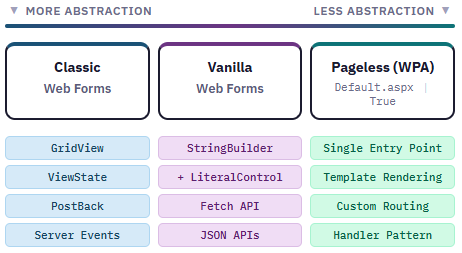
Movement Along the Spectrum
Classic → Vanilla:
Start by replacing one GridView with a StringBuilder-generated table. Add one API page for a Fetch call. Disable ViewState on pages that don’t need it. The conversion can happen gradually, page by page.
Vanilla → WPA:
If you find yourself with many stripped API pages all following the same pattern, WPA consolidates them. The route resolver and handler pattern formalize what Vanilla does informally.
You Don’t Have to Move:
Each position on the spectrum is valid. Classic Web Forms still works for internal tools and rapid prototyping. Vanilla is a practical middle ground for many production applications. WPA suits specific high-performance or high-control requirements.
Choosing Your Position
Stay with Classic Web Forms if:
- The built-in controls meet your needs
- ViewState size isn’t causing problems
- Your team is productive with the event-driven model
- You’re building internal tools where development speed matters more than page weight
Move to Vanilla Web Forms if:
- GridView templates are limiting your layouts
- ViewState is bloating your pages
- You want modern JavaScript interactions (Fetch API, dynamic UI)
- You need to modernize without a full rewrite
- You’re comfortable writing HTML and CSS directly
Consider Pageless Architecture if:
- You want a single, consistent request handling pattern
- Caching strategy is important for your traffic levels
- You want complete transparency in how requests flow
- You’re building a content-heavy public site
- You’ve already adopted Vanilla patterns and want to consolidate
Conclusion
ASP.NET Web Forms is more flexible than its reputation suggests. The platform provides a robust HTTP processing foundation that can be used in multiple ways — from the full RAD experience of Classic Web Forms to the stripped-down transparency of Pageless Architecture.
Understanding these approaches helps developers make intentional choices rather than defaulting to habit. Some teams will find that Classic Web Forms serves them well. Others will discover that Vanilla or Pageless patterns better fit their needs.
The approaches can coexist. A single project might use Classic for admin interfaces, Vanilla for public-facing pages, and WPA patterns for high-traffic endpoints. The choice isn’t all-or-nothing.
What matters is recognizing the options and choosing deliberately.
Further Reading
Vanilla Web Forms
- Introducing Vanilla ASP.NET Web Forms Architecture
- CRUD with Fetch API in Vanilla ASP.NET Web Forms
- GridView VS Dynamic HTML Table